
Screen full of Icons

Bronco Billy

Well-known member
UKGSer Subscriber
Joined
Feb 22, 2005
Messages
1,250
Reaction score
1
Location
Coalville
Now.....

Just downloaded Mozilla Firefox and got loads of associated Icons all over my desktop......Can anybody tell me how to get rid of em please? I`ve right clicked and deleted `em but everytime I use Firefox the pesky creatures re-appear.

Help appreciated, am using XP and make it simple `cos I am.

Thanks....BB
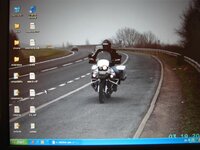
 
sounds odd...I use firefox on at least four computers and I've never seen
anything like this; can you post a screenshot showing the problem?
 
See how this turns out......
 

Attachments

  • IMG_1204 (Small).JPG
    IMG_1204 (Small).JPG
    45.6 KB · Views: 77
you've installed all the files to your desktop by the look of it :(
instead of in program files......i think.....


better wait till Steptoe sees it he'll know what to do ;)
 
Sorry about the quality of the photo but other than the Recycle bin and the explorer shortcut icon the other icons arrived when I downloaded Firefox.
 
OK....

So how do I change my settings to install it all in the right place and not my desktop........


STEPTOE.....!.........Giz a hand mate......!
 
TUNED IN said:
by the way are you not meant to ride your bike on the road not the hard shoulder :D


Wasn`t taxed at the time so I was keeping it offroad...... :D
 
TUNED IN said:
you've installed all the files to your desktop by the look of it :(
instead of in program files......i think.....


better wait till Steptoe sees it he'll know what to do ;)

i think tooned is right. uninstall as sgt. pluck suggested & install in program files, which is surely default.
 
I removed the programme and the shortcuts from the desktop completely. I then downloaded Firefox again but this time I made sure it went to program files....Gues what......still loads of shortcuts on the desktop........I must be able to turn `em off but I don`t seem to be able to find the way to do it.. :(
 
Got it sorted......

Load Firefox but then close everything and from the start menu.....

In Run.....enter.....firefox.exe -profilemanager

Delete all profiles (Not Delete files)

Select...... Dont delete Files

Then you can delete the icons and they don`t come back.

Thanks for the replies...............Who needs Steptoe..! :D


Back
Top Bottom
