Spurious straight line in tracks

G&T

Well-known member
UKGSer Subscriber
Joined
Jan 18, 2016
Messages
4,408
Reaction score
2,308
Location
Shropshire
Awesome outing following another 'Tosser' through mid Wales. Places I've never heard of let alone been. There were 3 stops. NAV V recorded 1 full track of the day, and two parts of that track.

Question 1
When you stop on track, switch ignition off, at what interval in time does NAV V make that a hard stop in recording? I.e. It becomes a part of a the day's track so you will need to stitch them all together to make a route. It seems odd to me that I had a full track and part tracks when I downloaded to basecamp?


Question 2
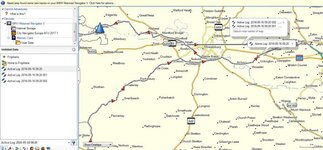
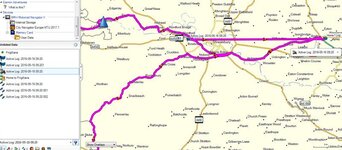
The full track actually had a straight solid grey line for the last 10 miles of the track as well as the actual track I took which was dotted. Converting it to a route I was unable to take the solid line out as it was somehow connected, so deleting it meant I lost much of the route. Why would it create a straight line? I didn't fly!

In the end I used tracks as a template and created a new route over it, but not very efficient!

Comments, piss takes welcome. And no I didn't have cross country on.
 
In the end I used tracks as a template and created a new route over it, but not very efficient!

Comments, piss takes welcome. And no I didn't have cross country on.

Thats exactly what I use tracks for, I download many routes from bestbikingroads.com and they all appear as tracks, I just use them as a guide.
 
Are you using a Mac or a PC?

The straight line, along with the track, is probably simply a display error. You see it sometimes on handmade routes where the proper magenta line along the road occasionaly has a straight line connecting two points, too.

How long is the gap between the device splitting a track into pieces? I don't know. Not least, I guess it will depend if you turn the device off or if it loses its signal. You might be able to tell from any time stamps embedded within the tracks themselves, perhaps? I have never looked.

On a Mac, when you plug in a Nav V you should get a message that BaseCamp has found new tracks and would you like to create an Adventure. If you click Yes, you should be confronted with a series of tracks, with numbers alongside them. There should also be a help or ? button to explain what the numbers mean.

It should be possible to import significant chunks of tracks in one single go, saving you having to stitch segments together. Save the Advenure, adding notes, pictures and / or amending it as you see fit.

http://garminbasecamp.wikispaces.com/Adventures

Here's the Mac video:

<iframe width="560" height="315" src="https://www.youtube.com/embed/ZoBVnhiJxhA" frameborder="0" allowfullscreen></iframe>

And the same for a PC:

<iframe width="560" height="315" src="https://www.youtube.com/embed/Bx5XAbHiNbg" frameborder="0" allowfullscreen></iframe>


It's just one of the many great extra features available in that crap BaseCamp software.
 
....It's just one of the many great extra features available in that crap BaseCamp software.
Oooer, thank you Mr N :thumb2

I had seen the Garmin Adventures link in BaseCamp but never explored what it was...... I like this function and take back all cursing I have done about BaseCamp.

Who says you can't teach an old trick new dogs :thumb
 
Cheers, Paul.

It's something I have taken up using, if only to keep a tidy record of some of the rides I have done, using it to remind me of things in the future. Bods could use it to add to their sometimes very good trip reports, building their photographs and whatever into their Adveture and giving their readers the actual roads they rode down. It takes a little while to get used to it but it's pretty simple really.

If anyone wants to try it out, then play around. Load up any old track you have got. Add random made up points, move them or take them away again. Add notes, pictures or any old video clips. You can't break it and you can always just send the play-around file to trash once it's done with.
 
It's just one of the many great extra features available in that crap BaseCamp software.

Thanks Wapping. I'm using a PC. The bike stopped 3x, switched NAV off, with a max interval of say 15mins. So does that split the day's track? Is the software designed, to do that? As well as keep a full track of the day?

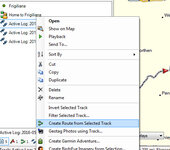
Re the straight line, who knows, but bloody annoying. In PC you simply download data to basecamp and hey presto you see the tracks for the day in left menu. I didn't need to make an adventure. I clicked on the track and created a route from. Simple. If it had worked of course. I'll get some screen grabs.

Thanks
 
You can do the same on a Mac, no problem. You are never forced to make Adventures.

The line's a line, just ignore it.

The track records will do whatever the track records will do. Sometimes they'll split into short segments, sometimes it will be hours or miles and miles.
 
You can do the same on a Mac, no problem. You are never forced to make Adventures.

The line's a line, just ignore it.

The track records will do whatever the track records will do. Sometimes they'll split into short segments, sometimes it will be hours or miles and miles.

Hi Wapping,
Just for your interest. The trick I found was to go into the original track. Mak any changes and then save to route. I did notice that once in route you have no shaping points. To make any future changes you create a track from it.
 

Attachments

  • Wales Hack.jpg
    Wales Hack.jpg
    55.2 KB · Views: 126
  • Wales Hack 2.jpg
    Wales Hack 2.jpg
    65.5 KB · Views: 129
  • Wales Hack 3.jpg
    Wales Hack 3.jpg
    54.8 KB · Views: 127
Yup, a track that's converted into a route will have no shaping points in it.

Actually, that's not quite true. It has a mass of shaping points; a long trail of breadcrumbs - dropped as pins by your GPS - all shaping the track and ultimately the route. Similarly, when you create a route manually, using shaping points to force the magenta line along the roads you want to take, Garmin will drop breadcrumbs between them all.
 
Yup, a track that's converted into a route will have no shaping points in it.

Actually, that's not quite true. It has a mass of shaping points; a long trail of breadcrumbs - dropped as pins by your GPS - all shaping the track and ultimately the route. Similarly, when you create a route manually, using shaping points to force the magenta line along the roads you want to take, Garmin will drop breadcrumbs between them all.

See that straight line though. Without that it would have been a 2 minute job to save the route. On the plus side it did self train me to get rid of that rubbish.:thumby:
 
GlennT, not having the actual file and also not being able to see the route close up, but could you not have selected the move point tool in basecamp and gone to the end of the straight line and moved it to the start of it, or on to a point elsewhere on the route. Like i say without having the route its hard to see what has occurred and to suggest a way around it for future reference. You could try and post a link to the problem route.
 
It seems from the screenshot that the device has, for some reason or another, created a straight line track between:

1. A random point (marked with a blue flag) to the west of Shrewsbury, slightly to the west of your actual route, that took you west northwestwards

And

2. A random point (again marked with a blue flag) slightly to the west of Apley

The track also shows that your ride between roughly Maple Brace (?) and the blue flag at Apley was circular, by which I mean you rode from roughly Maple Brace up to near enough Apley and back again.

For some unknown reason the device created a west to east track between the two blue flags but lacked any breadcrumbs to do it properly, hence the straight line. In parallel it also created a correct track of your actual journey. Interesting or not, the tracks appear to be timed one second apart.

Something happened at either or both of those blue flags, sufficient for the dumb device to create a false track west to east between the two points. Why the two blue flags are there I can't imagine, did you create them either on this journey or at some time in the past? The blue flag to the west of Apley might make sense as it appears to be where you turned around, perhaps? The one to the west of Shrewsbury seems to have been created by error; by whom, what or why.... A mystery.

Garmin are quite good at solving some mysteries. Why not contact them and send them the track file, along with as much other detail of the ride as you can. See what they say. They'll also be able to answer your question over the timings / circumstances behind track segment creation.

In the meantime, share you track file with us. Host it on Dropbox or something similar so we can download it. Of, if it's a small file or can be compressed to within the site's limit, post it here.

PS There's lots of good information out there on how to edit tracks. Some of it might help you sort out the removal of the straight line very easily.
 
Thanks Wapping. Appreciate the in-depth reply of possibilities. It is a mystery. I have since corrected the offending straight line in tracks (good training). Rather than go for an autopsy on this I shall see if I can replicate the problem.

One question though:
In tracks, if you modify a route by inserting new shaping points, I notice it doesn't act as if you added them in routes where it behaves like a magnet to trace the road. Does this mean you have to be super accurate when you draw on a road in tracks?
Thanks
 
if you are wanting your route to go exactly where you intend it, best practice is to zoom in to place shaping point,as you may find when dropping them for eg on a dual carriage way or motorway you may end up going the wrong way.
 
A pretty good guide:

https://garminbasecamp.wikispaces.com/Tracks

Depending on when the article was written and for which device, some of it might have changed.

http://www8.garmin.com/learningcenter/training/basecamp/

There are some reasonable 'How to do it' videos, too.

<iframe width="560" height="315" src="https://www.youtube.com/embed/gNIje-TMqLc" frameborder="0" allowfullscreen></iframe>

<iframe width="560" height="315" src="https://www.youtube.com/embed/sfFBlMoFUvI" frameborder="0" allowfullscreen></iframe>

Amongst others.
 
if you are wanting your route to go exactly where you intend it, best practice is to zoom in to place shaping point,as you may find when dropping them for eg on a dual carriage way or motorway you may end up going the wrong way.
Lee, that's exactly what I was thinking :D


Back
Top Bottom