Starcom1 Digital with Bluetooth iPhone - HELP

smaytum

Registered user
Joined
Feb 20, 2009
Messages
224
Reaction score
0
Location
Folkestone, England
Hi,

I was lucky enough to get everything on my Christmas list this year... which was just about everything that Starcom1 sell :D But i'm having problems with the bluetooth part... any experts out there who can help?

I have...
- Starcom1 Digital
- BTM-02 bluetooth kit
- BikeCam2
- Kenwood radios
- Zumo 660
- and all the cables and other bits like Volume Controls and PTT etc

I set it all up on a bench with an old battery to make sure it all works...
- Rider to pillion works
- bike to bike radios work
- Bikecam2 works, inc recording sound from starcom1

BUT the phone does not work.....

I can pair my iPhone with the BTM-02 unit just fine. BUT, cannot get sound through the rider headset. That is, i can make a call and the other person can hear me, but I cannot hear them! Nor can i play my iPhone music.. just silence!

Plan B was to use the Zumo 660 bluetooth to pair with my iPhone. Now I can hear sound perfectly well, and make and receive calls, BUT the other person can only hear 1 second of sound before my mic cuts out. So if i quickly count to 10, the other person would only hear "1" followed by a whole load of silence... now if i count slowly with a second gap between each number 1...2...3... etc then the other person can hear it all. So it is cutting out my voice after 1 second and only restores it after a second of silence. If the other person mutes their phone, then they can hear my just fine! It's kind of like a duplexing problem.

Regardless.. the effect is that they can only hear small parts of my conversation. :confused:

If i plug my iPhone directly into the Starcom1 Digital, then it all works just fine.

If i go back to the BTM-02 bluetooth kit and use the cables for the Starcom1 Advanced cable (the cable splits into two), then i get the same problem as with the Zumo 660 bluetooth. I.e. the mic cuts out after the first word.

I have upgraded the Zumo 660 to the very latest firmware.

So someone.... please help? :bow

Rgrds,
Steve.
 
I had a similar problem with my iPhone connected via BT to the Zumo 660, well actually I have never quite sorted it but I beieve the problem lies within the Mic Vox setting. Try switching the Vox off on the Starcom. Can't be more specific but the guy at Starcom is superb at offering help. Please post up your resolution on here if you manage to sort it please.
Yes just been and looked at my paperwork and the note says switch Mic Vox to Off and then much around with the iPhone volume. I dont use the BTM-02 as I wanted to have stereo music from the Zumo and was told you can't have it with the BT? I find it is unreliable and works now and then. Trial and error I believe.
 
I have the same problem with mine

I had a zumo 550 until the screen went all funny and garmin replaced with 660 plugged everything in and like the first post could hear but not speak well could but no one could hear me have since changed phones and will try again when i have more time and keep you posted will note the vox on the starcom digital
 
Don't know much about iPhones but does the headset profile have separate volume controls :nenau
 
I have similar problems when playing music through te hands free kit in the car - to solve it I turn off bluetooth then manually connect through list of devices and it sorts it - it sounds a ball ache but the problem only occurs when playing music - it may be worth trying the same thing and manually connecting rather than auto - if not you havnt lost owt!
 
I don't have the BTM module but have had similar problems when I had my 3GS and now have the same with my new 4S. Make sure you do a web update on your garmin using web updater. Unpair the phone. Set the volume on the iPhone to half and then repair. It should work again. My setup is paired with the Zumo 660 and a PTT with my vox turned off. Good luck.
 
I had a similar problem with my iPhone connected via BT to the Zumo 660, well actually I have never quite sorted it but I beieve the problem lies within the Mic Vox setting. Try switching the Vox off on the Starcom. Can't be more specific but the guy at Starcom is superb at offering help. Please post up your resolution on here if you manage to sort it please.
Yes just been and looked at my paperwork and the note says switch Mic Vox to Off and then much around with the iPhone volume. I dont use the BTM-02 as I wanted to have stereo music from the Zumo and was told you can't have it with the BT? I find it is unreliable and works now and then. Trial and error I believe.

Played with the Mic VOX but no luck.

Also tried playing with the "Auto Vol" and "Sidetone" settings, but no luck there either.

If i mute the other phone then my voice can be heard loud and clear. If i remove the mute, then my voice cuts out after a second.

I tried different phones on the far side and difference phones on bluetooth.

Nothing works.

Will put a call into Starcom1 next week. I'm live not too far away from them, so may take a drive there with all the gear.

:tears
 
I don't have the BTM module but have had similar problems when I had my 3GS and now have the same with my new 4S. Make sure you do a web update on your garmin using web updater. Unpair the phone. Set the volume on the iPhone to half and then repair. It should work again. My setup is paired with the Zumo 660 and a PTT with my vox turned off. Good luck.

Thanks for all this, but no luck.

Garmin updated to the latest version 4.40.

Tried with PTT which seems to have no effect on the phone.

Tried different volume levels.

No luck all round.

:tears
 
FIXED - Kind of...

Looks like i fixed this, but in a bizarre way... :roll

The BTM-02 bluetooth module was faulty. Starcom quickly sent me a replacement and i can bluetooth from my phone to the starcom. All now works fine.

HOWEVER... i would rather bluetooth my iPhone via the Zumo 660 so i can interact with the Zumo 660 screen to accept/ignore calls and to use the phonebook etc when riding. But i still get the mic cutting out in this configuration.

In the diagram below, the "))))" symbols are a bluetooth connect and "---->" is a wired connection.

So this config DOES NOT work....

iPhone )))) Zumo 660---->Starcom1 Digital

i.e. the iPhone bluetooth to Zumo which is wired into the starcom does not work (and it should).

THEN... i thought.. could i bluetooth the iPhone to the Zumo and bluetooth the Zumo to the BTM-02 module at the same time. And yes, you can :eek:

In the Zumo bluetooth setup, I configure my iPhone as the phone and the BTM-02 module as the audio device and it all worked :D

iPhone )))) Zumo )))) BTM-02 ----> Starcom :thumb

So the answer is... configure your starcom/autocom as a BT headset for the Zumo.
 
In the Zumo bluetooth setup, I configure my iPhone as the phone and the BTM-02 module as the audio device and it all worked :D

iPhone )))) Zumo )))) BTM-02 ----> Starcom :thumb

So the answer is... configure your starcom/autocom as a BT headset for the Zumo.

If it's anything like the Autocom system the you may still have a problem depending if you use any other devices. The phone input on Autocoms has No1 priority. If you use your Zumo for music it will cut out any other inputs into the device such as PMR radio because MP3s are being piped in via the phone socket. It'll do the same for directions. Not sure if it does the same to the pillion, blocking their speech, though. If you only have the iPhone and Zumo and don't carry a pillion then you should be OK.

About the only way around this with an Autocom and Zumo, so I'm informed, is to split the phone to Bluetooth and keep the directions and MP3 via a hard wired connection. Apparently this is possible.

Not sure if the same applies to the Starcom.
 
About the only way around this with an Autocom and Zumo, so I'm informed, is to split the phone to Bluetooth and keep the directions and MP3 via a hard wired connection. Apparently this is possible.

This workaround applied to the pre-2009 Super-Pro Avi etc where one of the contacts on the phone 1 input was an option for power. Consequently you could not have stereo - only binaural mono - music and microphone and power into Phone 1.
Autocom were well caught out by the sudden progress in Sat-Nav technology at the time and it takes a couple of years to layout a new PCB design, test it and get it into production.
With the post-2009 units, such as the Super-Pro Automatic, 12V power for bluetooth comes from a separate connection. Therefore it is possible to have stereo music and microphone into Phone 1 via a wired connection from the Zumo .

Since I know naff all about Starcom hardware, I am grasping to understand why the wired connection should not work.
 
This workaround applied to the pre-2009 Super-Pro Avi etc where one of the contacts on the phone 1 input was an option for power. Consequently you could not have stereo - only binaural mono - music and microphone and power into Phone 1.
Autocom were well caught out by the sudden progress in Sat-Nav technology at the time and it takes a couple of years to layout a new PCB design, test it and get it into production.
With the post-2009 units, such as the Super-Pro Automatic, 12V power for bluetooth comes from a separate connection. Therefore it is possible to have stereo music and microphone into Phone 1 via a wired connection from the Zumo .

Thanks for that explanation. Does the partial muting of the incoming audio (callers voice) still occur when the rider speaks with the later, post 2009, Autocoms?
 
I assume that Autocom and Starcom are more or less the same because they are the same manufacture (aren't they?).

The starcom unit i have does have a separate power cable for for the BT module and i can push stereo into the Phone1 socket (not they i have actually test this).

The comment re Phone overriding radio etc has burst my bubble i little. I will need to test this evening.
 
The comment re Phone overriding radio etc has burst my bubble i little. I will need to test this evening.

That's with Autocom, Starcom maybe different. After all the companies were totally separate entities until TecStar (parent Co of Starcom) bought Autocom a couple of years ago.

Fundamentally the phone should take priority over anything else. The problem lies with using the phone input for other things such as directions and music.

Found this out a while back. Had bought a Autocom #1273 Bluetooth module and in playing around with it had paired it to my Garmin. Despite being hard-wired, with the BT active that's the route it took. Was telling my riding buddy that I couldn't hear him on the radio and he must have a problem. When we pulled over we took his seat off and were trying to sort it out when I dawned on me to check my set-up :blush :banghead:
 
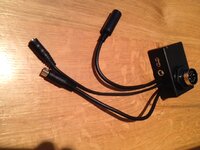
Thinking about it further... the Starcom BTM-02 bluetooth module comes with a cable which can split the audio out and mic into two plugs. So i bet i can plug the audio into an iPod socket or aux sound socket and the mic into the phone socket.

I will use the Garmin as a media player as well as phone. It will mean that the radio will break over the phone, but that's not such a big problem.

will play around tonight.
 
Just tried it and it all works :clap

I used the split cable from the bluetooth module. Sound plugged into the "music" socket and mic plugged into the "phone" socket. It all plays in stereo and my mate on the radio can over talk my wife on the phone :rolleyes:
 
Thanks for that explanation. Does the partial muting of the incoming audio (callers voice) still occur when the rider speaks with the later, post 2009, Autocoms?

Hi Bumpkin,

Firstly, I take mobile calls on the bike extremely rarely.

There is no muting on Phone 1 (Aux2 on the Super Pro Automatic) apart from incoming bike to bike (on Aux1) will mute the GPS/phone link.
Tom Beman's (the unit architect) idea was that if your passenger says "Watch Out - Danger" this should take precedence over everything. If someone in the group connected by radio wants to issue a "Watch Out" then this should also take priority over an incoming call/GPS.
If someone is jabbering inanely on the radio - tell them to shut up as you are trying to concentrate.

HTH,

John

On the older units connected by a #1273 into Phone 1 surely there should be no muting when the rider talks. The muting from riders speech should only have occurred if the phone was plugged into Phone 2 in order to receive stereo music.

Paul Barrett is the only ex-Autocom employee working at Tecstar and he is always willing to give advice. FYI, he told me that the factory no longer do any new installations, but they can recommend reliable fitters.
 
If anyone from Tecstar is reading this thread, then feel free to make a product for me :bow It's taking me hours to make myself and I would pay for an off the self version. I suspect others would to.

I have all the Starcom gear;
- starcom1 digital
- bikecam2
- Radios
- all the accessories PTT, Vol, pro-kit, radio power, etc.

I want to put everything which is of value and i need to get to frequently into the tank bag (iPhone, bike cam DVR, radio) and everything else integrated into the bike (starcom, PTT, VOL, Remote Rec for BikeCAM, etc).

So i am making a harness...

1) the first part fits inside the tank bag and has
- connector for radio (6 pin DIN)
- connector for remote record switch (4 pin DIN) - yes i cut the cable
- connector for remote mic into bike cam (phono)
- USB charger for iPhone :D
- generic 12v power for anything else

It also have a 15 pin waterproof socket poking outside the bag through a whole I cut (bolted in place).

Picture below.

2) a 15 core quick release cable which can plug into the bag and the bike.

3) a harness integrated into the bike which goes to the starcom, vol, ptt, remote rec, etc.

That's it :D The benefit is that I can unclip my tank back and go with all the expensive bits. The are all plugged in still inside the tank bag. I also can charge my iPhone and Camcorder using the USB connector in the bag.

Call it the PROFIT-2 Kit :D

The pic below shows the first part of the harness which goes inside the bag. The multi-pin connector goes through a hole in the side wall and bolts in place.

photo.JPG

:thumb2


Back
Top Bottom