TFT / Cardo / iPhone Playlists - Pulling my hair out!

I left the phone connected to the bike for one hour. Still updating

When my screen says that it's because there a message on my phone asking if I want to share stuff, click ok and all is well with the world. Happened two or three times in the past couple of months.
 
Just sharing what I found out. Try rebuilding your library and deleting any albums or songs that are broken or aren’t perfectly synced across your devices/iCloud account. It worked for me.

What’s the process for rebuilding a library ? I’ve never done that


Sent from my iPhone using Tapatalk
 
When my screen says that it's because there a message on my phone asking if I want to share stuff, click ok and all is well with the world. Happened two or three times in the past couple of months.

Is that with iPhone ?


Sent from my iPhone using Tapatalk
 
TFT Playlist continued...
I've now tested what BMW Motorrad told me; unfortunately whilst its validated Motorrad's advice, there is no fix. As a refresher....

Problem - The TFT was not displaying my entire music library (accessed via the Music app on my iPhone, and using my Apple cloud based and local music collections, both of which are sync'd to the iTunes Music cloud service).

Reason - Motorrad told me that the TFT can only display a maximum of 2000 songs in the aggregate, including your playlist tracks.

I've now tested this and can validate what Motorrad say. IRRESPECTIVE of whether tracks are stored locally, or in the cloud, the TFT can only 'read' and therefore browse 2000 tracks on the TFT display itself

How I tested it.....
I turned OFF my library sync, and then transferred circa 1500 songs (via iTunes) and a couple of playlists (roughly 50 extra tracks each), totalling in the region of 1600 songs. I reconnected the phone to the bike. The total list of songs AND PLAYLISTS display perfectly.
If I turn the library sync back on (in doing so, reintroducing my entire library of 40,000 songs to the iPhone, and therefore the TFT, the TFT updates the track list but is then capped again at 2000 songs. The playlists begin to fail once more.
Theoretically you could merge the two by limiting your cloud library to 2000 songs, but that defeats the object of a cloud based music platform.

Conclusion
The BMW TFT media player is extremely basic and a bit poor for an £18k bike. Motorrad have said they are aware of this "Bug" and are working on an update.
Hopefully this will help you draw a line under the issue until such time Motorrad offer a fix.
 
TFT Playlist continued...
I've now tested what BMW Motorrad told me; unfortunately whilst its validated Motorrad's advice, there is no fix. As a refresher....

Problem - The TFT was not displaying my entire music library (accessed via the Music app on my iPhone, and using my Apple cloud based and local music collections, both of which are sync'd to the iTunes Music cloud service).

Reason - Motorrad told me that the TFT can only display a maximum of 2000 songs in the aggregate, including your playlist tracks.

I've now tested this and can validate what Motorrad say. IRRESPECTIVE of whether tracks are stored locally, or in the cloud, the TFT can only 'read' and therefore browse 2000 tracks on the TFT display itself

How I tested it.....
I turned OFF my library sync, and then transferred circa 1500 songs (via iTunes) and a couple of playlists (roughly 50 extra tracks each), totalling in the region of 1600 songs. I reconnected the phone to the bike. The total list of songs AND PLAYLISTS display perfectly.
If I turn the library sync back on (in doing so, reintroducing my entire library of 40,000 songs to the iPhone, and therefore the TFT, the TFT updates the track list but is then capped again at 2000 songs. The playlists begin to fail once more.
Theoretically you could merge the two by limiting your cloud library to 2000 songs, but that defeats the object of a cloud based music platform.

Conclusion
The BMW TFT media player is extremely basic and a bit poor for an £18k bike. Motorrad have said they are aware of this "Bug" and are working on an update.
Hopefully this will help you draw a line under the issue until such time Motorrad offer a fix.

Hi @MatthewH I have the same problem and I am looking for solutions. Any advance with this problem?. Thank you
 
TFT Playlist continued...
I've now tested what BMW Motorrad told me; unfortunately whilst its validated Motorrad's advice, there is no fix. As a refresher....

Problem - The TFT was not displaying my entire music library (accessed via the Music app on my iPhone, and using my Apple cloud based and local music collections, both of which are sync'd to the iTunes Music cloud service).

Reason - Motorrad told me that the TFT can only display a maximum of 2000 songs in the aggregate, including your playlist tracks.

I've now tested this and can validate what Motorrad say. IRRESPECTIVE of whether tracks are stored locally, or in the cloud, the TFT can only 'read' and therefore browse 2000 tracks on the TFT display itself

How I tested it.....
I turned OFF my library sync, and then transferred circa 1500 songs (via iTunes) and a couple of playlists (roughly 50 extra tracks each), totalling in the region of 1600 songs. I reconnected the phone to the bike. The total list of songs AND PLAYLISTS display perfectly.
If I turn the library sync back on (in doing so, reintroducing my entire library of 40,000 songs to the iPhone, and therefore the TFT, the TFT updates the track list but is then capped again at 2000 songs. The playlists begin to fail once more.
Theoretically you could merge the two by limiting your cloud library to 2000 songs, but that defeats the object of a cloud based music platform.

Conclusion
The BMW TFT media player is extremely basic and a bit poor for an £18k bike. Motorrad have said they are aware of this "Bug" and are working on an update.
Hopefully this will help you draw a line under the issue until such time Motorrad offer a fix.

I concur with that.

Spotify didn’t work at all no matter what I did, but a switch to Apple Music and a limited number of songs works perfectly.

I had to change the settings to stop songs being added as separate albums (not sure why that option even exists because it fecks up your album lists with a ton of ‘albums’ with only one song in it!).

I much prefer Spotify, but will have to suffer iTunes so that I can use the media player on the bike. Annoyingly, my new car (when it arrives) will work well with Spotify and not with iTunes :blast
 
I concur with that.

Spotify didn’t work at all no matter what I did, but a switch to Apple Music and a limited number of songs works perfectly.

I had to change the settings to stop songs being added as separate albums (not sure why that option even exists because it fecks up your album lists with a ton of ‘albums’ with only one song in it!).

I much prefer Spotify, but will have to suffer iTunes so that I can use the media player on the bike. Annoyingly, my new car (when it arrives) will work well with Spotify and not with iTunes :blast

I also made the switch from Spotify to Apple Music, even switched phones, believing that I could browse my playlists, but I see that I can't. The solution you are commenting on, I understand that it would serve to avoid duplicate songs in the playlists and prevent them from taking up space. Is there a way to avoid that limit of 2000 songs? Do you know if BMW has planned a solution through update?

Thank you
 
I also made the switch from Spotify to Apple Music, even switched phones, believing that I could browse my playlists, but I see that I can't. The solution you are commenting on, I understand that it would serve to avoid duplicate songs in the playlists and prevent them from taking up space. Is there a way to avoid that limit of 2000 songs? Do you know if BMW has planned a solution through update?

Thank you

No, there is a limit to how many songs you can have and BMW will do feck all to change it (they’ll pay lip service to it, but nothing more, you’ll probably need to buy the 2024 model for that).

I think it’s something in your settings that is preventing the sharing of information between the bike and iTunes, or possibly Spotify is set as your default player? I had to ask Siri to play something, it’s the only way of changing the default player apparently.

Make sure you only have a couple of small playlists on iTunes when testing, that way you will know it’s not a ‘file size’ issue.

It does work with iTunes, so it can only be the default player or a lack of permission stopping it from working (unless you have lots of music downloaded on iTunes). I would also ensure that you are only trying to play downloaded music and not cloud based, it’ll be easier to make sure that you aren’t trying to access too many songs :thumb2
 
No, there is a limit to how many songs you can have and BMW will do feck all to change it (they’ll pay lip service to it, but nothing more, you’ll probably need to buy the 2024 model for that).

I think it’s something in your settings that is preventing the sharing of information between the bike and iTunes, or possibly Spotify is set as your default player? I had to ask Siri to play something, it’s the only way of changing the default player apparently.

Make sure you only have a couple of small playlists on iTunes when testing, that way you will know it’s not a ‘file size’ issue.

It does work with iTunes, so it can only be the default player or a lack of permission stopping it from working (unless you have lots of music downloaded on iTunes). I would also ensure that you are only trying to play downloaded music and not cloud based, it’ll be easier to make sure that you aren’t trying to access too many songs :thumb2

My player is Apple Music, I can see playlists, artists, album art, etc. and can skip songs but some playlists are empty or has not synced all the songs
Do you mean that is it possible to make it work only with downloaded songs? Is there any other way?
 
So Much rubbish posted here:rolleyes:
There is no limit on files size. :blast
Its mirrored, not transferred. :thumb

IOS have issues sharing (permissions) ...... Its not BMW, Although BMW and Apple are working together for a solution. :thumb
 
So Much rubbish posted here:rolleyes:
There is no limit on files size. :blast
Its mirrored, not transferred. :thumb

IOS have issues sharing (permissions) ...... Its not BMW, Although BMW and Apple are working together for a solution. :thumb

Totally agree! :okay
 
So Much rubbish posted here:rolleyes:
There is no limit on files size. :blast
Its mirrored, not transferred. :thumb

IOS have issues sharing (permissions) ...... Its not BMW, Although BMW and Apple are working together for a solution. :thumb

I only had issues when I had a lot of music on, hence me thinking it was a size of file issue.

All I know is mine works no problem now I am on iTunes and haven’t got 46Gb+ of music stored on my phone.
 
Hello, I comment on my situation.
I have an iPhone 12 Max Pro with the latest version of iOS and Apple Music. I don't have music synced with iTunes, all the music I have is in the cloud, except for 1Gb of that music that I have downloaded to my iPhone. My cloud library has many more than 2000 songs and the problem I have is that in the TFT there are some playlists that are empty and others that are missing songs.
I need to find a solution and I see that some of you have my own problem and others say that it synchronizes you perfectly. Please, for those that work correctly, can you indicate what your configuration is to see if we can find a solution?
Thanks a lot.
 
Most of these problems seem to be with iphone users and apple music. I thought that Apple says not to fit iphones to motorcycles.
 
Most of these problems seem to be with iphone users and apple music. I thought that Apple says not to fit iphones to motorcycles.

The TFT only syncs playlists and music with iPhones and Apple Music. With Android or Spotify there is no problem because it simply does not sync
 
The TFT only syncs playlists and music with iPhones and Apple Music. With Android or Spotify there is no problem because it simply does not sync

I'll try it with my android the next time that I go out. Never listened to music on the bike so never noticed.
 
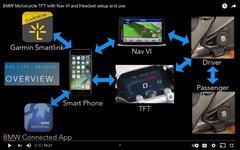
The attached file is the sequence I use to connect all my devices. Nav 6, Android Phone, Sena headset to 2021 GSA TFT. It works 99% of the time and on the odd occasion it doesn't I switch off the bike, wait a few seconds and 99.9% of the time that works a treat. You soon get used to the sequence as the headset tells you 'phone connected' then you get a beep or two as the rest join in.

A couple of 'gotchas' along the way, make sure sound output on the phone is the TFT, make sure 'do not disturb' is off on the phone, make sure the volume is up, adjust sound output from the Nav6 to suit.

One of the other must do's is to clear all connections from everything before you start the connection sequence above, particularly on the TFT and the Nav. For the phone I unpair the headset, Nav and TFT only

It works guys, a little patience and a quiet garage is required to hear the various helmet prompts.....good luck.
 

Attachments

  • 185e76ce-7c8b-48b3-9137-c02a6d58b12b.jpg
    185e76ce-7c8b-48b3-9137-c02a6d58b12b.jpg
    178.4 KB · Views: 175
The attached file is the sequence I use to connect all my devices. Nav 6, Android Phone, Sena headset to 2021 GSA TFT. It works 99% of the time and on the odd occasion it doesn't I switch off the bike, wait a few seconds and 99.9% of the time that works a treat. You soon get used to the sequence as the headset tells you 'phone connected' then you get a beep or two as the rest join in.

A couple of 'gotchas' along the way, make sure sound output on the phone is the TFT, make sure 'do not disturb' is off on the phone, make sure the volume is up, adjust sound output from the Nav6 to suit.

One of the other must do's is to clear all connections from everything before you start the connection sequence above, particularly on the TFT and the Nav. For the phone I unpair the headset, Nav and TFT only

It works guys, a little patience and a quiet garage is required to hear the various helmet prompts.....good luck.

Is not a connecting secuence problem, it is a sync problem. I have the connections done exactly like in the image you attached


Back
Top Bottom