The expand function

Wapping

Well-known member
Moderator
Joined
Oct 21, 2005
Messages
91,143
Reaction score
16,340
Location
Wapping, London
When creating routes, MyRoute, who should know what they are talking about, recommend placing a shaping point every 5 km or 3 miles. This is to help the GPS device pin the route in place. Their mantra is ‘Just have enough’.

This might be tedious but MyRoute will do it for you, using Gold subscription’s expand function. This sits alongside the reduce function.

More to follow…..
 
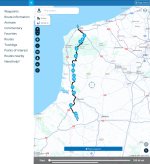
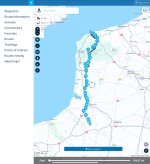
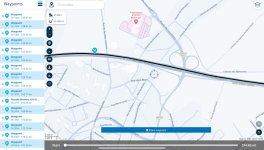
Here is a 100 mile route in France, created for demonstration purposes only. It has a start and end point (all routes must have these) and 14 intermediate points, sufficient for it to take the roads I want to take.

14 intermediate points over 100 miles is an average of one every seven miles, when MyRoute recommends one every three miles. In other words, it is short by a factor of two.

IMG_5352.jpeg

It’s time to expand (increase) the number….

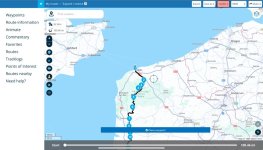
Go to Toolkit:

IMG_5353.jpeg

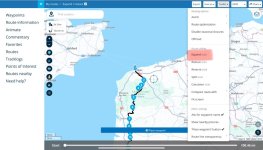
From the dropdown box, select expand:

IMG_5354.jpeg

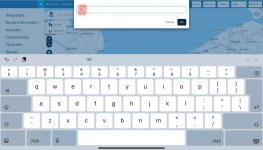
Now think how many intermediate points you’d like, For 100 miles, with one roughly every three miles, that would be say, 30:

IMG_5355.jpeg

And tap OK. Bingo! They are all inserted between the start and finish points:

IMG_5356.jpeg

But don’t assume that is necessarily the end….
 
Last edited:
Whilst MyRoute is very good at expanding, it is not always so very good at inserting the additional points exactly on the route.

Being accurate with placement is (and always has been) important. Have one on the ‘wrong’ exit of a roundabout or, in an extreme case, the wrong carriageway of a motorway and your dumb GPX or MyRoute’s own Navigation app on your phone, it WILL take you there, for no other reason than YOU have told the dumb device to do it.

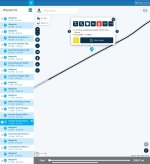
Here is an example of a bad placement it has chosen for one point (there are others) in its expansion of 14 points out to 30:
IMG_5359.jpeg

Drag the point onto the road,

It takes just a minute or two to display the points, zoom in once and click on each, tidying up any wrong un’s as you go.

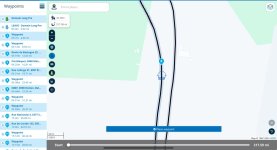
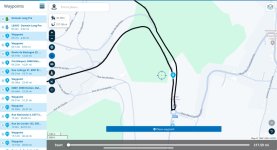
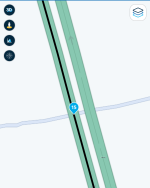
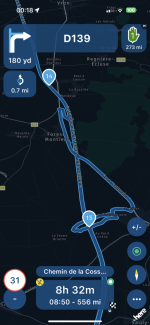
The other thing to watch out for, is when expand places a point on a bridge or underpass. Sometimes, the dumb device can interpret this as the point being on the road above (or below) with inevitable consequences. Here is an example of what can happen when the point (no. 15) is on a bridge, when the route is then run in MyRoute Navigator on a phone:
IMG_5756.png


IMG_5047.png

As you can see, the route deviated away dramatically from the motorway and then rejoined it.This was all because the software read point 15 as being, not on the motorway but on the minor road. In short it did as it was told to do. Dragging point 15 away from the bridge, cures the problem instantly.

Sometimes, being off to the side of the road, as in the example above, probably won’t make too much difference, the dumb device probably won’t take too much notice. It’s just not best practice to have points away from the road you need to be on. Corrections made now will maybe save you hours of ranting in the rain or broiling sun.

 
Last edited:
The reduce function works the same way but in reverse.

Take care though. For obvious reasons, if you take too many out, it WILL alter the route, taking you away from the route you wanted to take.

Consider it like the bad effects you can sometimes see with the ‘skip’ function or ‘recalculate’ on your GPS device, except this time it was definitely self-inflicted. Again, the moral is: Check and check again.

If you find the route altered (sometimes it’s for the better) and you don’t like it, use the back / undo function.

Play around. You can’t break it.
 
Another thing learned. Thank yuh Richard.

Must review my routes for Germany to avoid a grumpy pillion situation.
 
That's great never noticed those tools. Looks like the reduced function would be good for converting a track to a route (y)
 
That's great never noticed those tools. Looks like the reduced function would be good for converting a track to a route (y)

Indeed, I think that is the main purpose of the reduce function.

If you create your own bespoke routes, placing a via point on each road you want to take and are then happy with the route, I can’t see why you’d then reduce the number. Doing so would simply risk the bespoke route altering.

However, as you say, conversions of a track into a route, sometimes creates lots and lots of points, some of which could be safely reduced, not least as having so many sometimes obscures the route completely. Just keep an eye that what you end up with, still matches the original track….. or at least goes where you want it to.
 
Last edited:
That's great never noticed those tools. Looks like the reduced function would be good for converting a track to a route (y)
I'm finding there's quite a few interesting tools tucked away, certainly when using MRA on a Macbook, the 'Page Menu' is much more accessible and in view on a Windows PC, but not very obvious on the Mac
 
Another example of why you should always check routes when you use the expand (or reduce) function

I used the expand function to increase the number of points in a 210 mile route from about 30 points to 70 points. This follows MyRoute’s best practice advice to have a point roughly every 5 km or 3 miles.

Having expanded the number of points, I clicked on each one individually. It maybe takes two to three minutes but it’s worth it. As sometimes happens, one of the expanded points was not on the road I wanted to be on. It was off to the side. This, if it is in a field is often not too life threatening; but, if it happens to be on a different carriageway of another very different road it can start to spoil your entire day.

When checking I have the route zoomed right in and am very suspicious if I ever see the route doubling back on itself or making an odd deviation for no apparent reason. Sometimes there is a very good reason for it, as shown here:

Looks bad ie. Why does it go down and then up?

IMG_5564.jpeg

Zoom out a bit and it’s OK. It’s simply the road layout, using a roundabout, instead of them putting in a junction a bit higher up:

IMG_5565.jpeg

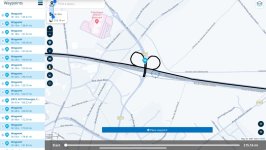
This though was more alarming. Why would the route offered up do this?

IMG_5561.jpeg

Yes, that’s right. When MyRoute expanded the number of points, it plonked point 54, not on the motorway but on the D919! If I hadn’t checked and had simply followed my sat nav blindly, I’d be cursing it wildly for actually doing nothing more than doing what it had been told to do.

One very quick drag of point 54 onto the correct road carriageway and all was well again:

IMG_5562.jpeg

In short, check and then check again.
 
Last edited:


Back
Top Bottom