Tom Tom on a GPS Phone

nick

Registered user
Joined
Aug 27, 2004
Messages
739
Reaction score
0
Location
SE London, England
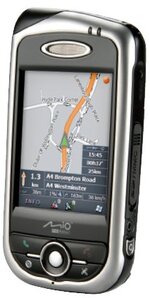
A colleague resigned and I have become the new owner of a secondhand Mio DigiWalker GPSPhone A701.

Not a great fan of these gadgets, but since it is lying around I thought I would try to use it.

It has TomTom 5 already installed and I am in the process of "tidying" up the installation and removing the personalisation made by the previous owner.

First "annoying" feature is that TomTom autostarts everytime I switch the phone on even if I don't want to use it. Anyone know how do I disable the autostart ?

I tried to re-run the install process from the TomTom CD's, but this complains if I don't install Palm Desktop first (I don't really want to use this, the phone came with Microsoft Activesync), but Palm Desktop won't launch HotSync for some reason. Are these required to install TomTom?
 

Attachments

  • mio_a701_gps.jpg
    mio_a701_gps.jpg
    20.8 KB · Views: 153
Something doesn't seem right - I think the Palm desktop is for the Palm operating system on a PDA, but you say that the phone works with Microsoft ActiveSync, which is a Windows PDA app. If the phone is running Windows, perhaps you have the wrong TomTom CD, or there's an option to install TT under Palm or Windows o/s?
 
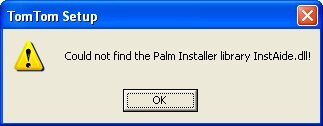
When I load the TomTom CD I get an error message ....

I searched for this DLL and found it was part of Palm Desktop. Even though I shouldn't need it, I installed it, just to get the DLL. This didn't work though.

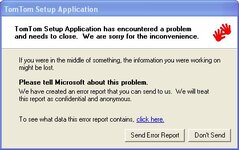
If I ignore the error message and try to install (selecting Windows CE device)without the DLL installed, the TomTom install procedure crashes ...
 

Attachments

  • palm.jpg
    palm.jpg
    10.1 KB · Views: 121
  • tt.jpg
    tt.jpg
    30.5 KB · Views: 136
Hi Nick,

Ive got the same phone and have never come across that problem.

Seeing as it's new (to you) and you wont have put too much of your own stuff on it yet, you might consider re-imaging it and starting from fresh.

The Mio Website has an improved firmware available which suppports Email push and voice dialling. You can download it from here: R65 Firmware

You will need to reinstall TomTom afterwards though so you will need the original media/binaries.

Regards,

Mike
 
Thanks for the reply Mike - useful to know someone with the same phone !

I am trying to load additional Maps (France). That is when the TomTom install fails.

I can load the application, additional voices etc... and ActiveSync works so everything SHOULD be OK.

New tactic - I tried the "Advanced" install option and am installing to a temporary directory on my PC first, then I simply copy the files across to the phone. This works for all files except the largest file "cline.dat" which is 160Mb.

There is plenty of room on the SD card for this file.

I suspect my PC's USB port is timing out (if this is possible) as once it crashes I can no longer connect to the phone and I have to re-boot my PC.

This is probably what is happening to the TomTom install process as well.

Any suggestions ?
 
An SD Card reader would be a more reliable way of transferring large files.

The A701 can be placed into a card reader type mode, the option is located in: Start | Settings | System | M eUtility | USB | and then choose 'card reader mode'.

Failing that, could your source files be corrupt at all?

Also, some versions of TomTom will not install onto WM5, but thats not the same error you are seeing.

Have fun,

Mike


Back
Top Bottom