Transferring Basecamp GPX files from Mac to Nav 5.

WShep

Registered user
Joined
Dec 20, 2021
Messages
55
Reaction score
31
Location
Rochdale Nr Manchester England
Hi,

I'm looking for help for the above.

I've plotted a route on Road Trip Planner (route planning software) But I'm unable to export it to my Nav 5.

I've tried always to get it on and even been to the Apple store thinking it may be a problem with my Mac but that's working as it should, the chap at the Apple store has confirmed that.

Any help would be appreciated, I'm not a "techy type" and I've spent ages trying but keep hitting a brick wall. Is there a tutorial I could follow ??

Thanks in advance
 
I'm not a MAC user but I'll give it a pop.

1. Have you downloaded the GPX files to your Mac?

2. Have you imported them into BAsecamp on your mac.

3. Does your mac see your NAV 5
 
What is the problem? The Nav 5 doesn't appear in Basecamp (Mac doesn't see it) when connected via USB?
 
Thanks for your replies chaps. I have my granddaughter with us at the moment so I'll check later when I'm free.

However some of your questions above I can answer,

I'm not a MAC user but I'll give it a pop.

1. Have you downloaded the GPX files to your Mac?

2. Have you imported them into BAsecamp on your mac.

3. Does your mac see your NAV 5
YES to all three questions.
 
What is the problem? The Nav 5 doesn't appear in Basecamp (Mac doesn't see it) when connected via USB?
Thanks for your replies chaps. I have my granddaughter with us at the moment so I'll check later when I'm free.

However some of your questions above I can answer,

YES it appears on Mac and pretty sure in Basecamp too, but I need to confirm later.
 
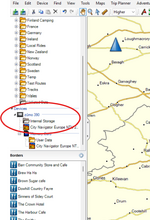
Do you see the Nav 5 in Basecamp like this zumo 390 in the left panel?

1742566202443.png

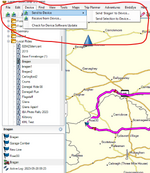
When you go to Device can you send a selected list to the device.

1742567484227.png
 
Slightly different on the macbook I think. I've followed similar directions to yours and still nothing installed to the nav5.

One message I did get up was "No unlocked maps were found for this device" to all intent and purpose it seems to be transferring to the nav5 but when I disconnect from my Macbook and search there's no route on the nav5 .
 
Slightly different on the macbook I think. I've followed similar directions to yours and still nothing installed to the nav5.

One message I did get up was "No unlocked maps were found for this device" to all intent and purpose it seems to be transferring to the nav5 but when I disconnect from my Macbook and search there's no route on the nav5 .

are you using the import feature on the Nav 5 trip planner app?

On my Zumo 390, similar era to the Nav 5, basecamp sticks the GPX onto the SD card. I then have to import the route into the Zumo's own memory where it becomes visible in Trip Planner


Back
Top Bottom