Twin PC Monitors....

Dutchman

Registered user
Joined
Sep 3, 2002
Messages
1,271
Reaction score
0
Location
Edinburgh, Scotland
I'm planning to get a second 20" flat panel monitor for my Dell PC......for two reasons:

(a) Failing eyesight

(b) The desire to have Photoshop CS open on one screen & Dreamweaver open on another.

What, if any, special software will I need to enable two monitors to display two different programmes from the same PC at the same time?

Cheers

Dutch
 
Hi Chris,

As long as your video card has 2 monitor connections on it I don't think you need any special software at all. I run 2 monitors on my PC at work and the company certainly won't have done that if they had had to pay extra for software :D

Iain
 
The Stimulator said:
Hi Chris,

As long as your video card has 2 monitor connections on it I don't think you need any special software at all. I run 2 monitors on my PC at work and the company certainly won't have done that if they had had to pay extra for software :D

Iain

Thanks Iain......

Decided to read the manual that came with the Dell.....

There's actually a section for installing two monitors!!

The video card has two ports and the PC software allows for 'clone' mode, ie the same image on both screens & 'extended desktop' mode wich allows the display of different programmes on each screen......sorted!!

Cheers

Dutch
 
I had a similar setup at work (before I gave up) and it certainly makes life much easier and increases productivity when using multiple applications.

The only additional costs would be the video card with two outputs (if you don't have one) and the second monitor.

Extended desktop is the business!!

Iain
 
Okay guys, so far so good......thanks for the help........

However, I've just discovered that my 2 year old Dell has only got one connection on it's video card.

So here's the question.....given that I've got enough spare slots...can I just buy another single video card or do I need to shell out for a 'twin monitor' card...........?

Thanks

Dutch
 
I believe that you need a dual monitor card - all the clever stuff is done on that.

Fitting a second video card will run ibto all sorts of software conflicts.

Try Matrox or similar.

Iain
 
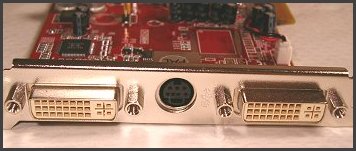
Dual output video cards used to be a quite rare purchase unless you worked in graphics or film editing (though Windows 2000 and XP allow for the synchronous use of multiple video cards without the need for any clever software.)

However with the introduction of Digital video monitors (LCD etc) an additional DVI connector as well as the VGA is now de rigeur on almost all high end (and some low end) video cards in the last two years. So if you are prepared to put up with one connection being analogue (VGA) and the other being digital (DVI) then two monitors is no big hassle.

VTV-5200-128AD_2_4.jpg


I find this quite acceptable.

If you want them to be both digital (or even, weirdly, both analogue) you'll need to invest in custom dual port kit.


backplane.jpg
 
Two VGA cards...

using two VGA cards are not a problem, I use a PCI and an AGP video card's and they work perfectly.


Back
Top Bottom