Unable to calculate route following an update

Orinoco

Well-known member
UKGSer Subscriber
Joined
Jun 1, 2010
Messages
2,000
Reaction score
564
Location
The Bride Valley
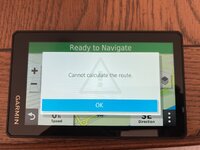
My XT appears unable to calculate a route after updating the maps. I've tried a reset and reinstalling the maps, but still not able... any clues on what to try next?

XT photo.jpg
 
I’d start with the easiest possibility:

1. How long is this route? Does it cross borders and / or go into areas where you do not have the detailed maps loaded and active?

2. Does the device know where you are? In other words, it has a current satellite fix and the positional cursor is stable on the screen?

3. Is there something in your preferences settings, which inhibits route calculation?

4. Are you creating the route in the device itself or importing the route from, say MyRoute or BaseCamp?

Can you share the route, so others can try.
 
This is any route, just tried something 50 yards away. Device can see current location and is showing maps. However, also things I'm moving at the moment, whilst not!
 
However, also things (thinks) I'm moving at the moment, whilst not!

Put it into ‘indoor mode’, please. Will it calculate a route then?
 
Last edited:
Check the map type selected for routing/mapping on the 'nav. Sometimes it de-selects the option leaving it unable to route anything.
 
Put it into ‘indoor mode’, please. Will it calculate a route then?
Cannot calculate in indoor mode either

Delayed responses as also dealing with 90 year old mother!

Just noticed, that despite the Cannot calculate the route, after pressing 'OK' there is a green bar at the top of screen with 'Ready To Navigate'... but no route displayed, but no option to stop the route either
 
Last edited:
Cannot calculate in indoor mode either

Delayed responses as also dealing with 90 year old mother!

Just noticed, that despite the Cannot calculate the route, after pressing 'OK' there is a green bar at the top of screen with 'Ready To Navigate'... but no route displayed, but no option to stop the route either
Had this in 2022. Garmin support told me to clear out the files in the archive folder on the device. I did this and it fixed the issue and it never returned. Kicker was I have a Mac and couldn’t see the device, so I had to do it with my wife’s laptop
 
Had this in 2022. Garmin support told me to clear out the files in the archive folder on the device. I did this and it fixed the issue and it never returned. Kicker was I have a Mac and couldn’t see the device, so I had to do it with my wife’s laptop
Thanks, will give that a go, also on a Nac so will try on mother’s PC :) maybe there was a good reason for visiting her after all! 😂
 
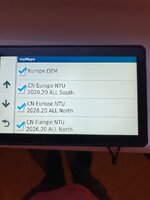
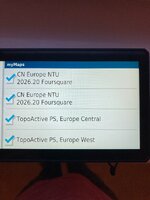
OK I've been having a bit of a play. Are these maps on your device and ticked.

50218[1].jpg

50806[1].jpg
 
I noticed from your photograph above that what appears to be an A road is yellow like below. This appears if the maps are loaded but not enabled.

11544[1].jpg

If the maps are enabled they appear like this. With A roads Green.
7964[1].jpg
 
Ooooooh, base map only. No wonder it won’t calculate a route along the goat tracks.
 
It's possible to update the maps on the XT without connecting it to a PC or Map. Connect it to WiFi and a power supply and cancel it going into charging mode.
 
Yip it looks like something is fubar with the maps. I'd try and reinstall them with express.
 
Got it routing, I had to change the installed maps from whole of Europe to just UK/Ireland, but that's good enough for now. However... all the roads are still yellow.

Edit - found it, changed to UK and roads appearing in different colours, all good now :)

Thanks all, input appreciated. Also have noted that it seems much easier on a PC compared to my Mac..
 
Last edited:
Yup, somehow the device has two copies of CN Europe NTU ALL North loaded and active (ticked). Simply untick one and the device may well route normally.

At some point, hook the device to a PC and delete the installed extra map file.

PS Unless you really want the topographical maps, you can untick those, quite safely. Likewise, if you don’t want all the ‘Four Square’ stuff, you can untick that too. You can always tick (ie. select) them again, if you change your mind.
 
Last edited:


Back
Top Bottom