
Updating a Carpuride W702 - (702 ONLY) - Upload / Download and help notes etc - CHECK YOUR VERSION FIRST!!!!

TheStammeringBiker

Well-known member
UKGSer Subscriber
Joined
Jun 18, 2019
Messages
880
Reaction score
338
Location
Warrington UK
NOTE: THIS THREAD RELATES ONLY TO THE 702, NOT TO OTHER DEVICES - If in doubt see post #19

:::.EDIT.::: Please also note post #43 (link)


Might it be possible for you to host them on a file sharing platform, perhaps? If so, I’ll create you a sticky, here on the forum.
Sure! I'll upload it to Google Drive! This folder should contain the file:


The instructions they sent me didn't pan out quite the way they described it. But as with anything DO NOT power off the device while the update is running.
They recommend using a MicroSD card of less than 32Gb, they also recommend formatting it to exFAT however in my case this didn't work and I had to format it as FAT32.

Here's what I did:

1. Format MicroSD card (I had to use FAT32)
2. Copy the ISPBOOOT.BIN to the root of the SD card (do NOT put any other files on it)
3. Remove the side cover to expose the SD card slot
4. Power on the unit (wait for it to fully boot)
5. Insert the MicroSD card
6. Message should come up on the screen saying "Upgrade the MPEGBOOT?"
7. Select Yes
8. Screen should change to a white screen (see below) which eventually says "Success" in the middle
9. Power the unit off
10. Remove MicroSD card
11. Screw SD card slot door back on
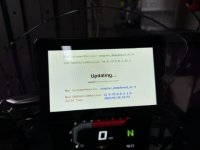
71539E9B-D4BA-45AE-9776-A0AEA27C99FA_4_5005_c.jpeg

What I noticed with the latest firmware is that you have the option to have the audio routed to the built in "BTTrans" second channel or switch it to iCarPlay output. It'll tell you each time its powered on which output it's using, so with it set to iCarPlay output my phone just sends the audio and calls direct to my headset rather than trying to route via the W702 and it seems to work flawlessly.

I also managed to set the nighttime brightness much lower which was a bit of a faff but worked eventually.
 
Last edited by a moderator:
Hi
I have a carpuride w702. But i haved problems with connectivity with my cardo freecom 4+, i contact carpuride and they send me a bin file to do the update, but something went wrong and whem the message appears i just pressed the V to confirm and the unit just turn black and never turn on again..... carpuride just tried to help me but nothing works. Anyone here could help me, since my unit seems to work, because it's getting hot when plug in the power, but the screen is always black
 
Hi
I have a carpuride w702. But i haved problems with connectivity with my cardo freecom 4+, i contact carpuride and they send me a bin file to do the update, but something went wrong and whem the message appears i just pressed the V to confirm and the unit just turn black and never turn on again..... carpuride just tried to help me but nothing works. Anyone here could help me, since my unit seems to work, because it's getting hot when plug in the power, but the screen is always black
I had the same issue with the dark screen. After some messing around this worked: 1. Disconnect the unit from power (take the SD card with bin file out) 2. Connect power again. 3. Insert the SD card / bin file. 4. (Screen remained dark) but quickly "guess" the position of the Yes button to update software and touch the screen. After a couple of attempts it worked and updated software and has run great ever since. With the latest software there is an alternative connection route whereby you would connect you phone the carpuride but also phone to cardo ie no connection between cardo and headset. Good luck...
 
I had the same issue with the dark screen. After some messing around this worked: 1. Disconnect the unit from power (take the SD card with bin file out) 2. Connect power again. 3. Insert the SD card / bin file. 4. (Screen remained dark) but quickly "guess" the position of the Yes button to update software and touch the screen. After a couple of attempts it worked and updated software and has run great ever since. With the latest software there is an alternative connection route whereby you would connect you phone the carpuride but also phone to cardo ie no connection between cardo and headset. Good luck...
Can you put some pic exactly where's the 'yes' botton.
What file bin you use, and how did you format your microsd card.
Thanks
 
Can you put some pic exactly where's the 'yes' botton.
What file bin you use, and how did you format your microsd card.
Thanks
I dont have a pic and difficult to say exactly where the "yes" is but imagine a cross on the screen then touch to the right of the centre point. This is the instruction i received from carpuride including formatting with FAT32........Please use a PC Windows computer to copy the latest version of the software ISPBOOOT.BIN to the TF Card, power on the Carpuride unit, and wait for 10 seconds to display the operation interface. After inserting the TF Card, the "upgrade MPEGBOOTI" will pop up. Check √ -> Wait for the upgrade progress bar to reach 100% -> Update success and pull out the TF Card.

Need to pay attention to these situations.
1. Only one software can be copied to the TF Card. If there are other files, it will cause interference and cause the upgrade to fail. It is recommended to format the TF card with Fat32 as the file system before copying the software to the TF card.
2. The file name cannot be changed or added characters, it must be the same as the attachment.
3. The memory of the TF Card does not exceed 32GB.
4. Please do not remove the TF Card during the upgrade in case of damage to the device. Thank you.
 
Carpuride have sent me another newer update as I’m encountering a weird issue occasionally. Will upload it once I have better signal.
 
Hi. What was the issue and is it the 7 or 5 inch screen?
Only started in the last week, it’ll be on the CarPlay screen on Google Maps for instance then instantly bounces back to the Carpuride main screen but doesn’t disconnect. I tap on the iPlay button and it instantly goes back, sometimes happens multiple times on the bounce and some days just once and it stops. There’s no single click way to get back to that screen so it can’t be a phantom screen press, very weird. And it’s the 7inch.
 
Only started in the last week, it’ll be on the CarPlay screen on Google Maps for instance then instantly bounces back to the Carpuride main screen but doesn’t disconnect. I tap on the iPlay button and it instantly goes back, sometimes happens multiple times on the bounce and some days just once and it stops. There’s no single click way to get back to that screen so it can’t be a phantom screen press, very weird. And it’s the 7inch.
Mine does this too. I’ll have to see what version mine is running.


Back
Top Bottom
