thank you, I have the same version but didn't know about the long press, tried on mine and it works, thanksThank you @bandit8623
In the meantime, I contacted support and got the latest version.
You can download it here
Firmware version LT-N702-V1.10
So far the only change i noticed is brightness control, it's changed from the slider to a button, when long press on it you can change brightness separately for day and night mode.


You are using an out of date browser. It may not display this or other websites correctly.
You should upgrade or use an alternative browser.
You should upgrade or use an alternative browser.
Updating a Carpuride W702 - (702 ONLY) - Upload / Download and help notes etc - CHECK YOUR VERSION FIRST!!!!
- Thread starter TheStammeringBiker
- Start date
- Status
- Not open for further replies.
bandit8623
Registered user
new firmware as of dec. got direct from carpuride. 702 non pro. V1.13
older firm
 drive.google.com
updating
drive.google.com
update comnplete
drive.google.com
booted into new firm
drive.google.com
firmware v1.13 file here
 drive.google.com
unknown any new features. just know it boots up just fine. havent tried android auto yet.
older firm
v110.jpg
drive.google.com
updating
v110-113.jpg
drive.google.com
update comnplete
v113success.jpg
drive.google.com
booted into new firm
v113-booted.jpg
drive.google.com
firmware v1.13 file here
ISPBOOOT.BIN
drive.google.com
unknown any new features. just know it boots up just fine. havent tried android auto yet.
Last edited:
**WARNING**
For anyone with a Carpuride W702 I strongly advise against trying to update Firmware using one of the numerous files posted online here.
I tried this and it caused a "black screen" which is widely known to be an issue. In my case it also prevented the touchscreen from working.
After much experimenting I found out the following...
1) The black screen occurs because during initial power up the unit encounters corrupt code in the Bios and immediately switches off the screen backlight and the touchscreen. The unit still boots up as normal and you will see the various app icons if you shine a torch sideways at the screen.
2) Fortunately you do not need to touch the screen to initiate another Firmware update as it commences automatically after a countdown following insertion of the micro USB card with ISPBOOT.BIN file on the FAT32 card.
3) There are obviously many different derivatives of the same Firmware Version so just because it says the version is for example Vs 1.11, it does not mean it is appropriate for your W702. There are different chunks of code in any Firmware update and they ALL have to be compatible. The analogy for me is the Software version on my RT. The TFT says 014_015_020, but as my workshop says, that is just the TFT version and there could be different software version running the ECU.
My W702 Firmware is shown on the screen as -
SDK Version 22.0.11.0.0.0.1.2
CUST Version LT-M702D-S9-V1.22
MCU Version LT-702S2-921-V1.11
BTTR Version SO40-23.08.15.11
I tried all of the files posted on this forum and none of them exactly matched my version, and they all caused the black screen. I then got a specific download link from Carpuride and instantly the update started the screen came on full brightness. Issues resolved. Now works properly.
I suspect that different countries have different Bios code, or multiple design changes over time to the W702, and they are not all compatible. The actual OS and Apps are probably the same, but a Firmware update also rewrites the Bios and these are clearly different.
Not sure if Carpuride have worked this out yet that users sharing Firmware online is probably the source of their need to warn customers "not to upgrade firmware because some customers are experiencing black screen issues". A better solution would be for them to implement more stringent checks when the ISPBOOT.BIN file commences execution and stop it if it is an improper version.
======
I have highlighted the warning you have given.
Richard
For anyone with a Carpuride W702 I strongly advise against trying to update Firmware using one of the numerous files posted online here.
I tried this and it caused a "black screen" which is widely known to be an issue. In my case it also prevented the touchscreen from working.
After much experimenting I found out the following...
1) The black screen occurs because during initial power up the unit encounters corrupt code in the Bios and immediately switches off the screen backlight and the touchscreen. The unit still boots up as normal and you will see the various app icons if you shine a torch sideways at the screen.
2) Fortunately you do not need to touch the screen to initiate another Firmware update as it commences automatically after a countdown following insertion of the micro USB card with ISPBOOT.BIN file on the FAT32 card.
3) There are obviously many different derivatives of the same Firmware Version so just because it says the version is for example Vs 1.11, it does not mean it is appropriate for your W702. There are different chunks of code in any Firmware update and they ALL have to be compatible. The analogy for me is the Software version on my RT. The TFT says 014_015_020, but as my workshop says, that is just the TFT version and there could be different software version running the ECU.
My W702 Firmware is shown on the screen as -
SDK Version 22.0.11.0.0.0.1.2
CUST Version LT-M702D-S9-V1.22
MCU Version LT-702S2-921-V1.11
BTTR Version SO40-23.08.15.11
I tried all of the files posted on this forum and none of them exactly matched my version, and they all caused the black screen. I then got a specific download link from Carpuride and instantly the update started the screen came on full brightness. Issues resolved. Now works properly.
I suspect that different countries have different Bios code, or multiple design changes over time to the W702, and they are not all compatible. The actual OS and Apps are probably the same, but a Firmware update also rewrites the Bios and these are clearly different.
Not sure if Carpuride have worked this out yet that users sharing Firmware online is probably the source of their need to warn customers "not to upgrade firmware because some customers are experiencing black screen issues". A better solution would be for them to implement more stringent checks when the ISPBOOT.BIN file commences execution and stop it if it is an improper version.
======
I have highlighted the warning you have given.
Richard
Last edited by a moderator:
bandit8623
Registered user
this is why the firmware i shared i also posted the version its for. so its more on you for not matching. from the beginning of this thread its known that there are many hardware versions.**WARNING**
For anyone with a Carpuride W702 I strongly advise against trying to update Firmware using one of the numerous files posted online here.
I tried this and it caused a "black screen" which is widely known to be an issue. In my case it also prevented the touchscreen from working.
After much experimenting I found out the following...
1) The black screen occurs because during initial power up the unit encounters corrupt code in the Bios and immediately switches off the screen backlight and the touchscreen. The unit still boots up as normal and you will see the various app icons if you shine a torch sideways at the screen.
2) Fortunately you do not need to touch the screen to initiate another Firmware update as it commences automatically after a countdown following insertion of the micro USB card with ISPBOOT.BIN file on the FAT32 card.
3) There are obviously many different derivatives of the same Firmware Version so just because it says the version is for example Vs 1.11, it does not mean it is appropriate for your W702. There are different chunks of code in any Firmware update and they ALL have to be compatible. The analogy for me is the Software version on my RT. The TFT says 014_015_020, but as my workshop says, that is just the TFT version and there could be different software version running the ECU.
My W702 Firmware is shown on the screen as -
SDK Version 22.0.11.0.0.0.1.2
CUST Version LT-M702D-S9-V1.22
MCU Version LT-702S2-921-V1.11
BTTR Version SO40-23.08.15.11
I tried all of the files posted on this forum and none of them exactly matched my version, and they all caused the black screen. I then got a specific download link from Carpuride and instantly the update started the screen came on full brightness. Issues resolved. Now works properly.
I suspect that different countries have different Bios code, or multiple design changes over time to the W702, and they are not all compatible. The actual OS and Apps are probably the same, but a Firmware update also rewrites the Bios and these are clearly different.
Not sure if Carpuride have worked this out yet that users sharing Firmware online is probably the source of their need to warn customers "not to upgrade firmware because some customers are experiencing black screen issues". A better solution would be for them to implement more stringent checks when the ISPBOOT.BIN file commences execution and stop it if it is an improper version.
======
I have highlighted the warning you have given.
Richard
Look at your customer version. .. its totally different!!!
M702D vs ours with N702
what would be helpful is if you provided the firmware for the M702 and posted it so those that have that device can use it.
Last edited:


And some folk thought Garmin was a crock of shit…… 
"this is why the firmware i shared i also posted the version its for. so its more on you for not matching.
I agree you were kind enough to post all the details about the version you were listing and I did realise at the time it was probably not a match. It is never going to be a match anyway as a new version will have at least changed the CUST Version string and maybe others as well - we don't know. I tried yours in desperation after trying a number of the other earlier listings which did not contain screen shots of all the version info as you suggested, and trying yours was a last resort before getting an update from Carpuride which fixed the problem. It would have been even more helpful if you had also posted a "**WARNING**" and explanation of the known issues and I would then have opted not to take this risk and end up confirming what I already suspected - that I am an idiot. Lesson learnt. But what lesson?
You will note that I also explained that in my case the "black screen" reported by others is actually just the backlight failing to come on. This is helpful to know otherwise diagnoses starts with unnecessarily checking for loose ribbon cables inside the unit - as requested by Carpuride. I correctly guessed it was corrupted Bios code in the very early stage of the POST process at power on.
Misinformation is everywhere. On another site someone suggests when you apply an update to a unit that has suffered the "black screen" you have to quickly guess where on the screen the "ok" button is and press it to accept the update. Not so. An update will start automatically after a countdown unless you hit Cancel. Crazy stuff.
Many will be like me and make the same mistake unless guided otherwise and this is confirmed by the number of reports of "black screens" such that Carpuride now strongly advise against Firmware updates unless there is an existing problem.
These are cheap units by design and manufacture, although they seem to perform well and are value for money. In most other similar devices I have used and for computers (which this in effect is), it is usual practice for the designers to implement safeguards so that any attempt to install an incompatible Bios or Firmware update is rejected after running pre execution internal checks. Maybe Carpuride will now implement this as they are probably paying the price for these user mistakes. I think they instead are pursuing automatic online updates - perfect!
Any suggestion that one can determine for sure by looking at the four version codes of an existing device, and comparing it with the four codes of an "updated" version, that they are compatible, I think is far from certain.
My original codes out of the box were..
SDK Version 22.0.11.0.0.0.1.2
CUST Version LT-M702D-W3118-S9-V1.16
MCU Version LT-702S2-921-V1.11
BTTR Version SO40-23.08.15.11
The new ones from Carpuride are now....
SDK Version 22.0.11.0.0.0.1.2
CUST Version LT-M702D-S9-V1.22
MCU Version LT-702S2-921-V1.11
BTTR Version SO40-23.08.15.11
The CUST Version is now V1.22 up from V1.16 but the string no longer contains the W3118 substring? This alone might incorrectly suggest they are incompatible versions.
My point is we can't be absolutely certain by comparing these strings that we have a compatible version, and the number of failed updates/black screen being reported to Carpuride suggests this is widely misunderstood and people just go ahead and do it. This is the only website I have found that is enthusiastically sharing updates that have been provided by Carpuride for the specific model number listed on the side of your unit eg mine is 250401 702S7C-DGK702XKXP-V1.11. They ask for this for a reason.
So NO, I will not be uploading my Firmware for others to corrupt their devices like I did, as the easy, free and SAFE option is to email Carpuride and get the right update - simples!
I agree you were kind enough to post all the details about the version you were listing and I did realise at the time it was probably not a match. It is never going to be a match anyway as a new version will have at least changed the CUST Version string and maybe others as well - we don't know. I tried yours in desperation after trying a number of the other earlier listings which did not contain screen shots of all the version info as you suggested, and trying yours was a last resort before getting an update from Carpuride which fixed the problem. It would have been even more helpful if you had also posted a "**WARNING**" and explanation of the known issues and I would then have opted not to take this risk and end up confirming what I already suspected - that I am an idiot. Lesson learnt. But what lesson?
You will note that I also explained that in my case the "black screen" reported by others is actually just the backlight failing to come on. This is helpful to know otherwise diagnoses starts with unnecessarily checking for loose ribbon cables inside the unit - as requested by Carpuride. I correctly guessed it was corrupted Bios code in the very early stage of the POST process at power on.
Misinformation is everywhere. On another site someone suggests when you apply an update to a unit that has suffered the "black screen" you have to quickly guess where on the screen the "ok" button is and press it to accept the update. Not so. An update will start automatically after a countdown unless you hit Cancel. Crazy stuff.
Many will be like me and make the same mistake unless guided otherwise and this is confirmed by the number of reports of "black screens" such that Carpuride now strongly advise against Firmware updates unless there is an existing problem.
These are cheap units by design and manufacture, although they seem to perform well and are value for money. In most other similar devices I have used and for computers (which this in effect is), it is usual practice for the designers to implement safeguards so that any attempt to install an incompatible Bios or Firmware update is rejected after running pre execution internal checks. Maybe Carpuride will now implement this as they are probably paying the price for these user mistakes. I think they instead are pursuing automatic online updates - perfect!
Any suggestion that one can determine for sure by looking at the four version codes of an existing device, and comparing it with the four codes of an "updated" version, that they are compatible, I think is far from certain.
My original codes out of the box were..
SDK Version 22.0.11.0.0.0.1.2
CUST Version LT-M702D-W3118-S9-V1.16
MCU Version LT-702S2-921-V1.11
BTTR Version SO40-23.08.15.11
The new ones from Carpuride are now....
SDK Version 22.0.11.0.0.0.1.2
CUST Version LT-M702D-S9-V1.22
MCU Version LT-702S2-921-V1.11
BTTR Version SO40-23.08.15.11
The CUST Version is now V1.22 up from V1.16 but the string no longer contains the W3118 substring? This alone might incorrectly suggest they are incompatible versions.
My point is we can't be absolutely certain by comparing these strings that we have a compatible version, and the number of failed updates/black screen being reported to Carpuride suggests this is widely misunderstood and people just go ahead and do it. This is the only website I have found that is enthusiastically sharing updates that have been provided by Carpuride for the specific model number listed on the side of your unit eg mine is 250401 702S7C-DGK702XKXP-V1.11. They ask for this for a reason.
So NO, I will not be uploading my Firmware for others to corrupt their devices like I did, as the easy, free and SAFE option is to email Carpuride and get the right update - simples!

I’ve had mine 2 know.
When I first received it I sent an email to Carpuride with my firmware version asking if there was an update available. I was advised not to update to a newer version unless I had a problem with my unit.
Sent from my iPhone using Tapatalk
When I first received it I sent an email to Carpuride with my firmware version asking if there was an update available. I was advised not to update to a newer version unless I had a problem with my unit.
Sent from my iPhone using Tapatalk
Should read 2 weeks now
Sent from my iPhone using Tapatalk
Sent from my iPhone using Tapatalk
I got the same reply from Carpuride when I enquired about an update and that was immediately after I unboxed the unit and checked the firmware version.
My problem started 2 days later when I thought I would try putting mp3 files on a micro SD card and insert in the unit. When I switched it back on the screen flashed then went black and it took me a while to realise the backlight was switching off and the touch screen not working. Went through diagnostics with Carpuride including checking ribbon cables.
Eventually they agreed to a replacement unit.
I don’t give up that easily so then tried the updates on this web site in the belief it was a Firmware/Bios issue. These failed because of failure to match versions exactly. So, despite the English: Chinese language barrier I managed to convince Carpuride it was worth trying a forced Firmware update as there was nothing to lose. They eventually understood what I meant and sent me a link. When I inserted the card with update in the unit I honestly thought it was probably not going to work. But within 5 sec the screen flashed and then came on properly bright with the Carpuride logo and I watched the update get successfully installed. It was corrupted bios code after all. All fixed.
The cause of my initial problem is unknown but my experience has highlighted that the Bios is prone to corruption and the most common reason is probably using the wrong update file or using the wrong procedure. No wonder Carpuride are discouraging updating. Since none of the files members uploaded to this site worked for me it is reasonable to expect that none of them would accept my update.
I can’t see any functional differences between my new Vs1.22 and original Vs1.11 but will post again if I find any. Presumably Carpuride will eventually implement the auto online updates which will satisfy our urge to always have the latest software.
My problem started 2 days later when I thought I would try putting mp3 files on a micro SD card and insert in the unit. When I switched it back on the screen flashed then went black and it took me a while to realise the backlight was switching off and the touch screen not working. Went through diagnostics with Carpuride including checking ribbon cables.
Eventually they agreed to a replacement unit.
I don’t give up that easily so then tried the updates on this web site in the belief it was a Firmware/Bios issue. These failed because of failure to match versions exactly. So, despite the English: Chinese language barrier I managed to convince Carpuride it was worth trying a forced Firmware update as there was nothing to lose. They eventually understood what I meant and sent me a link. When I inserted the card with update in the unit I honestly thought it was probably not going to work. But within 5 sec the screen flashed and then came on properly bright with the Carpuride logo and I watched the update get successfully installed. It was corrupted bios code after all. All fixed.
The cause of my initial problem is unknown but my experience has highlighted that the Bios is prone to corruption and the most common reason is probably using the wrong update file or using the wrong procedure. No wonder Carpuride are discouraging updating. Since none of the files members uploaded to this site worked for me it is reasonable to expect that none of them would accept my update.
I can’t see any functional differences between my new Vs1.22 and original Vs1.11 but will post again if I find any. Presumably Carpuride will eventually implement the auto online updates which will satisfy our urge to always have the latest software.

Why? If there is no new functionality and its working, leave well alone.Presumably Carpuride will eventually implement the auto online updates which will satisfy our urge to always have the latest software.

Do you use your one with Google maps or MRA for navigation?Why? If there is no new functionality and its working, leave well alone.
Neither. Kurviger. I like it.Do you use your one with Google maps or MRA for navigation?
I've used that on the pc but not on my phone.Neither. Kurviger. I like it.
Use it on both. Usually plan route on PC and save to cloud. Download to phone. Cant be arsed with phone screens for planning.I've used that on the pc but not on my phone.
Must remember to download offline maps b4 crossing borders though

Couldn't get the phone switched to the Lux carrier when I wanted it
When I start the bike and the Carpuride springs to life is starts Kurviger in "follow" mode if no route loaded.

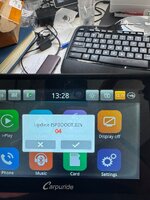
My 702 is playing up, i have some control on the screen.
I am trying to do a factory reset to start with but the unit lets me choose factory reset then its just greyed out and i cant select the tick box for yes to perform factory reset. So i got an SD card and copied over the bin update file. I insert the SD card but again the button for tick wont allow me to press it to update the firmware.
Its not that the screen isnt working as some functions i can press its just these various splash screens it wont let me choose.
I am trying to do a factory reset to start with but the unit lets me choose factory reset then its just greyed out and i cant select the tick box for yes to perform factory reset. So i got an SD card and copied over the bin update file. I insert the SD card but again the button for tick wont allow me to press it to update the firmware.
Its not that the screen isnt working as some functions i can press its just these various splash screens it wont let me choose.
Attachments
bandit8623
Registered user
that 04 seems to be an error. you sure you have the correct ispboot version? so be sure you can message carpurideMy 702 is playing up, i have some control on the screen.
I am trying to do a factory reset to start with but the unit lets me choose factory reset then its just greyed out and i cant select the tick box for yes to perform factory reset. So i got an SD card and copied over the bin update file. I insert the SD card but again the button for tick wont allow me to press it to update the firmware.
Its not that the screen isnt working as some functions i can press its just these various splash screens it wont let me choose.
Reset done with no SD card inserted?My 702 is playing up, i have some control on the screen.
I am trying to do a factory reset to start with but the unit lets me choose factory reset then its just greyed out and i cant select the tick box for yes to perform factory reset. So i got an SD card and copied over the bin update file. I insert the SD card but again the button for tick wont allow me to press it to update the firmware.
Its not that the screen isnt working as some functions i can press its just these various splash screens it wont let me choose.
SD card formatted FAT32?
Read my warning post above.
If the screen goes dark it indicates a firmware problem which could have been caused by a fail during the reset, but in most instances posted on line it is due to installing an incorrect firmware version. If you get the firmware from Carpurude it will work because they ask for your model designation on the unit. If you download one from online site like this you are playing Russian roulette.
Most times when the screen goes dark it’s because the unit has switched off the backlight. You can still see the icons on the screen if you shine a torch on it at an angle. Then you can see what to press. But sounds like your firmware needs reloading so email carpuride and explain your issue and they will supply correct firmware. They only decline to provide it if a unit is working ok without any issues.
If the screen goes dark it indicates a firmware problem which could have been caused by a fail during the reset, but in most instances posted on line it is due to installing an incorrect firmware version. If you get the firmware from Carpurude it will work because they ask for your model designation on the unit. If you download one from online site like this you are playing Russian roulette.
Most times when the screen goes dark it’s because the unit has switched off the backlight. You can still see the icons on the screen if you shine a torch on it at an angle. Then you can see what to press. But sounds like your firmware needs reloading so email carpuride and explain your issue and they will supply correct firmware. They only decline to provide it if a unit is working ok without any issues.

- Status
- Not open for further replies.