
USB memory stick

Hamster

Registered user
Joined
Jan 31, 2004
Messages
3,407
Reaction score
2
Location
Hampshire
My son has yet again failed to back up his memory stick. All his college work is on it and it has crashed. Of course.

When plugged into a USB (either type 1.0 or type 2) the computer can 'see' the memory stick but when you try and open it, it comes back with the report 'Please insert a disk into removable drive E'
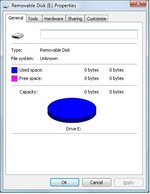
A screen grab of 'Properties' is attached

Is it terminal (I think it is) or is there some arcane 'stick it in the freezer for 15 minutes and it will be fine' trick??
 

Attachments

  • thumb.jpg
    thumb.jpg
    28.3 KB · Views: 123
My son has yet again failed to back up his memory stick. All his college work is on it and it has crashed. Of course.

When plugged into a USB (either type 1.0 or type 2) the computer can 'see' the memory stick but when you try and open it, it comes back with the report 'Please insert a disk into removable drive E'
A screen grab of 'Properties' is attached

Is it terminal (I think it is) or is there some arcane 'stick it in the freezer for 15 minutes and it will be fine' trick??

Its not one of the ones with 2 partitions on it, is it???

My Sandisk Cruzr has a user partition and a filesystem (auto play) partition on it, failing that the freezer trick sounds tempting,,,, but i have Ben and Jerries in mine :D
 
When you say the computer can "see" it what exactly do you mean? Does it show up as disk on the computer?
 
Thanks for all the help, the problem solved itself - we have had a power cut.
The thumb drive was in the USB when the power went down.
35 minutes late the power came up and, humpagorilla! The memory stick was working again.
It was rapidly downloaded and all is well and khulu quais.


By accident :thumb2


Back
Top Bottom
