v7 upgrade problem

  • Thread starter Thread starter gfspencer
  • Start date Start date

gfspencer

Guest
My Navigator II Plus came with City Navigator v6. I just got the upgrade (v7) from Garmin. I put the upgrade DVD in my computer and transferred v7 to my Navigator. The transfer worked fine to the Navigator but City Navigator did not upgrade in MapSource (on my computer). All I can find is City Navigator v6 (and City Select v6 for another GPS). City Navigator v7 is nowhere to be found on my computer. I can look at the new, updated maps on my GPS but they're not on my computer. I’ve been in contact with Garmin but so far they can’t help me. (They keep telling me to go to "View" and select a new one but I have already tired that.) :confused:
 
I upgraded from Version 6 of City Navigator to V7. However, when I open Mapsource, the pop-up box still says "Version 6.8". Is it possible that this is whats confusing you? I'm guessing that it is, as I can't see how you've got V7 on your GPS unit, if you haven't got V7 on Mapsource.

To check, on the top line, press the Help button, then press About Mapsouce, then press Product Info and under CD Set Name you should see City Navigator V7

Hope its ok, but if it doesn't say V7 on yours, then sorry I can't help you.
 
Taff said:
I upgraded from Version 6 of City Navigator to V7. However, when I open Mapsource, the pop-up box still says "Version 6.8". Is it possible that this is whats confusing you? I'm guessing that it is, as I can't see how you've got V7 on your GPS unit, if you haven't got V7 on Mapsource.

To check, on the top line, press the Help button, then press About Mapsouce, then press Product Info and under CD Set Name you should see City Navigator V7

Hope its ok, but if it doesn't say V7 on yours, then sorry I can't help you.

I understand what you are saying but I have v7 on my GPS (says so when I check information and I can see the map upgrades) and v6 on my computer (again, it says so and I do not see the map upgrades). I personally don't see how the upgrade could be on the GPS and not on the computer but that is what has happened. And Garmin seems as confused as I am. :confused:
 
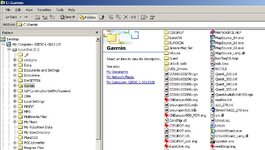
In Windows Explorer find the Garmin folder and check that inside that folder is another folder called EuroCN7.
 

Attachments

  • ScreenShot009.jpg
    ScreenShot009.jpg
    90.1 KB · Views: 105
Whatton has provided very precise instructions above that will enable you to determine whether the new product actually did install on your computer. My guess is that it installed just fine on your computer, but you are encountering some difficulty in selecting the new product for use when you start the MapSource program.

Below are two pictures that show MapSource running on a computer that has quite a few different map products installed. (I apologize for this, but I get around a lot - Toronto yesterday, Switzerland today, Africa tomorrow).

There are two ways of selecting the map you want to view. The easiest is with the drop-down menu in the first picture. If you don't see that drop down menu, then go to the VIEW menu and choose SWITCH TO PRODUCT - that command will always be available - and choose the map you want to view there. Logic dictates that you will want to always view the most current version of your map. If you don't see the drop down menu that appears in the first picture below, you can enable it by going to the VIEW menu, going down to the SHOW TOOLBARS sub-menu, and then making sure there is a check mark beside the VIEW toolbar choice (see the third picture).

Michael

Choosing which map to view by using the VIEW toolbar
map_1.jpg


Choosing which map to view by using the VIEW menu
map_2.jpg


Enabling the VIEW toolbar (as seen in the first photo)
map_3.jpg
 
Taff said:
I upgraded from Version 6 of City Navigator to V7. However, when I open Mapsource, the pop-up box still says "Version 6.8". Is it possible that this is whats confusing you? I'm guessing that it is, as I can't see how you've got V7 on your GPS unit, if you haven't got V7 on Mapsource.

Taff:

You may be mixing apples up with oranges. The 'Version 6.8' splash screen refers to the version number of the computer program that you are using to view the maps, which is called MapSource.

The maps themselves can be any version at all, as you can see in the pictures I have posted above. I was also using version 6.8 of MapSource when I took these pictures.

Think of it like this: You might be using Microsoft Word version 9 to write your resume (CV), but the name of the document you are working on is "resume version 2". In the case of the pictures above, I am using MapSource version 6.8 (though you can't tell that from looking at the pictures), and the map I happened to be looking at when I took the pictures was BlueChart Americas version 7.5.

Michael


Back
Top Bottom