Vance and Hines Fuel Pack FP3

snaponphil

Well-known member
UKGSer Subscriber
Joined
Dec 1, 2007
Messages
1,501
Reaction score
0
Location
Lincolnshire, Nottingham
Recently fitted the FP3 to my 2014 model fuel injected 48..
I was suffering engine running weak at low revs which was affecting around town journeys.
So, visited Harley dealer, they had stock & released my wallet of £350..
Downloaded app to my iphone, plugged in the FP3 to connector located under the battery, selected the map most suitable to my exhaust & air filter, highlight 'send to engine' & hey presto it's remapped, follow instructions turn bike off & on again & all done. (Don't try this if battery is low, as it takes 15 mins with engine not running & headlamp on)
 
How does it run now? Mine runs so much nicer than stock I'm hesitant to go through the auto-tune process, but I really need to do that to get the most benefit I suppose.
 
How does it run now? Mine runs so much nicer than stock I'm hesitant to go through the auto-tune process, but I really need to do that to get the most benefit I suppose.

Hi Clifton, runs better but still not perfect, as good as it's ever been though, I'm part way through the Autotune process, it's at least a 2 hour varied riding session, & it's still not completely learned all the values for complete remap.. update to follow..
 
Autotune update

The FP3 Autotune option isn't a five minute flash update, it takes multiple varied riding sessions to log all the data at various engine RPM & throttle % travel.
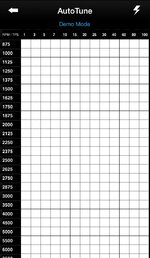
First thing the Autotune session does is re flash a base setting into the ECU, I used the V&H short shot already stored in memory, then it says drive for approx 45 minutes of varied riding styles, I did this, pulled over & only approx 25% of all the values it needed was complete, going back to the iPhone whilst out (Bluetooth) what you are looking for are clear white sections that change to yellow (partly learnt) then change to Green (fully learnt) when learning process for that particular section is complete.
When all or most of the screen is GREEN you are ready to flash ECU..
Note.. Things I didn't know at the start..
Once started to Autotune you can;
1, turn off ignition for fuel etc..
2, Flash ECU after first session with partially learnt values with option to continue to 'learn'..
3, Flash final session & remove FP3 unit from bike..
4, start again & relearn all values leaving FP3 connected for considerable time..

I've done all except option 4, as bike has gone into dealer for servicing, but bike runs sweet now & worth spending the extra time doing the Autotune..
Also, the FAQS section of the autotune app makes a lot more sense after playing with the unit on the bike..

Hope that helps.. :beerjug:
 

Attachments

  • image.jpg
    image.jpg
    118.4 KB · Views: 117
Thanks for the update, I'll autotune mine when I get a chance. I understand the bike runs poorer during autotune with the ignition retarded. Also it takes a couple seconds in each block's rpm and throttle position for it to learn and fill in. It's not easy to have the rpm to stay constant for 2 seconds while at almost full throttle.
 
Upgraded software info

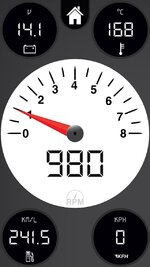
Since the latest software upgrade on the App Store, there are now viewing options that are not immediately obvious, on the bottom left corner (see piccy) if you tap the screen you get more viewing options on live data (you need the FP3 connected to the bike)

Anyway, hope this helps.. :beerjug:
 

Attachments

  • image.jpg
    image.jpg
    86.9 KB · Views: 91


Back
Top Bottom