Viewing "unpaved roads" diff between Mapsource and my 2610

markie_wales

Registered user
Joined
Jul 21, 2003
Messages
961
Reaction score
12
Location
Hampshire
I've done a search but it didn't come up with anything.

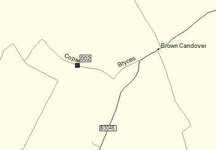
OK, it appears that my 2610 shows more "unpaved roads" as dotted / dashed roads than my CN V8 on my PC. For example Copse Lane (N51 08 54.2 W1 11 13.0 - Oh God, everyone will be going down it now!!) shows as a dashed line on my 2610, but as a solid line in Mapsource V8, and yes, the maps on my 2610 are the same version :) .

You know where I'm going with this don't you? Basically I want to roam around on my PC finding bits of unpaved road that I can then go and explore by bike. I have a few examples of this, but that's as good an example as any. Have I missed a setting on my PC version of Mapsource (running version 6.12.2)? Or am I considered not worth having a KTM 990 Adv in the garage?

cheers

Markie
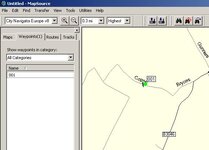
 
Do you mean this lane isn't shown as a dotted line which would let you know it was unpaved?
 

Attachments

  • ScreenShot045.jpg
    ScreenShot045.jpg
    31 KB · Views: 263
Whatton

that's the baby - shows as dotted on my 2610, but not on my (or it appears your) Mapsource. That's how I "found" it - riding along, saw a dotted road off the the left, rode down there and hey presto - lovely little lane with "Right of Way" sign and everything.

Dead easy lane it is if you were wonderiing, and seen deer and hare (not rabbits) up there from time to time.

cheers

Markie
 
Get V9

I've found that version 9 shows em ;o)

or at least more of em ;o)
 
I've found that version 9 shows em ;o)

or at least more of em ;o)

Stig

does V9 show that one? I guess that'll be the litmus test for me. Still think all versions should show them though - I mean they must have the road attribute of "unpaved" if by transferring them to the 2610 then shows them.

cheers

Markie
 
OK so V9 doesn't help. TBH I hink it is a Mapsource issue rather than a map issue, since the 2610 shows them all (as far as I can tell) as dotted.

Any other ideas? Is there different road proerties which means some are shown dotted but not all? Anyone intimately familar with Garmin (snigger)??

cheers

Markie
 
All

here's another one that comes up dotted on the 2610 but solid on the PC. Can someone try it on a different unit to the 2610, to see if it''s just the 2610 that makes it correctly on the screen, but "as solid" on the PC (not how I carefully didn't use the word "wrong" :) ).

If these two show as solid on PC but dotted on the 2610 and another unit, I see a mail to Garmin on my horizon.

N51 00 12.4 W1 11 43.6

cheers

Markie

PS I am willing to accept it's "just me" but I really would like to se the same on the PC as the 2610, and find a load of dirt-roads on the PC and link them up as a nice "off road day" route. That's what a KTM 990 will do to you (ducks flying rotten fruit)
 
Would a phone call to Garmin not help anyway...I would have thought they could answer the question??:hide

Adie
 
Would a phone call to Garmin not help anyway...I would have thought they could answer the question??:hide

Adie

Ada

My doctor says I've only got 40 years left to live, so not nough time to get through :) Seriously, I've been lucky on the phone to them, and I've been on hold for an hour - since this isn't that high priority for me, I'd rather just send them an e-mail. If it's the same on some other units, they might take it a bit more seriously?

cheers

Markie
 
I always assumed you could not route along a dashed "road", based on the assumption that I cannot force a route between these two waypoints over the River Douglas (unpaved over a 100 metre section with a 4 ton GW limit on a bridge) It seems however that I was wrong and dashed "roads" have a mind of their own
 
Reply from Garmin

Here's what I got back from Garmin (very mildly trimed):

Mark,
To answer your question, I have duplicated the issue you're having with your coordinate you provided. I was not getting the same results.

The roads that show on the Mapsource program should show the same on your unit. I duplicated the same on the 2610 that I have, I show this particular roads(Copse Lane) appears as a solid line on the unit and on Mapsource program.
Pam C


So Pam at Garmin is geting it solid on PC and 2610. Hummm not much help there then. If anyone sees this as solid on their 2610 I'd like to see what your config is on the unit so I can tell Garmin wthat when "X" is set on a 2610 it'll appear as solid / dashed, but how do I get it dashed on the PC. Can't really be bothered to send another example, since I sort of expect the same response. If I lived nearer Romsey I thik I'd offer to pop in and show them. Oh well, shame because that would have been really nice to sort out.

Shame because I'm in the market for a new GPSR and was thinking about the Zumo (even without the ability to turn off auto zoom), but think I'll look at other options that might allow me to see unpaved roads as unpaved on the PC.

cheers

Mark
 
Shame because I'm in the market for a new GPSR and was thinking about the Zumo (even without the ability to turn off auto zoom), but think I'll look at other options that might allow me to see unpaved roads as unpaved on the PC.
Not entirely sure what you are looking for in "unpaved roads", but I think you are wasting your time (although it is your time to waste ;) ).
Download the Waypoint file in this post http://www.ukgser.com/forums/showpost.php?p=1017571&postcount=159
you will find some lanes show as "roads" in 2610/Mapsource but most don't appear at all. I can't recall any that appeared as dashed lines.
 
Not entirely sure what you are looking for in "unpaved roads", but I think you are wasting your time (although it is your time to waste ;) ).
Download the Waypoint file in this post http://www.ukgser.com/forums/showpost.php?p=1017571&postcount=159
you will find some lanes show as "roads" in 2610/Mapsource but most don't appear at all. I can't recall any that appeared as dashed lines.

Clive - consider yourself "owed a pint"!! Brilliant.

Just to clarify - on my 2610 I drive along and see a dotted line - so find unpaved roads almost by luck. These same roads don't always show as dotted in Mapsource, if they did I could spend a happy couple of hours mooching around Mapsource finding more unpaved roads. That's all I want :) There is obviously some sort of attribute against these UP's roads since they do show as such on the 2610.

However with a rource like the one you've created, I think I'll be happy for a while!

cheers

Markie
 
Just to clarify - on my 2610 I drive along and see a dotted line - so find unpaved roads almost by luck. These same roads don't always show as dotted in Mapsource, if they did I could spend a happy couple of hours mooching around Mapsource finding more unpaved roads. That's all I want :)
The trouble is, that Mapsource maps and/or 2610 "dotted lines" are not a true reflection of legal "roads", paved or unpaved, so I'd suggest that you'd be better off using something like Multimap.com zoomed into 1:25000 scale.

e.g. (Bearing in mind I use Mapsource v6.5 and things may have changed at later versions) take a look at Mapsource, just to the North of Overton, Hants.

and compare to Multimap (which is effectively OS data)
About here

In Mapsource the lane shown as "Alley" at SU 51096 52881 looks like a normal road (and is in fact a tarmac road) - however it is a private road with the legal status of "footpath".

Byways and UCRs in that area do not appear on Mapsource as "unpaved roads".

In Mapsource the "unpaved road" at SU 46438 62867 is also, legally, a "footpath" link

In Mapsource the "unpaved road" shown as Oxdrove around SU 47456 61957 is a Byway, but Mapsource shows only a very short stretch of the overall byway.
 
Clive

fully agree that just because there is a dotted line in Mapsource does not mean it is a legal right of way for motorised vehicles. But as per "Copse Lane" earlier - I did come across it using the 2610 and dotted lines, and it was marked as legal.

Point well made and taken tough.

As far as you know are all the routes in your .gdb file legal rights of way? IO tried a couple last Friday on the way home from work, but they were clearly signed so not a problem.

cheers

Markie

In Mapsource the lane shown as "Alley" at SU 51096 52881 looks like a normal road (and is in fact a tarmac road) - however it is a private road with the legal status of "footpath".

Byways and UCRs in that area do not appear on Mapsource as "unpaved roads".

In Mapsource the "unpaved road" at SU 46438 62867 is also, legally, a "footpath" link

In Mapsource the "unpaved road" shown as Oxdrove around SU 47456 61957 is a Byway, but Mapsource shows only a very short stretch of the overall byway.[/QUOTE]
 
As far as you know are all the routes in your .gdb file legal rights of way?
As far as I know they are, but I've not checked them against the definative map. Hampshire, Wiltshire and Berkshire are pretty good with their signposting.
 
As far as I know they are, but I've not checked them against the definative map. Hampshire, Wiltshire and Berkshire are pretty good with their signposting.


Clive

Consider youself owed a bag of peanuts with that pint I must owe you for all this cracking info :)

cheers

Markie

PS at some point I'm going to photograph Copse Lane as dotted on the 2610 and send it off to Pam for him/her to investigate.


Back
Top Bottom