VLC won't open my DVD player ( Windows 11 )

Kenny

Trustworthy Scouser AND
Moderator
Moderator
Joined
Jan 6, 2002
Messages
12,649
Reaction score
1,228
Location
Toxteth scouser, made good ..now hiding on Wirral
My PC ( Windows 11 ) used to play and open automatically on VLC for my vids etc. Then, stopped working ( it pings when plugged in and I can also remotely eject DVD via VLC player, so it is recognising it. Plays downloaded films and any online stuff etc., perfectly, just won't play direct from my DVD player :-(
Uninstalled/installed it twice and still no joy. So I assumed the ORIGBELIE remote DVD player had a fault. Bought a new replacement and still the same :oops:. Must be something simple, just to get a DVD film to open automatically in VLC player. Anyone offer any help?
 
Does another program open the file/video?
It could be that an update has took over that kind of file. You may need to reassign the preferences for that type of file.
 
Have you made any changes since it last worked or done any security updates? It sounds like possibly a driver or bios issue. If you go into your DeviceManager, you may have an option to update the driver or try deleting it all together and restart the computer which might force it to download a more up-to-date driver.
 
Uninstalled it, then installed it without mozilla and activeX add ons. Put in vid THE MARVELS ( I know :D ) and she loaded up and played. But only the very latest DVD's
will play ?????? All the older BBC DVD's load but then just don't appear. All seemed to go wrong ( just a theory ) when my latest fibre broadband was faulty ( sent a new power lead which cured that ) ...never seemed to work after that ! Always just loaded and played before that ! Very weird.
 
does device manager report any faults - my internal speakers in my Asus Win 11 laptop stopped working after I had streamed some stuff to the TV. Both DM and the Asus diagnostics found a fault and Asus offered an update that fixed the problem.
 
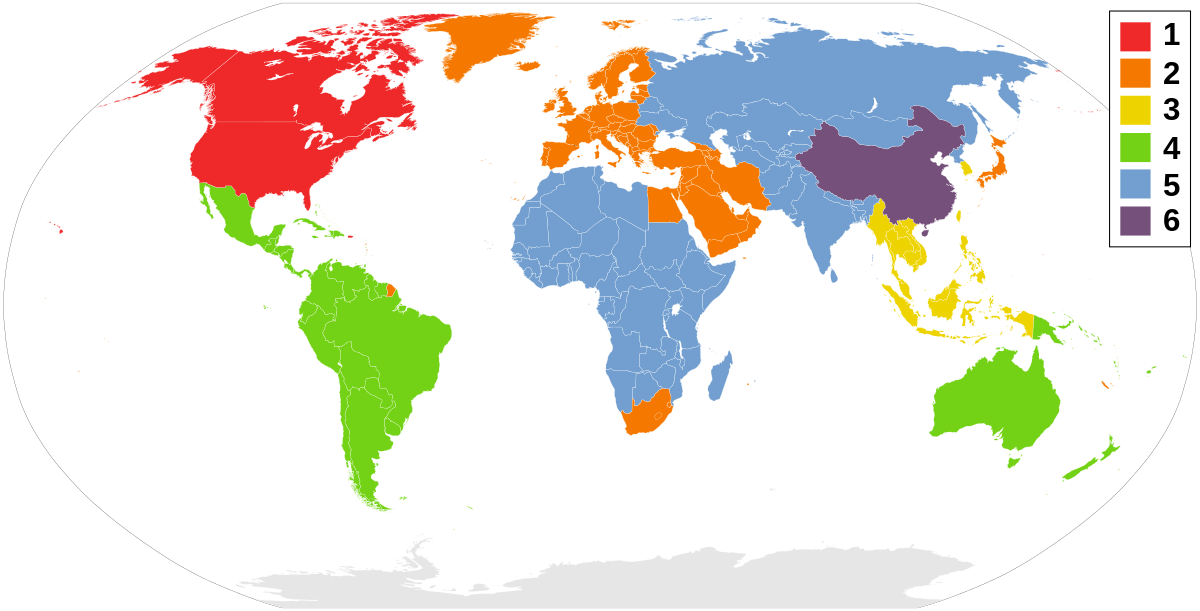
Went into device manager and it was displaying playback area 6 so changed that to area 2 ( UK and Europe ) and she came on....but is stuttering every other second ! At least got something coming on ( at last ). Brain frazzled so time for kit kat and tea :-)
 
Might well be a region code problem, I’d forgotten about that.

They built in some kind of control in the dvd player so it would only play from one area (maybe after it had played five or ten dvds) to prevent wholesale copying of eg Indian dvds at two quid each spoiling their (wholly deserved) profits for selling the same dvd in England for ten times more.

If you can completely reset your dvd player so it accepts uk/europe (area 2) you might be ok. It might need doing in more than one place.


Similar threads


Back
Top Bottom