Hi All:
I've actually been spending about 4 hours a day for the last 10 days testing SP 26xx performance with the European augmentation system.
First, let's please clean up our terminology: All of these Satellite Based Augmentation Systems (SBAS) are referred to as: Satellite Based Augmentation Systems. WAAS, or Wide Area Augmentation System, is the term that refers to the system over North America that has been sponsored by the American Federal Aviation Authority (FAA), with a little bit of money thrown in by the Canadians, to ensure coverage in Southern and mid-level Canada.
The European Space Agency (ESA) is currently in the final stages of testing a European SBAS, which will be called the European Geostationary Navigation Overlay Service (EGNOS). Some of the satellites and other components of the EGNOS system, which is scheduled for full functionality in July 2004, are being pre-tested in a system called the EGNOS System Test Bed (ESTB).
The Japanese Civil Aviation Authority also desires to set up an augmentation system to serve users in the Japanese Flight Information Region (FIR), the Japanese System will be called MTSAT [Multi-functional Transport Satellite] Satellite-Based Augmentation System (MSAS). The first rocket with a Japanese MSAS augmentation satellite on it blew up when it was launched, so the Japanese are a bit behind schedule. So Sorry.
To see a world map showing the coverage of these three SBAS, please click on
this link. And, for sake of keeping the nomenclature straight, let's please all refer to these augmentation systems as SBAS, which is the proper generic name, not by the name of one of the individual systems, unless we are speaking about that specific individual system.
For those of you who would like more information about how SBAS works, there is an excellent overview (though it contains a few minor errors) at
this link.
For those of you who would like more information about the European SBAS, (currently the test platform, ESTB), there is more info at
this link. More information about the final form of the European System, once the test phase is finished in a month or so, can be found at
this link, although it is rather technical and not written for the end user.
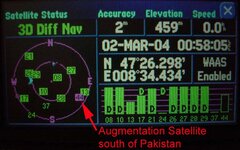
Concerning the ESTB and Garmin SP 26xx GPSR's - because the ESTB is still a test platform, it does not fully comply with all the agreed international specifications (DO-229C) for augmentation systems. This has caused some difficulty for the Garmin software engineers, who expected that the test platform would comply with the specs. At present, only the satellite over the Indian Ocean Region (satellite IOR - longitude 64 East - about south of Pakistan over the equator) is sending out a regular usable signal. This shows up as Garmin satellite number 44, though the actual licence plate on the side of the satellite is PRN 131. You can see details of the broadcast schedule of this satellite (IOR - PRN 131 - Garmin 44) at
this link.
For the first time ever, I got signal strength bars today from Garmin satellite number 37 (satellite Artemis, PRN 124, located over the Republic of Congo), and Garmin satellite number 39 (satellite Indian Ocean Region West - IOR/W, PRN 126, also located over the Republic of Congo). Garmin satellite 33 (Atlantic Ocean Region East, AOR/E, PRN 120, located south of Senegal) has not been broadcasting anything lately, but because Garmin 37, 39 and 33 all broadcast almanac information for each other (but not for 44), I see the little square in the satellite map show up for 33, indicating where it should be and where the GPSR should look for it, but the GPSR never gets a signal from it. Maybe this satellite needs new batteries, who knows.
When Garmin 44 (IOR, PRN 131) is working, which has been just about every day for the last 10 days, my GPSR will note it and switch into 3D differential mode, showing an accuracy of 2 meters or so. Whether this is truthful or not we don't know, because the system is still in test. The satellites transmit a 'flag' when they are in test, telling the GPSR not to count on them for accurate signals - so the signal strength bar shows up as hollow, not solid.
If you are running 2.95b, and your GPSR has already locked onto either 37 or 39, you will see a square for 33 as well, because of the almanac rebroadcast. You probably
won't see 44, which is the only functional one, because 37 and 39 are not on speaking terms with 44, but since 37 and 39 got to your GPSR first, they have told the GPSR that they (plus the non-functional 33) are the ones to look for, and not to bother looking for anything else.
Presently I am working with a later version of the SP 26xx software (not a public release) which has a work-around for this shortcoming of the ESTB - the failure of 37 and 39 to disclose the information about 44 - incorporated into it. The testing has been going pretty well, but we have to observe for a while the functionality of the test EGNOS system (ESTB) with the new algorithms in the software. Probably this will come out as a public final release in a week or so, if it can be determined that the ESTB people won't change the rules again and break the algorithm before the EGNOS system becomes functional in April.
The short answer - yes, the SP 26xx were designed right from the very beginning to work with EGNOS. The problem is that the EGNOS predecessor, ESTB, was not designed in accordance with the international specifications for SBAS. The ESA cannot be faulted for this, because they started work on the ESTB before the international standard (DO-229C) was promulgated. EGNOS itself - the final product - will comply with the world standard when it comes on line in the summer.
PanEuropean