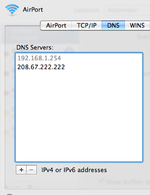
Without knowing exactly how your network is configured it's difficult to be precise, but it sounds to me like you may have had an IP conflict. In System Preferences/Network/Built-In Ethernet/TCP/IP there's a button "Renew DHCP Lease" which in cases like this is often worth a press (that is assuming that your Mac is set to DHCP in the first place). As previously mentioned it's a great idea to make sure your computer or router is accessing a nippy DNS server. DNS servers are basically the phone books that translate website names into the addresses networking equipment needs to use to find the appropriate host. Some are way more efficient than others. Your ISP should be able to help with this.
As regards the Mac/PC issue, we encounter similar problems from time to time with Windows, Linux, Irix, OS9, OSX, Solaris- you name it, we use it, and it's going to spit the dummy at some point.
As regards the Mac/PC issue, we encounter similar problems from time to time with Windows, Linux, Irix, OS9, OSX, Solaris- you name it, we use it, and it's going to spit the dummy at some point.