Wireless network help please

Dave Hall

Registered user
Joined
Aug 6, 2002
Messages
1,307
Reaction score
1
Location
South Yorkshire
I have a lynksys G spec router which is connected to my desktop PC via an ethernet cable. My cable modem is connected to the router the same way.
My laptop has a Belkin wireless card fitted, again G spec, and I can surf the net using both machines no problem.

My problem is file sharing ...I cant seem to enable this. Is there something I`m missing?
 
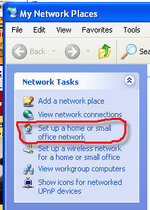
have you run the network wizard from my network places?
 

Attachments

  • net.jpg
    net.jpg
    27.9 KB · Views: 154
Can you "ping" between the machines?

If so, have you set any folders/directories as "Shared"?

If it's any consolation, I have the opposite problem where I can share files/printers, even "see" the internet connection (modem) but can't get access to it from one of the machines!

"Black Magic" (not the chocolate!) springs to mind :rolleyes:

Iain
 
This definitely comes under the heading of dark arts.

I have`nt tried pinging yet.

I have set shared folders on both machines

I`ve tried running the network wizards but I think my problem is this:
I have a wired connection between the cablemodem and the router.
I have a wired connection between the router and the desktop.
I can access the internet on the desktop via these wired connections.
I have a wireless connection between my laptop and the router and can therefore access the internet on the laptop via the wireless and wired connection to the modem.

What I cant seem to do is share files between the laptop and the desktop.

Do I need another bit of kit do you think?
 
Nope - thats exactly as i have my setup - sharing files and laptop is now an itunes relayer ( via cable conn. ) to the HiFi
 
motomartin said:
Nope - thats exactly as i have my setup - sharing files and laptop is now an itunes relayer ( via cable conn. ) to the HiFi

So what do you think I`m doing wrong?
 
Just set up a similar network Dave. I experienced all the problems you have.
Still not perfect but managed to read the files on my Desktop from my wireless pc but cant read the other way round.
Still working on that, but my problems were down to firewall settings and using different virus programmes on each machine.
Seems my Norton on my laptop doesn't like networking.
Had a fiddle with the settings and now working in sort of simplex mode but suits my purpose. HTH
 
gazza said:
but my problems were down to firewall settings and using different virus programmes on each machine.
Seems my Norton on my laptop doesn't like networking.

Cheers Gaz...I`ll disable all the firewalls and virus stuff see if that works. No peekin now
 
From start, choose 'run' and type 'command' to get to the command line interface. Now type 'ipconfig' and note the settings. The subnet masks should be the same (e.g. 255.255.255.0) and the IP addresses should be in the same block (e.g. 192.192.1.3 and 192.192.1.4).

Both machines should be in the same workgroup (start >settings >control panel >system >computer name).

Tim


Back
Top Bottom