Zumo 660 mini usb fix

Andy63

Well-known member
UKGSer Subscriber
Joined
Mar 4, 2010
Messages
1,112
Reaction score
124
Location
Somewhere in the south
Anyone know where I can get a Zumo 660 mini USB socket fixed the set takes power/charges the battery but cannot transfer data i.e. routes / maps and updates. Is this fixable ? :confused: no warranty!
 
You can always get a mini SD card adaptor , take out the SD card and plug that into your PC to transfer data. But I guess for updates you're stuffed.
 
Google Garmin 660 repairs. There there was a recent thread on it, something about a bod looking to get a screen repaired.
 
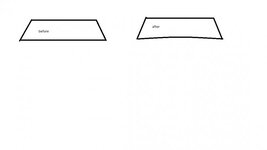
Now i am not going to say this will fix the issue but it may be worth a try, first off make sure its the correct lead, one you have used before and that used to work for transfering data and charging the to the unit, and will also work other devices correctly when plugged into your pc/mac as it may be an issue with your usb port socket on the pc/mac. when you are sure that you have the correct lead and you can confirm it is ok and works. take the end that plugs into the nav and get yourself a small pair of pliers and very gently squeeze the conection and i do mean gently, until you get something resembeling the image below. i have done this and it did work, what happens is that the connections on the socket become worn and loose. doing this tightens the plug fit into the socket. as i have said dont crush it and be very gentle when you do it. it may or may not work for you its just worth a try and if DONE RIGHT will not harm anything. let us know the result. Do it a little at a time until the connection feels tight.

 

Attachments

  • Untitled.jpg
    Untitled.jpg
    11.5 KB · Views: 218
As stated above - make sure you rule out other factors before looking to get the Zumo repaired. The wires in USB leads are easy to break if flexed. My Zumo has the same USB socket as my phone so it's easy for me to rule out a wonky lead by testing in both devices.

Also make sure the software on your PC/Mac/tablet is not corrupted. Perhaps delete the device in Garmin Express, or reinstall Express. I've had Garmin drivers get corrupted in a system update in the past. Again, I have the benefit of an old Netbook that I can use to rule out a problem with my laptop.
 
Thanks Leedude03/wessie I posted the question on here on behalf of a friend who is coming on a biking trip with me next week and needs the fix to load the routes.
Unfortunately the socket was beyond squeezing the plug I think he mentioned some contacts missing in the socket after he tried repairing it.

He actually approached the company in the link I provided after a google search and I think he sent it off for repair will keep you posted on his experience and costs when he gets it back.

As for the plug adjustment Lee I will try this out in future top tip!!

Thank you for your feedback

Andy
 
Good One.

Mod. Can you put this address somewhere like 'List of Repairers' or similar.


Back
Top Bottom