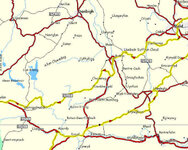
2610 Custom vs shortest

(RIP) Perryhill

Active member
UKGSer Subscriber
Joined
Apr 15, 2006
Messages
131
Reaction score
0
Location
Berkshire, UK
In an effort to find some interesting new routes in the area, I started fiddling with the settings on my 2610.


Someone of greater IQ than me must be able to tell me why, on a trip from Sandhurst in Berkshire to Newbury, it routes me onto the M4 when my custom preferences are set to minor roads 'loved' with everything else on 'disliked immensely'. When set on shortest route it still has a tendency to ignore minor roads though it did avoid the M4.


Autoroute made a much better fist of it on the PC so is this cureable without resorting to waypoints or via points (which ever one it is that you can set to pass in the proximity without being forced to the exact location)? :confused:


Neville
 
In an effort to find some interesting new routes in the area, I started fiddling with the settings on my 2610.


Someone of greater IQ than me must be able to tell me why, on a trip from Sandhurst in Berkshire to Newbury, it routes me onto the M4 when my custom preferences are set to minor roads 'loved' with everything else on 'disliked immensely'. When set on shortest route it still has a tendency to ignore minor roads though it did avoid the M4.


Autoroute made a much better fist of it on the PC so is this cureable without resorting to waypoints or via points (which ever one it is that you can set to pass in the proximity without being forced to the exact location)? :confused:


Neville


PITA isn't it! In the Menu routing function, on roads to avoid (like Tolls; U Turns; Off Road etc, try selecting avoid Highways. See if that makes a difference.....
 
Garmin routing - a waste of time !

The routing algorithms used by Garmin are an absolute bag of sh1te. They produce the most ridiculous routes I have ever seen. When I raised these problems, very politely, they really didn't want to know. They seem to have the road classifications totally wrong. I gave them many specific examples but all I got from them was 'it's just an aid to navigation' and it will get you there in the end.

Maybe in the US, routing on their roads is easy. They really ought to examine very closely how it works in the UK and Europe. If it wasn't for Mapsource and the ability to manually plan a route, I would sell mine tomorrow.

paul :spitfire :spitfire :spitfire
 
The routing algorithms used by Garmin are an absolute bag of sh1te. They produce the most ridiculous routes I have ever seen. When I raised these problems, very politely, they really didn't want to know. They seem to have the road classifications totally wrong. I gave them many specific examples but all I got from them was 'it's just an aid to navigation' and it will get you there in the end.

Maybe in the US, routing on their roads is easy. They really ought to examine very closely how it works in the UK and Europe. If it wasn't for Mapsource and the ability to manually plan a route, I would sell mine tomorrow.

paul :spitfire :spitfire :spitfire
That's your opinion, mate!
 
Or, to be slightly less confrontational, I would humbly suggest that you might be expecting too much from your Garmin. We tend to think these units are designed solely for us GS riders, looking for those out-of-the-way roads, that no-one else knows about, etc, etc. Sadly, the truth is rather different; Garmin is after a different market altogether - the car driver who wants to get from A to B. Hence, in answer to the original post, any route won't necessarily avoid the roads that we dislike unless, as Peter Pan pointed out, one uses the avoid function.

Having said that, the 2610 can be manipulated to provide some excellent routeing - but it's not a mind reader. Play about with the settings. Use Mapsource. Don't give up. But, I humbly (again) suggest, don't accuse Garmin or their GPSs of having algorithms which are a bag of whotsit. It's not true, & unfair.
 
Or, to be slightly less confrontational, I would humbly suggest that you might be expecting too much from your Garmin. We tend to think these units are designed solely for us GS riders, looking for those out-of-the-way roads, that no-one else knows about, etc, etc. Sadly, the truth is rather different; Garmin is after a different market altogether - the car driver who wants to get from A to B. Hence, in answer to the original post, any route won't necessarily avoid the roads that we dislike unless, as Peter Pan pointed out, one uses the avoid function.

Having said that, the 2610 can be manipulated to provide some excellent routeing - but it's not a mind reader. Play about with the settings. Use Mapsource. Don't give up. But, I humbly (again) suggest, don't accuse Garmin or their GPSs of having algorithms which are a bag of whotsit. It's not true, & unfair.

OK, so in a less confrontational mode - When all you want to do is get from A to B, as in most car journeys, is when the problem occurs. If you want just the fastest route from A to B why does it so often take you down side roads and single track roads. As an example in Mapsource, pushing the preferences up towards 'prefer highways' actually forces the route down side roads, ignoring major roads. This is clearly wrong and if you look more closely it is obvious that they are ignoring the road classifications in the underlying map data from Navteq. Have a look at the route after Mold and after Ruthin, around Cerrigydrudion and the approach to Llandegla. There is no way I have found to get consistent settings that will apply generally for most routes. Leaving the settings on 'standard' & faster time can still take you down single track roads and ignore the A roads.

Garmin have some good gear and the ability to plan routes on the PC is excellent - far better than the rest of the competition. Why then, for a straight forward, A-B fastest journey, do they fail so miserably? Why can't they see that their competition in the 'car market' is better in this respect and address those issues? This is why I wonder if routing in the US is far easier, given their road structure??

Show me where I am wrong and I will be a happy tosser! I can't be the only one who has wondered about the strange routes, can I?

Sorry about the rant :augie
paul
 

Attachments

  • Prefer Highways.jpg
    Prefer Highways.jpg
    42.9 KB · Views: 211
I am so pigged off with the Garmin 2610, that I bought an ickle Navman F50 from Costco for £99 for use in the car. (As a sales rep covering half of England, from Lincloln up to the Scots border, I use a GPS primarily in the car. This little thing is a doddle to use. And it cost a fraction of the 2610.

The Navman does not continually tell me it is offroute, recalculating. It does not freeze mid-route. It does not have a billion "functions", it just gets me to where I need to be. It can be expanded by use of SD cards for more map coverage if I want. It is half the size and half the weight of the 2610. I can slip it into my shirt pocket before leaving the car.
It does not mist up inside the screen and have to be left in the airing cupboard to dry out.

I only keep the 2610 for 2 reasons: 1 it's waterproof, (?) and 2: Erm.........

Why do I keep the 2610 ???
 
Try this to see if it works. In Mapsource go to Edit, select Preferences. Go to the Routing tab and in the Road Selection don't drag the cursor to the extreme top or bottom.

I once set mine to Prefer Highways (while driving a min bus) and Mapsource was sending me on some really small country roads. The only reason I could think of was that it was trying to avoid traffic lights. :nenau

Anyway, once I dropped the slider down 1 notch and recalculated it worked a treat. :thumb2
 
Paul,
I'd like to replicate your route - it looks an interesting problem :beerjug: However, I'm stuck in Atlanta for the next few days, away from Mapsource etc.

A couple of observations. Firstly, your example is from Mapsource - not the GPS unit. That is not to say that the unit won't produce the same result. It is possible that your settings might be slightly adrift - the 'Prefer Highways' shouldn't affect the choice of A roads/B roads, just Motorways.

Have you ticked/unticked the 'Avoid U-turns?' Sometimes, I have noticed that Mapsource hates very sharp bends, and interprets these as u-turns.

I'll try the same route at the end of the week.

Spanner rash - the 2610 is year's old in design. As you have pointed out, it is large, waterproof and, with lots of 'buttons', quite sophisticated for your average car A-B journey. Why anyone would use one in a car is beyond me; I would use an i3 in preference. You should have no trouble selling your 2610 on this forum.
 
thanks . . .

thanks for you comments chasr :thumb2 . If you are interested I can send you the gdb file for this and some other interesting 'anomolies'

A couple of observations. Firstly, your example is from Mapsource - not the GPS unit. That is not to say that the unit won't produce the same result. It is possible that your settings might be slightly adrift - the 'Prefer Highways' shouldn't affect the choice of A roads/B roads, just Motorways.

I have tried it on my 2820 as well, with very similar results. As you say, the unit won't produce exactly the same results


Have you ticked/unticked the 'Avoid U-turns?' Sometimes, I have noticed that Mapsource hates very sharp bends, and interprets these as u-turns

Totally agree with this! If you route from Lake Bala to Lake Vyrnwy, there is a hairpin at N52°47.504 W3°36.693 which it will not take without turning this feature OFF. You end up going several miles down the road and back again.

Also, if you select a stretch of 'A' road, say 2 miles for a route, it will take 2 minutes at the standard speeds for that class of road. Select a 2 mile stretch of single track with grass down the middle and an odd hairpin or two and the time is the same. This proves to me that Garmin do not differentiate between the differing types of road and hence the odd routing.

Believe me when I say I have been thorough in my tests - to the point of being totally anal!! All I want is for it to work well with unplanned A-B trips. For trips pre-planned in Mapsource, there is no competition and I am very pleased with this facility.

Taff - I have tried adjusting the slider to all possible positions - solves the problem for one set of conditions only to re-emerge elsewhere. I just cannot get it to be consistent for the majority of routes.

Thanks for the comments
paul
 
Paul,

I have managed to replicate your route (using a Mac iBook G4, running Guest PC, Windows 98, a slightly older version of Mapsource, City Nav 8 veeeeeeeery slowly!). With standard settings, a route from Ewloe to Glasfryn via Llanfih' G M (as near as I could get to your route), produced a more sensible plan. Unfortunately, I can't post it to show you, but mine used A-roads, sensibly avoided the centres of Mold & Ruthin, but went through Cerrigydrudion.

I then set the Preferences to maximum 'Prefer Highways', and it shot up the A55 - exactly as one would expect. However, reducing the slider by one notch, made the route avoid Cerrigydrudion, and it took a lot of effort to make it go through the town.

So, you have a point :thumb2 Although, since we are using Mapsource & Navteq, it doesn't prove the Garmin GPS is at fault. Have you tried the same route on the unit?
 
Paul,

Our posts crossed. As you say, it's all very interesting.

For what its worth, I never bother adjusting the unit settings, or those in Mapsource (& I plan lots of routes). I set the start & end points - maybe one or two vias, and then 'drag' the route to the roads I want. I've occasionally come across oddities (u-turns being one), but mostly find the 'errors' have been caused by clicking on the wrong side of dual carriageways, or similar user mistakes.

'This proves to me that Garmin do not differentiate between the differing types of road and hence the odd routing.'

I don't think either Mapsource or the GPS is capable of this mistake. It is down to the Navteq information.

atb
 
Paul,

Our posts crossed. As you say, it's all very interesting.

For what its worth, I never bother adjusting the unit settings, or those in Mapsource (& I plan lots of routes). I set the start & end points - maybe one or two vias, and then 'drag' the route to the roads I want. I've occasionally come across oddities (u-turns being one), but mostly find the 'errors' have been caused by clicking on the wrong side of dual carriageways, or similar user mistakes.

'This proves to me that Garmin do not differentiate between the differing types of road and hence the odd routing.'

I don't think either Mapsource or the GPS is capable of this mistake. It is down to the Navteq information.

atb

I only started changing the settings because I was having problems. I am more than happy to 'tinker' and fine-tune all night with Mapsource - planning future trips is a lot of fun - and at least you can see it all on the PC as you do it. I only used Mapsource as an example here because it is similar in its' end result but easier to run the tests on.

. . . if only you could reliably punch in a destination on the GPS unit and have the confidence that it will be a sensible route. I will double check the routes 'as planned' on my 2820 when I get a chance, thanks.

Interesting point you make about it being the Navteq data at fault. This could well be worth further investigation. The Navteq site talk a lot about the classification they use for roads and I have assumed that their data for the UK originates from Ordnance Survey and would therefore be spot-on. Whilst the OS data will be accurate, Navteq could have still gotten it wrong and not Garmin. If I find anything of interest, I will let you know.

must get on with some work now,
cheers
paul
 
Could your "Driving Speeds" settings be having an impact on the way Mapsource creates your routes?
 
Could your "Driving Speeds" settings be having an impact on the way Mapsource creates your routes?

I am fairly sure this would be the case if I had changed them in Mapsource.

To try and simplify matters resulting from a comment from chasr :thumb2 , I have been looking at routes generated only on my 2820 since this is where the problem arises when 'on the road' and wanting to get somewhere quickly. I now have everything in 'Avoidance Setup' set to 'don't avoid' and the routes tried so far seem OK. With the insertion of one or two additional waypoints, they improve even more. I will stick with these settings for a while and see how they go.

The anomolies in Mapsource still exist but for pre-planned routes you are able to see and correct them in advance - not ideal but workable.

Thanks to all for your helpful comments, I'll go away now and play :)

paul
 
just a sudgestion :rob try selecting truck in the prefrences. i use mine 80% in the truck and 20% on the bike, when i'm on the bike i forget to change it over. it works for me, but its not purfect :nenau. give it try..............



Hman


Back
Top Bottom