A Macro?

  • Thread starter Thread starter Deleted account W
  • Start date Start date

Deleted account W

Guest
Can I create a macro (one click) to open a PIM programme that I use, run it's export feature, export the .ics file to a folder, open a web page (Google calender) and use it's import feature to import the .ics file.

I can do this manually but it's a pain doing every day.

:confused:
 
Possibly.

Are you able to use ALT (or CTRL) keys to within the PIM program.

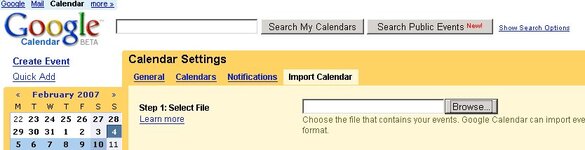
I've got Google Calendar up but how do you import?
 
I think so.....

You will need to make a note of the exact keys you press i.e. do all the work with the keyboard not the mouse

e.g. (my comment in brackets)

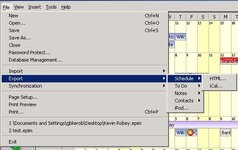
ALT F (to get the first menu to show
E (for Export)
S (for Schedule)
I (for the format)
(I guess you then get asked where to save)
C:\Blah.ics<TAB><ENTER> (to simulate the click)
 
What is the full name of the Program
e.g.

C:\Program Files\PIMStuff\Pim.exe

Oh, and I presume you have Excel (2003?)

Yep got excel 2003.

It's here C:\Program Files\EssentialPIM Pro\EssentialPIMPro.exe
 
You will need to make a note of the exact keys you press i.e. do all the work with the keyboard not the mouse

e.g. (my comment in brackets)

ALT F (to get the first menu to show
E (for Export)
S (for Schedule)
I (for the format)
(I guess you then get asked where to save)
C:\Blah.ics<tab><enter> (to simulate the click)

Alt F
E
S
I
Then "return"
Then type "Pim" for a file name
Then "return"

This gets the file onto my desktop :thumb2

</enter></tab>
 
Alt F
E
S
I
Then "return"
Then type "Pim" for a file name
Then "return"

This gets the file onto my desktop :thumb2

</enter></tab>
I'm a bit lost but this looks very interesting, I'll read up on macros
and try to understand what ye are talking about, do ye mind if I ask
a few questions, like is there a command in windows called Create
Macro ?
 
Alt F
E
S
I
Then "return"
Then type "Pim" for a file name
Then "return"

This gets the file onto my desktop :thumb2

</enter></tab>

IE is being a bitch on the Calendar page - TABs don't select all the links (i.e. Manage Calendar) - might need to do this in two stages - anyway - go into Excel Macro editor and enter

Sub DoExport()

Dim RV
'Run PIM
RV = Shell("C:\Program Files\EssentialPIM Pro\EssentialPIMPro.exe", 1)
'Activate so we can SendKeys to it
AppActivate RV
'SendKeys as required
SendKeys "%FESI" 'The % is the ALT key
SendKeys "{RETURN}"
SendKeys "PIM" 'The file name
SendKeys "{RETURN}"
'Run IE
RV = Shell("C:\Program Files\Internet Explorer\iexplore.exe http://www.google.com/calendar/render?hl=en_GB", 1)

End Sub

then save the Spreadsheet and ALT+F8 to select the macro

(Well something like the above - see what happens ;) )
 
I'm a bit lost but this looks very interesting, I'll read up on macros
and try to understand what ye are talking about, do ye mind if I ask
a few questions, like is there a command in windows called Create
Macro ?

Not as such - I assumed Whatton was talking about Excel Macros.

There is a thing called WSH (Windows Script Host) which can do lots of clever stuff - some info is here http://msdn.microsoft.com/library/d...html/d78573b7-fc96-410b-8fd0-3e84bd7d470f.asp
 
You can look in Visual Basic Help within Excel for the following, but for info the "keys" you can send are

Key Code

BACKSPACE {BACKSPACE} or {BS}
BREAK {BREAK}
CAPS LOCK {CAPSLOCK}
CLEAR {CLEAR}
DELETE or DEL {DELETE} or {DEL}
DOWN ARROW {DOWN}
END {END}
ENTER ~ (tilde)
ENTER (numeric keypad) {ENTER}
ESC {ESCAPE} or {ESC}
F1 through F15 {F1} through {F15}
HELP {HELP}
HOME {HOME}
INS {INSERT}
LEFT ARROW {LEFT}
NUM LOCK {NUMLOCK}
PAGE DOWN {PGDN}
PAGE UP {PGUP}
RETURN {RETURN}
RIGHT ARROW {RIGHT}
SCROLL LOCK {SCROLLLOCK}
TAB {TAB}
UP ARROW {UP}


You can also specify keys combined with SHIFT and/or CTRL and/or ALT. To specify a key combined with another key or keys, use the following table.

To combine a key with Precede the key code with
SHIFT + (plus sign)
CTRL ^ (caret)
ALT % (percent sign)


Back
Top Bottom