Android Tablet,( 10") which one though..

crumbles

C*ntry Bumpkin.
UKGSer Subscriber
Joined
Feb 11, 2012
Messages
1,756
Reaction score
460
Location
Honiton Debenshire
I am not that clued up on this type of stuff..
I have a Samsung Tab 5 already but it only has the charging port.
I want one with a USB type for exporting routes to my Garmin Xt...
I have recently discovered the Myroute App and although I have a laptop its too big too take with me..
And I stunned myself by creating a route on it and it actually sent it to the Xt.......

What's your recommendation please.....
Mike...
 
you don't need a cable

just put the Garmin Drive app on the phone or tablet with the My Route app. The 2 apps can talk to each other and the Garmin App talks to the XT using bluetooth
 
Get a USB C hub that breaks out to USB A, HDMI, SD card reader, whatever and connect to what you want. Some enable you to charge the S5 as well.
Anker have a few to choose from
 
I bought a Anker usb c too usb cable.
So on the myrouteapp..
Plugged in my Xumo xt..it goes into file transfer mode...
I asked Mra too do a round me route...it quickly does one.
Saved it...
Then went onto export file.
Windows configurator down loaded.
Click open route too send ....
Nothing happens...it just sits there no whirly wheel going or anything else happening..

Several attempts at doing it and numerous routes saved,still nothing going on....
Mike....
 
I bought a Anker usb c too usb cable.
So on the myrouteapp..
Plugged in my Xumo xt..it goes into file transfer mode...
I asked Mra too do a round me route...it quickly does one.
Saved it...
Then went onto export file.
Windows configurator down loaded.
Click open route too send ....
Nothing happens...it just sits there no whirly wheel going or anything else happening..

Several attempts at doing it and numerous routes saved,still nothing going on....
Mike....
HI crumbles is this with a Windows PC or an android tablet?
 
Or you could get a Galaxy Active Tab and do away with the XT.

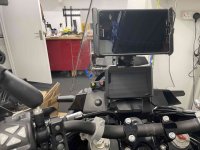
IMG_6911.jpg

This is on my Norden, but you get the drift.
 
It's an Android Tablet Samsung Tab 5.
I do have a Lenovo bigger lap top which sent a route too my Xt.but too big too carry around,
I think I need one with a USB port too send routes too the Xt..
It would only be mostly used on holiday as a route planner as I don't like set routes for an entire week or 2s jolly..
 
Last edited:
It's an Android Tablet Samsung Tab 5.
I do have a Lenovo bigger lap top which sent a route too my Xt.but too big too carry around,
I think I need one with a USB port too send routes too the Xt..
It would only be mostly used on holiday as a route planner as I don't like set routes for an entire week or 2s jolly..
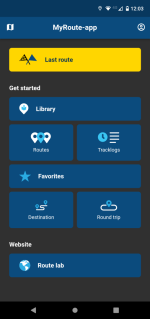
The windows downloader will not work with your Android tablet. As wessie says download the garmin drive app to your tablet and link it to your Zumo XT. When you create a route in the myroute app and download it when you launch it in your tablets file app it should open Garmin drive and ask if you want it sent to your XT the next time its turned on and linked to your tablet. I use my Android phone and it works thus. You will need wifi or mobile coverage.

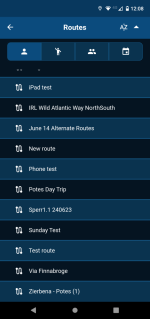
Open your routes
Screenshot_20230731-120334.png

Select the route you want to download to transfer to your XT.

Screenshot_20230731-120816.png

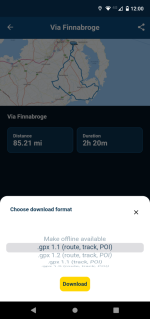
When you click on it this dialog box will open.
Screenshot_20230731-120045.png
Hit the Download button and the GPX file in the format you selected will be downloaded to your tablet

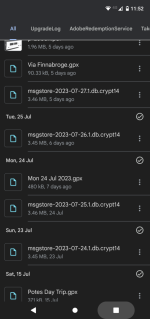
Find your route in your devices file handling app. These can be quite different between devices the one on my phone looks like this.

Screenshot_20230731-115251.png

Click on the downloaded GPX file you want to load to your XT. In this instance Via Finnabroge.
Android should set the default aplication for opening GPX files as Garmin Drive unless you have other GPX handling apps on your device.

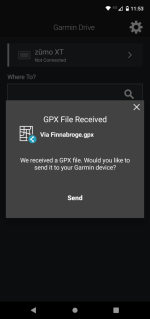
When you click on the GPX file this Dialog should open in the Garmin Drive app.
Screenshot_20230731-115303.png

Hit the send button and the next time you open the XT the route will be there in trip planner under imported trips.

3709610[1].png

Hope this helps a bit!!
 
Haa OK,will download drive onto the tablet,I have it on my bigger laptop..
All I did on the bigger laptop,was create and just sent it via the cable to the Xt..and it showed up as a new import to the Xt.


Back
Top Bottom