Anybody used an ipad to connect to their 660 with Mapsource?

heres one.
https://www.booking.com/hotel/es/va...3cc8e1cb11c818b0f81a2173ab9;dcid=2#map_closed

theres no gps co ordinates.we found it by fluke. well i cant see them anyways.we stayed here it was quite nice.

You get gps coordinates after you book, they are on the booking confirmation page. when entering your gps coordinates just use the amount of numbers that will fit, the errors will be small with the last 2 numbers truncated. just ensure that you have set N, E, or W as in the coordinates. these are the coordinates 43.156747, -4.617774
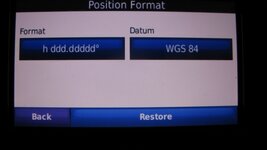
(first number being without a minus sign is north, second number being minus is west, enter these into your garmin ensuring your format is set to h ddd.ddddd datum wgs84. ensure you enter leading zeros where applicable.)
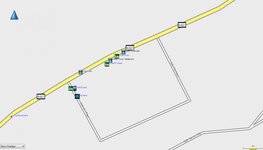
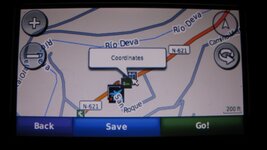
see below image of your hotel on garmin maps it appears to be there, it is also on google maps and on osm. Hope this helps.
 

Attachments

  • 08-08-2016 00-17-06.jpg
    08-08-2016 00-17-06.jpg
    20.5 KB · Views: 112
You can see that when downloading osm maps you have already run into a problem, just like when you have to learn how to do anything new, there can be hurdles you have to overcome. These hurdles maybe easy to get over or hard , depending on a persons ability. This maybe in your case learning how to put coordinates into your sat nav so you can then find the said location, or loading osm maps so that again you may find said location. You should pick a method you are happy and comfortable using, any of the two methods above will work, or you can choose to use a different method that will give you the result you are after. I would not presume to tell you what to use, but would try to help you to use whatever method you choose.
Its been said many times before, you have to learn to use what you have chosen to use, for some this will take no time at all, and for others it may take a while.

With reference to your osm problem, i will attempt to give instructions.
First go to the page in your link,
under choose your map type select Generic Routable (new style), or whatever version you require
next Choose a predefined country: one of your choice.
when chosen you will see the tiles highlighted on the map.
next select the tiles you need by clicking on the ones you want just once.
next under. Request your map or download it directly, enter your email addy and then click build my map.
you will then get the instructions about email and what to do, follow these instructions.
next when your map becomes available on the download page, go to it, you will then see these choices

[TXT] tiles.txt 52 Contains a list of tile numbers that are used for the maps in this directory.
[ ] osm_generic_new_windows.exe 18M Map installer for BaseCamp/MapSource on the Windows platform.
[ ] osm_generic_new_tiles.zip 17M Compressed file that contains the tiles and overview map. This is useful for applications like Qlandkarte and Linux users.
[ ] osm_generic_new_macosx.zip 17M Map installer for BaseCamp/RoadTrip on the Mac OSX platform.
[ ] osm_generic_new_gmapsupp.zip 17M Compressed file that contains a single image that can be placed directly onto the SD-card of the GPS.
[TXT] license.txt 1.0K License information for OpenStreetMap. Also contains the Mkgmap version used to combine the maps.
[TXT] buildlog.txt 3.7K
[TXT] 63240000_license.txt 379 License information for OpenStreetMap. Also contains the Mkgmap version used to combine the maps.
[ ] 63240000.nsi 6.1K Nullsoft Scriptable Installer script used to create the BaseCamp/MapSource installer.
[ ] 2000.typ 14K The Garmin TYP file used for this map.

i will presume you are wanting to load the map you have chosen onto your computer to use and also send to your sat nav and i will also presume you are using a pc. if this is the case you would choose,
osm_generic_new_windows.exe 18M Map installer for BaseCamp/MapSource on the Windows platform.

once this has downloaded you will need to install it by double clicking this downloaded file, a window will open select your language and then follow it through ensure to select the correct destination folder.
once completed open basecamp or mapsource go to your maps and select osm_generic_new and if all is good it should then be displayed.

its a while since i have done this so it may be wrong but thats how i remember it, i am sure The Grey One will correct any or all if its wrong, as he is more ofey with osm than i am.

 
I think you just about covered it! I would suggest people start by just downloading the UK maps. Pick the "New Style" version. These can be downloaded directly without having to select tiles. Choose the correct format, the one that says it is for Basecamp/Mapsource and it downloads automatically. Once finished you just click on the download and the .exc file will open. On Windows 10 you might get a warning notice with "nanny" saying it has protected your computer. Click on "open anyway" and it will instal the map for you.

You might need to restart your computer to get Basecamp or Mapsource to see the new maps. The will then see the maps in either Basecamp or Mapsource, switch to the your new osm maps. Take a look at an area you know well and compare the detail to your Garmin maps. In my area Garmin has two pubs in the wrong place, serious stuff!

John
 
go on...what do youknow
.its just trying to find streets and roads, the data wasnt there.mine is four years out of date, but the hotels werent new by a long chalk.


heres one.
https://www.booking.com/hotel/es/va...3cc8e1cb11c818b0f81a2173ab9;dcid=2#map_closed

theres no gps co ordinates.we found it by fluke. well i cant see them anyways.we stayed here it was quite nice.

The name 'Nomad Biker' suggests an Adventure biker of the tip-top class, untroubled by the exact positioning of a well established hotel in a well developed western country.

I found the coordinates in under five seconds by Googling: Hotel Valdecoron GPS coordinates. Up they popped. Of course I have no idea if they are correct, not least as they appeared on a Dubai website. That you also received them when you completed your booking was just a biker's bumper bonus.

http://www.dubaihotelsbooking24.com/hotel-view.hotel-valdecoro.188890.en.html

Sometimes you just have to do a little bit extra but you'd know that being a Nomad biker 'n all. :beerjug:
 
I think you just about covered it! I would suggest people start by just downloading the UK maps. Pick the "New Style" version. These can be downloaded directly without having to select tiles. Choose the correct format, the one that says it is for Basecamp/Mapsource and it downloads automatically. Once finished you just click on the download and the .exc file will open. On Windows 10 you might get a warning notice with "nanny" saying it has protected your computer. Click on "open anyway" and it will instal the map for you.

You might need to restart your computer to get Basecamp or Mapsource to see the new maps. The will then see the maps in either Basecamp or Mapsource, switch to the your new osm maps. Take a look at an area you know well and compare the detail to your Garmin maps. In my area Garmin has two pubs in the wrong place, serious stuff!

John

Thank you John,
 
I will try to explain as best i can on how to use coordinates and there formats, i will use google maps as an example as it creates the two most common formats. i will use Nomad Bikers link to the hotel in question.
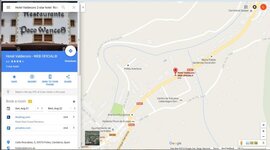
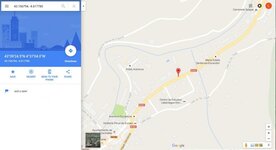
picture one i have searched for hotel using google maps, its found it and given its location

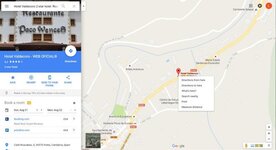
Picture 2 i have then right clicked on the location to bring up the window you see, now go to whats here and left click it.

picture 3 you now have the coordinates window open with the coordinates listed left click on these coordinates.

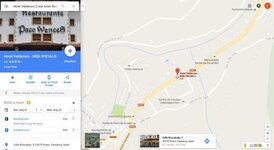
picture 4 you will now see that you have coordinates in one format in the search bar, and another set just below in a different format, you can choose to either copy and paste these into basecamp locate coordinates or mapsource by going to view and then go to position, and paste the coordinates in the box that appears.
Option two you could just type the coordinates into your sat nav using the where to function and select coordinates and type them in.

now stick with me while i post the pictures on how to do this using your sat nav
 

Attachments

  • image0011.jpg
    image0011.jpg
    40.6 KB · Views: 111
  • image0022.jpg
    image0022.jpg
    38.2 KB · Views: 81
  • image0033.jpg
    image0033.jpg
    38.6 KB · Views: 134
  • image0044.jpg
    image0044.jpg
    29.3 KB · Views: 81
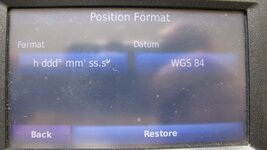
picture 1 using the coordinate format that you see in the search box in google maps above, you need to have your sat nav set as below

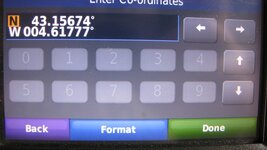
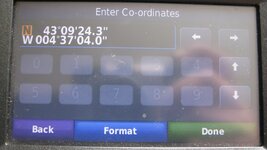
picture 2 shows how to enter that type format into the nav i have used this as an example (43.156747, -4.617774)

picture 3 shows the located coordinates.

the second type of format is in blue part under the search box its the white numbers in the blue bit.
picture 4 shows you how to have the nav set to enter these.

Picture five shows you how these are put in . and if you save these coordinates as waypoints you can then re name them to suit.

I do hope this is clear enough.
 

Attachments

  • image001.jpg
    image001.jpg
    113.4 KB · Views: 97
  • 2.jpg
    2.jpg
    111.8 KB · Views: 81
  • image003.jpg
    image003.jpg
    112.5 KB · Views: 84
  • 4.jpg
    4.jpg
    114.7 KB · Views: 89
  • 5.jpg
    5.jpg
    113.4 KB · Views: 83
The name 'Nomad Biker' suggests an Adventure biker of the tip-top class, untroubled by the exact positioning of a well established hotel in a well developed western country.

I found the coordinates in under five seconds by Googling: Hotel Valdecoron GPS coordinates. Up they popped. Of course I have no idea if they are correct, not least as they appeared on a Dubai website. That you also received them when you completed your booking was just a biker's bumper bonus.

http://www.dubaihotelsbooking24.com/hotel-view.hotel-valdecoro.188890.en.html

Sometimes you just have to do a little bit extra but you'd know that being a Nomad biker 'n all. :beerjug:
My name is such as i aimlessly wander about like a nomad , totally lost most of the time.
Actually Richard,thinking about it, i found navigating round Morroco easier than Spain.
 
Please remember if you have no internet or cell access all this is useless, and you will have to resort to using mapsource or basecamp with either garmin maps or osm maps to search for the location, or a map, or maybe some other downloaded maps that do not require a connection to work.
 
The vast majority of places to stay in Europe will be on the Garmin database already you just have to know how to look.

Your Spanish hotel can be found just by looking on a Garmin SatNav. There is no need to use any other source or to have an internet connection. Use "Where to" press on the "search near" top right of screen. Type town name (Potes in this case) It is important to remember hotels with restaurants can be listed in either category so you might need to search in both, Garmin list hotels under "Lodgings" In this case there is no listing as a "lodging" but ask it to search "Restaurants" and you will find "Hotel Picos Valdecoro"

If you a need a route there from somewhere in that area you can just press "Go" If you want to use it later as long as you had selected the place when you searched for it then it will come up in "History"

I found it straight away using Mapsource. Again you have to know that such places might be listed as Food & drink or lodging. Search in both . Once you have found it make it a waypoint and then you can either plot a route or simple send the waypoint to your device. Again this does not need an internet connection.

John


Back
Top Bottom