Apple Mac/icloud - where is my Apple Password?

Orinoco

Well-known member
UKGSer Subscriber
Joined
Jun 1, 2010
Messages
2,001
Reaction score
565
Location
The Bride Valley
I'm in a bit of a bind. I can never seem to find the right password for Apple and it seems things have got more complicated with updating to IOS 18 with the new Passwords app replacing Keychain.

I have a MacBook Air and an iPhone, then a couple of days ago I needed to reset my mother's old iPad Air before selling it on. Before doing that I thought I'd try it out, but cam unstuck with passwords and eventually needed to link it with a cable to my MacBook to reset it/reinstall, but needed to change my Apple password on my Mac to do this. I still haven't managed to reset the iPad yet, but for now just want to find out where my Apple password is. Good job I wrote it down as I cannot find it in Keychain or the new Passwords app - any clues as to where to look? There seem to be so many passwords saved by Apple!

Help :)
 
First things first: Apple's user management for AppleID accounts is terrible. Always hated it. :D
BUT: password reset procedure is your friend in this case.

I prefer a non-Apple password manager and been using 1Password for about a decade now. Few quid a month well spent.
 
I'd start here @Orinoco

I’m a dinosaur so use a biro and notebook to store all my passwords in

If you're being clever about it then change all of your passwords so that they're exactly as you've written them but then add a couple of extra characters that are the same for all but that you don't write down.

So, for example, you could start all your passwords with "ABC" but don't write that bit down.

Your notebook says things like:

UKGSer = Canteloupe7?
Facebook = 24Aardvark
Banking = Oscilloscope1984

But your actual passwords are really:

UKGSer = ABCCanteloupe7?
Facebook = ABC24Aardvark
Banking = ABCOscilloscope1984

It's surprisingly secure, as long as the rest of your password is long enough and contains numbers and preferably 'special characters' as well.
 
First things first: Apple's user management for AppleID accounts is terrible. Always hated it. :D
BUT: password reset procedure is your friend in this case.

I prefer a non-Apple password manager and been using 1Password for about a decade now. Few quid a month well spent.
1Password is pretty good :thumb2

Some of them aren't though. If you're going down this route then do a bit of research. There are some that get breached and hacked and you really don't want that in a password manager....

I use Keeper which I just discovered I have a referral code for which gives me $30 and gives you 30% off
 
My beef with 1Password is that it got a bit bloated since they got VC funding.
But still going strong.

It has been useful to store/manage my parents' passwords as well over time.
They also use/used legacy systems that made most of the management and remote management more painful.

But you learn nice things like: on older MacOS versions, you have to append the 4 digit verification code to the password when logging in the first time after a reset, since older MacOS won't ask you for the code, but there is this small workaround that took me 1 hour to discover :D

Hence my suggestion above.
I had to reset my father's Apple ID password 2 weeks ago. Couldn't find it in Keychain.
Password now saved in 1Password. :)
 
I had an IPhone 4S years ago and iCloud, i went to samsung then years later went back to Apple.
Couldnt get my Icloud access, so gave the phone away and went back to Samsung.

My ICloud is on an old email address i dont have access too, so reset wasnt an option.
I lost all my photos etc.

I learned a valuable lesson and it made me rethink what i was doing with all my personal files.
My current phone backs up wirelessly over WIFI automatically as i walk in the house each day to the server I have set up and yes its backed up automatically weekly 👍

Not for everyone i know as not everyone has a server at home, i did so just made an extra use for it.
 
I learned a valuable lesson and it made me rethink what i was doing with all my personal files.
You'd be surprised how many people don't.

None of my personal data is in the public cloud.

Everything automatically backs up to a NAS with a RAID array, which in turn backs up to a USB drive and also mirrors to a second off-site NAS in case my house burns down....
 
Thank you all, sometimes I love the integration of Apple stuff and other times I really don't like it. I'll have a look at the other password managers, funnily we do have a little book for writing down the financial passwords, I'd just not thought about the need for the Apple stuff, but clearly need too, and will report back too. I think part of my confusion comes from the different names: Apple Password, Apple ID, Passcode.

Thanks again
 
You'd be surprised how many people don't.

None of my personal data is in the public cloud.

Everything automatically backs up to a NAS with a RAID array, which in turn backs up to a USB drive and also mirrors to a second off-site NAS in case my house burns down....
Sounds similar to mine, I'm using an HP ProLiant server with 4x 12TB drives and a 1TB SSD cache drive using Unraid OS
It has quite a few dockers on it Sonaar, Radaar, Plex, Syncthing, Photoprism, Sabnzbd, Audiobookshelf etc etc
its Syncthing i use to backup my phone.
 
Whenever I create a new password, which will be a word I think of myself, I simply send myself an email with a subject of say, Password UKGSer .....
Works for me, and it's free.
I do not have a smart phone so all my equipment is generally only available at home therefore only a burglar is going to find these passwords and then he'll be far too busy trying to locate the non existent jewellery.
 
Last edited:
I create a new password, which will be a word I think of myself
Nothing wrong with that, but a longer word or a combination of three or four words will be a lot harder for hackers to crack.

If you're going to use a number then make sure it's memorable or is part of the phrase you're using. 99RedBalloons (100,000 years to crack), 3StepsToHeaven (9million years to crack), etc

You can try some of them here to see how good/bad they are.

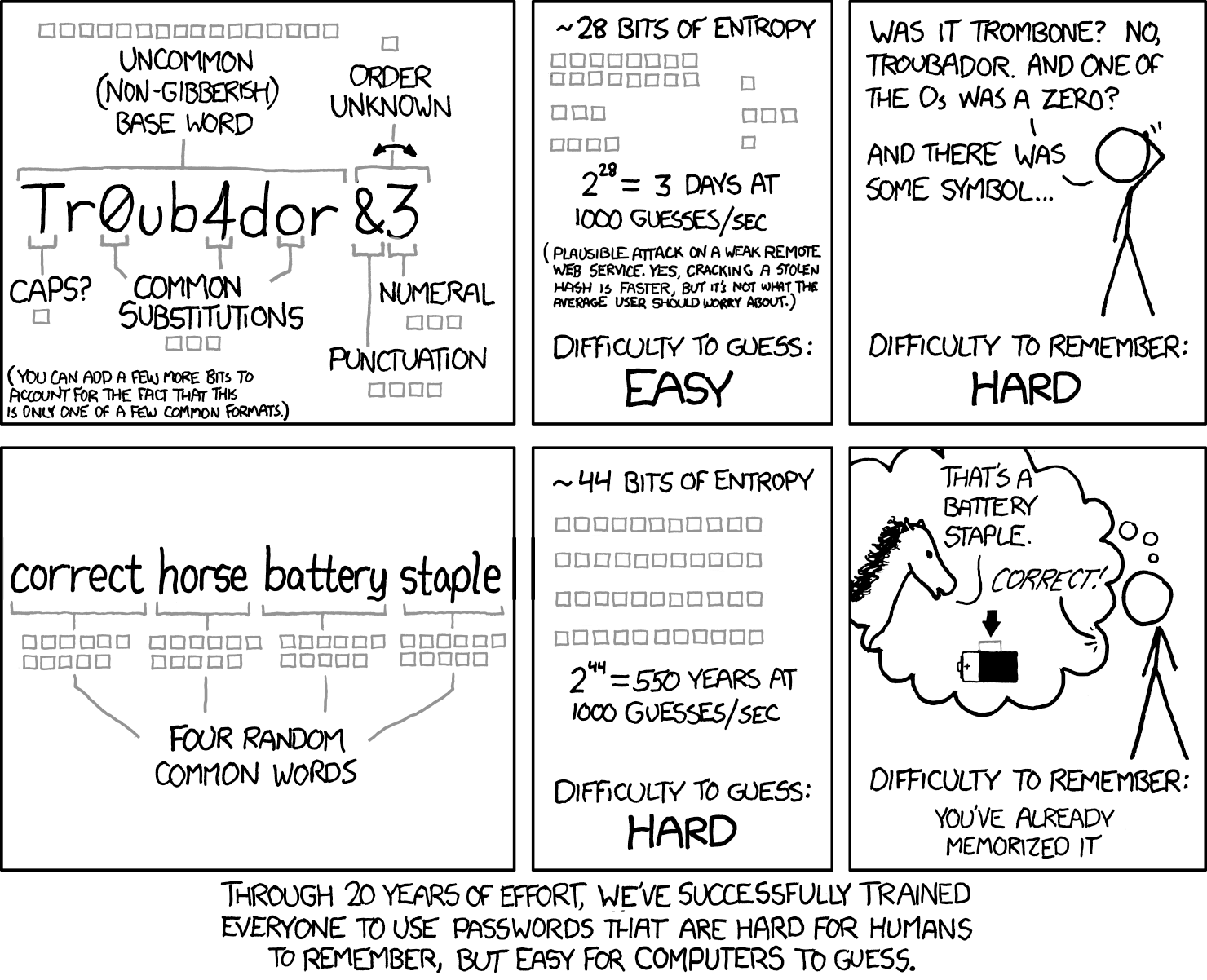
I've posted this from XKCD so many times I should probably put it in my signature :D

password_strength_2x.png


Explains it more succinctly than anything else I've seen.
 
Last edited:
This would be gold if it wasn't for password rules :(

"Add an odd number after every other letter and then use a symbol every 4 numbers, but only if it is a leap year, also password should be 768 characters long, oh and we won't live-check if the password requirement are ok, you have to submit the form and see if it generates an error".
 
Yeah - password rules are annoying AF :D The good thing with a password manager is that you can create something that meets the ridiculous criteria and then never have to think of it again.... (until the monthly expiry which forces you to change it again :blast)

Now, if the rules forced you to create a password that wasn't going to be crackable for a million years then you could probably only change it once at the start of each year and still be pretty safe. Of course if your password manager also included a stolen credentials check like Keeper does then you'll get alerted as soon as one of your passwords appears on a compromised password list...

I remember there was one (I think VirginMedia, but I could be wrong) who for years wouldn't allow you to put in a password longer than 6 characters. So, a rule to ensure that your password was weak! :blast
 
I store my passwords in notes on my iphone, which needs face or code id. All passwords are slightly coded, so not literally as stored. I tried a password manager but with apple and android (my wife prefers android) it got too complicated.
 
938 passwords currently stored in 1Password.
Wouldn't be able to operate without it. :)

But, also, very heavy digital use in my case.
 
I'm still using 1Password 6 which I paid for. Is the newer subscription version much better?
 
I'd say no.
I was on 6 too. I think I switched to the sub because at some point I used it with my team at work so it was easier to have the sub version to join all the vaults.

I'm back using it on my own for personal/work (non team)/family passwords on subscription.
As said above, it's a bit bloated and way slower than before, but still works ok.

Having everything synced to my phone at all time has been a life saver.


Back
Top Bottom