Apple support for Intel based apps ending?

Orinoco

Well-known member
UKGSer Subscriber
Joined
Jun 1, 2010
Messages
2,001
Reaction score
565
Location
The Bride Valley
Help!

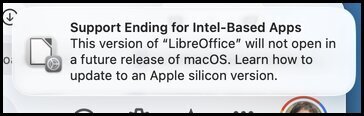
I've had this message a couple of times now when opening LibreOffice and Basecamp. I've tried to read the apple support page, link below, but there are so many if's, buts and caveats I'm really not sure what I need to do. I have a newish M1 MacBook Air which has Tahoe OS on it, no idea whether this is Intel based or Mac's own chip.

Does it mean I'll need a new MacBook or just that I'll need to find something else for word-processing and cannot use Basecamp any more?

Apologies for the question, I'm clearly not as bright as I like to think I am :D

Thanks folks

1780399740529.jpg

 
I have a newish M1 MacBook Air which has Tahoe OS on it, no idea whether this is Intel based or Mac's own chip.

It's not Intel based. You're good. Update your Libre Office app. There is a version that runs on Apple Silicon natively.
Any Mac with chips starting with "A" or "M" are what it is called Apple Silicone.


When using older, Intel based, Macs you won't be allowed to install OS over a certain version. So, all the old software will keep working on that machine.
 
To further explain this:

Apple switched processor architecture a few times over the last 30 years.
The first very big switch was from CISC to RISC processors. It was the end of the Motorola 680x0 family that was replaced by PowerPC chips.

Years after, during the "Mhz wars" Apple was severely lagging behind in processing power and stuffing Macs with multiple CPUs to keep up. At the time, the switch from MacOS to OSX was complete (and because of the kernel used in the operating system) there were massive rumors for years about a switch to Intel, and it was easier for Apple to switch chips again, from PowerPC to Intel processors/architecture. Rumors were real. There was a funny bit from Jobs during the keynote about this:


Then, in more recent years, Apple developed their own chips - faster, more efficient in terms of energy: Apple Silicon.
Apple Silicon uses ARM Architecture (of the very British ARM) as Apple used ARM stuff for ages. The defunct Newton personal assistant line had ARM processors, and earlier Apple hardware. But my memory of this stuff, and the intertwining between Apple and ARM historically, can be wrong here and there.


Anyway, long story short: each time Apple changed architecture was like switching from a 2 cylinder petrol engine to, say, a 4 cylinder diesel. Different stuff.
The same code wouldn't run properly from one processor to another, so Apple always included emulators (Rosetta) inside their operating system.

If you ran 68k software (Written for Motorola 680x0 processors) on a PowerPC Mac, for example, the more powerful PowerPC processor would "emulate" a 68040 processor and run the software, albeit slower than a real 68040, but it maintained continuity for software for the years that took people to "migrate" almost seamlessly to the new platforms, while who was making the software would "translate" newer versions of their app.

The apps had to contain both version of the code... a lot of work around it.


The same happens today. You have Universal apps that can run both Intel or Apple Silicon or you have Apple Silicon only or Intel only apps.
MacOS can still emulate an Intel processor if you run an Intel only app on a newer Mac equipped with Apple Silicon processors.
From the new versions of the OS they are dropping this emulator, so you will need the proper Universal or Apple Silicon specific version of the app.

How this translates for people with newer Macs is fairly simple: keep your apps updated, ad it will work without issues.

I hope I didn't make this even more confusing than before. :D
 
Last edited:
To further explain this:

Apple switched processor architecture a few times over the last 30 years.
The first very big switch was from CISC to RISC processors. It was the end of the Motorola 680x0 family that was replaced by PowerPC chips.

Years after, during the "Mhz wars" Apple was severely lagging behind in processing power and stuffing Macs with multiple CPUs to keep up. At the time, the switch from MacOS to OSX was complete (and because of the kernel used in the operating system) there were massive rumors for years about a switch to Intel, and it was easier for Apple to switch chips again, from PowerPC to Intel processors/architecture. Rumors were real. There was a funny bit from Jobs during the keynote about this.


Then, in more recent years, Apple developed their own chips - faster, more efficient in terms of energy: Apple Silicon.
Apple Silicon uses ARM Architecture (of the very British ARM) as Apple used ARM stuff for ages. The defunct Newton personal assistant line had ARM processors, and earlier Apple hardware. But my memory of this stuff, and the intertwining between Apple and ARM historically, can be wrong here and there.


Anyway, long story short: each time Apple changed architecture was like switching from a 2 cylinder petrol engine to, say, a 4 cylinder diesel. Different stuff.
The same code wouldn't run properly from one processor to another, so Apple always included emulators (Rosetta) inside their operating system.

If you ran 68k software (Written for Motorola 680x0 processors) on a PowerPC Mac, for example, the more powerful PowerPC processor would "emulate" a 68040 processor and run the software, albeit slower than a real 68040, but it maintained continuity for software for the years that took people to "migrate" almost seamlessly to the new platforms, while who was making the software would "translate" newer versions of their app.

The apps had to contain both version of the code... a lot of work around it.


The same happens today. You have Universal apps that can run both Intel or Apple Silicon or you have Apple Silicon only or Intel only apps.
MacOS can still emulate an Intel processor if you run an Intel only app on a newer Mac equipped with Apple Silicon processors.
From the new versions of the OS they are dropping this emulator, so you will need the proper Universal or Apple Silicon specific version of the app.

How this translates for people with newer Macs is fairly simple: keep your apps updated, ad it will work without issues.

I hope I didn't make this even more confusing than before. :D
Thanks for that, it was useful and the clip quite funny (y)
 
To further explain this:

Apple switched processor architecture a few times over the last 30 years.
The first very big switch was from CISC to RISC processors. It was the end of the Motorola 680x0 family that was replaced by PowerPC chips.

Years after, during the "Mhz wars" Apple was severely lagging behind in processing power and stuffing Macs with multiple CPUs to keep up. At the time, the switch from MacOS to OSX was complete (and because of the kernel used in the operating system) there were massive rumors for years about a switch to Intel, and it was easier for Apple to switch chips again, from PowerPC to Intel processors/architecture. Rumors were real. There was a funny bit from Jobs during the keynote about this:


Then, in more recent years, Apple developed their own chips - faster, more efficient in terms of energy: Apple Silicon.
Apple Silicon uses ARM Architecture (of the very British ARM) as Apple used ARM stuff for ages. The defunct Newton personal assistant line had ARM processors, and earlier Apple hardware. But my memory of this stuff, and the intertwining between Apple and ARM historically, can be wrong here and there.


Anyway, long story short: each time Apple changed architecture was like switching from a 2 cylinder petrol engine to, say, a 4 cylinder diesel. Different stuff.
The same code wouldn't run properly from one processor to another, so Apple always included emulators (Rosetta) inside their operating system.

If you ran 68k software (Written for Motorola 680x0 processors) on a PowerPC Mac, for example, the more powerful PowerPC processor would "emulate" a 68040 processor and run the software, albeit slower than a real 68040, but it maintained continuity for software for the years that took people to "migrate" almost seamlessly to the new platforms, while who was making the software would "translate" newer versions of their app.

The apps had to contain both version of the code... a lot of work around it.


The same happens today. You have Universal apps that can run both Intel or Apple Silicon or you have Apple Silicon only or Intel only apps.
MacOS can still emulate an Intel processor if you run an Intel only app on a newer Mac equipped with Apple Silicon processors.
From the new versions of the OS they are dropping this emulator, so you will need the proper Universal or Apple Silicon specific version of the app.

How this translates for people with newer Macs is fairly simple: keep your apps updated, ad it will work without issues.

I hope I didn't make this even more confusing than before. :D
thanks for the explanation


Back
Top Bottom