Avoiding minor roads

red rocket

Active member
UKGSer Subscriber
Joined
Feb 25, 2004
Messages
437
Reaction score
2
Location
Norfolk U/K
Do others have the same problem as me.Got it set on avoid everything apart from major & toll roads yet when I make up a route on the pc with the route tool if you dont check the route mile by mile between your points the bugger will take you off a decent road & have you going down what are almost dirt tracks which you dont realize until you get going down them.I usually do fastest route , would I be better going into custom settings & have very little percentage of minor roads as I prefer to often stay on the A roads.
Cheers Ian
 
What unit are you using and what version of mapsource is it, presuming you are talking Garmin here.

Pete A
 
My 2610 takes a bit of getting used to. I've got the opposite settings, avoid anything major, prefer everything minor. Even then it'll lead me up the M1 if it's the best obvious route. However, it doesn't ignore me completely and at each junction, it'll give me a bit of minor road action by leading me up the off ramp and back down the on ramp back on the the motorway.
 
Turn off unpaved roads (if you must....they're fun ;) ) and adjust the sppeds on different types of roads in edit, preferences, routing (assumin you're on mapsource )

There are still anomolies...my quest takes me one way one day then another way the next on an identical route home when I use 'take me home' and I'm on the M25 heading north towards the tunnel.

Odd. :rolleyes:
 
I've noticed the same phenomena on my recently aquired V7 Cityselect. Running up a few local routes while testing often selects the unclassified "white" roads when using fastest route (same setting as yours) , and I suspect its because the major roads are speed limited to 50 etc whilst the narrow whites are national speed limit and therefore "faster" to the cityselect route program. Routing on the GPS itself (276c) doesnt seem to have as many strange route choices but I suspect it will happen now and again.
 
ya sorry I've the 2610 mapsource 6.5 thinking about the upgrade as going round mansfield it sent me off the nice new by pass down a friggin dead end where i could see the road going past just couldnt get on it .

Just that it seems to get the urge to send you off an a road to take a short cut wondered if i changed it to a truck setting may help I get now so i studdy the route on the screen a bit more now to see the general direction of the road & ignore it sometimes .
 
Have you checked your Preferences on the computer? Go to Edit then Preferences then Routing tab (I think). Have you got it set to "Shortest Route" instead of "Fastest Route"?
 
Part of the fun of the GPS is that it takes you down roads only frequented by tractors. Well its fun on the bike, not so good in the car......ended up reversing miles back to major roads:)
 
I don't think the MapSource data includes speed limit information.

I think the problem stems fom the fact that the road data is not very good. If you look in MapSource, all the road classifications are American - eg Interstate highways, collector roads, wtf are those? Who knows how Garmin have classified various roads - have they put all national speed limit roads under the same type?

I suspect that there's no distinction between small country B roads where you can average about 30mph if you're lucky, and large A roads. Some judicious use of extra waypoints is required.

I got my Garmin GPS nice and cheap, but I don't think I'd buy another one. I'd investigate a European product that knows about UK roads.
 
red rocket said:
Do others have the same problem as me.Got it set on avoid everything apart from major & toll roads yet when I make up a route on the pc with the route tool if you dont check the route mile by mile between your points the bugger will take you off a decent road & have you going down what are almost dirt tracks which you dont realize until you get going down them.Cheers Ian

Also try changing the vehicle type to truck/lorry, as this tends to keep you on major roads and motorways
 
red rocket said:
Do others have the same problem as me.Got it set on avoid everything apart from major & toll roads yet when I make up a route on the pc with the route tool if you dont check the route mile by mile between your points the bugger will take you off a decent road & have you going down what are almost dirt tracks which you dont realize until you get going down them.I usually do fastest route , would I be better going into custom settings & have very little percentage of minor roads as I prefer to often stay on the A roads.
Cheers Ian

Since getting my Quest, it has taken to places I would never have found before. It is a bit worrying to start with as it gets a little muddy but I am really enjoying discovering lanes that would be possible but not enjoyable on a road/tourer type bike.
 
Thanks for your replies guys I'm on fastest in the settings so now going to try it on truck settings.
 
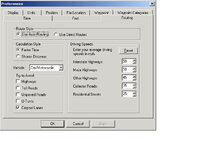
Mouse Mapsource has roadspeed preferences that you can adjust. Just like the unit itself. Go to edit prefernces and you get this dialog box. :)
 

Attachments

  • mapsource.jpg
    mapsource.jpg
    51 KB · Views: 219
If you like major roads adjust the speed up on these in mapsource or the unit down for minor roads and you'll end up on the main roads when it autoroutes.:)
 
Ian

I'm not sure why your unit seems to act differently from mine, but I've been using my 2610 for about a year now and only had one or two occasions of thinking 'why is this bloody thing taking me along this goat track' and they were mostly when returning from Austria last year. All my settings are default - or at least I'm not aware that I've ever changed them :D

Regards,

Charles
 
Originally posted by Mzokk
Mouse Mapsource has roadspeed preferences that you can adjust. Just like the unit itself. Go to edit prefernces and you get this dialog box. :)

I know about that dialogue box :)

My point was that, as in the UK we don't actually have roads called "interstate highways", "collector roads" etc the settings in that window are pretty meaningless, as you don't know what type of roads they actually apply to.

The tip about adjusting the speeds for a given road type to get the routing to prefer that type is a good one though - assuming you knew what the roads types meant :D And I suspect this will only work for routes you calculate in MapSource - not ones calculated by the StreetPilot itself.
 
Apparently we do have collector roads:

Major Road Network

Motorway or Primary Route Network(PRN)
National strategic routes for through and long distance traffic.
Primary County Route
Main County routes connecting principal settlements.
Secondary County Route
Main access routes to large settlements and principal recreational attractions.

Minor Road Network

Local Distributor
Access routes to smaller settlements and recreational areas.
Collector Road
Access route to small villages and other significant generators.
Minor Collector Road
Local road serving small hamlets and scattered communities.

Service Roads
Local road serving a few properties.
Minor Service Roads
Local road serving only one property.
Minor Lanes
Other minor roads serving fields only or duplicating other routes.
Tracks
Not normally used by vehicular traffic.

Taken from the East Devon local plan.

Not sure how that compares to the A, B, C etc roads, but I'd imagine collector roads cover B & C roads? :confused:
 
Hi Guys thanks again for all the imput.
My problem seems to be rather than just put in fastest route with a start & end point which I realize is partly what the sat nav is all about.
I keep adding via points & way points to obviously head it to my preferrred direction.What appears to happen is unless I check the route mile by mile it will take some dodgy short cuts.Early days though I am now a big truck so time will tell
Another very annoying thing happened today I made up a route to leave from a hotel it wouldnt tell me which way to go of course as soon as I decided to go one way the bugger soon said off route brought me back to the very same roundabout outside the hotel & knew exactly which exit I wanted that time

WHY??
 
If you had only just turned on the GPS receiver, or only just started moving on your bike, it's possible the GPS didn't know exactly where you were and what direction you were going in.

The GPS can only calculate direction by looking at subsequent locations - so remember that the arrow on the Streetpilot's screen is the direction of travel, which may be different from the direction you are facing in!
 
Mouse

> The GPS can only calculate direction by looking at subsequent
> locations - so remember that the arrow on the Streetpilot's
> screen is the direction of travel, which may be different from the
> direction you are facing in!

Are you sure? I thought it had an electronic compass in it.

No idea why I thought that, just did.

Cheers

Mark


Back
Top Bottom