Beeline Moto navigation

Yep. It's useful to have a small nav on the HP too.
Mount only in the picture. I am using the RAM ball generally dedicated to the GoPro for that bike:
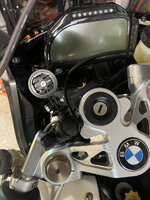
hp-bee.jpg

Regarding battery life, the II can be fed power via the bike and they do sell a powered mount for it.
To be fair, I used it for almost a full day and no battery issues with it. But it will degrade over time.

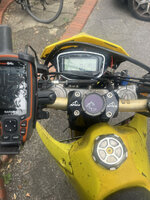
I tried placing it on the DRZ too.
Bog standard mount with elastics lifted from the pushbike:
IMG_2639.jpg

I use a 64s on that bike with specific maps with right of ways for greenlaning and can switch profiles to an OpenStreet map setup to route me back home when done. But considering it might be easier to also stick the Beeline on the bike, for when you're done with greenlanes at the end of the day, and don't need the custom maps anymore... and use it to "go home" direct, as the street routing the 64s does can be sometimes a bit convoluted when you are avoiding motorways :D
I'll test it hopefully next week.
 
Last edited:
One issue I found with the Beeline is or was, the app if you upload a route from say MRA or other apps, waypoints do not go over, so you just end up with a track. That is contrary to what Beeline say in their bumf. So if you want to visit specific waypoints, they are not shown.

Now this was a year ago when I was doing my research and I had several exchanges with Beeline tech and sent various examples to them, until they started to ignore me. So I decided to bin the Beeline idea and use something else.

This may have been fixed now of course :)
 
I used custom routes on the beeline and they are imported as a track. I was ok with it. Didn't try to have waypoints (doubt it does) but can have a look.
 
I used custom routes on the beeline and they are imported as a track…. Didn't try to have waypoints (doubt it does)

Tracks very probably will not / cannot bring waypoints and the like across, irrespective of the device they are to be displayed on.

But do have a look please, just in case Beeline have indeed found away to do it.

:beerjug:
 
If I make a route on my Garmin and import it as a GPX to my Moto Guzzi app it will only display the start and end points. The GPX is in v 1.1 format when exported from the Garmin device. If I convert the route to GPX v1.0 using My Route App the route then transfers perfectly to the Guzzi app with intermediary waypoints.

I suspect this is the issue with the early version of Beeline which has now been changed to GPX 1.1 on the Beeline 2 so that @er-minio does not see the problem
 
Last edited:
The "One" model, the one that Glenn used in Sardinia looks like this:
Beeline-Moto-GMG072019-2-small.png


I do agree the app is, stil today, somewhat improvable (do you want a new app designer, Beeline??? :D :D :D ). But given how these things go, wouldn't surprise me if they are refining a "next" version and do a rollout for a complete new/refined app soon-ish.
Especially when you split the device between motorcycle and pushbike use, there is quite a lot to make better (and clearer) in the app.

I do not pay the subscriptions because my use for it is mostly short trips within London or the random errand here and there. I'm ok without the audio/extra perks.
I do bring it with me when traveling (in my backpack – I'm not an Uber driver with dual GPS). Been useful this summer for Hotel > Restaurant trips for dinner without having to faff with the larger XT once off the bike.

Within large cities, I'd say that the OpenMaps routing works better than Garmin's algorithm. And this is another reason why I got it.

I really wish it could integrate with, say, Waze and get its user-based speed camera/alerts info.

It is an extremely good device (the II). I really appreciate the work they put into keeping it simple and minimal.
Just treat it as what it is. Do not expect a full cartographic GPS, as clearly it isn't and doesn't aspire to.


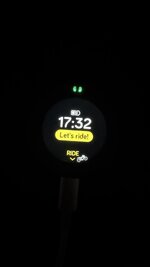
The little dash’s at the top count down to the turn, then when at the junction it goes from ahead to left or right…
 
If I convert the route to GPX v1.0 using My Route App the route then transfers perfectly to the Guzzi app with intermediary waypoints.

I haven’t looked. Is MyRoute exporting GPX v1.0 as a route or a track or both?

Edit…

I have just looked. MyRoute exports GPX v1.0 both route and track simultaneously, plus POI. I wonder if the Guzzi app is loading the route, not the track?

For instance, if I export a file from MyRoute in GPX v1.1 via Garmin Connect, my XT loads and displays the route (with all its blue dots and orange flags) quite separately to the track, which (from memory) carries no blue dots nor flags when displayed or worked with.
 
Last edited:
I have just exported a route from MRA as gpx 1.0 and imported into the Beeline app. The route does come across now with both waypoints and shaping points, but there is no distinction between what is a waypoint and what is a shaping point, so yes you will follow the right track, but guess there will be no count down to a specific waypoint.

I wanted to be able to visit specific waypoints and to be able to be given an eta and countdown (use the nav for treasure hunts and POI trips). My XT still seems to do the job. Beeline for a small nav looks like a good device.
 
For instance, if I export a file from MyRoute in GPX v1.1 via Garmin Connect, my XT loads and displays the route (with all its blue dots and orange flags) quite separately to the track, which (from memory) carries no blue dots nor flags when displayed or worked with.

the app just calls it a route after import. The image looks more like a track in the viewer. Start and end points of this loop (we did not use it) are the same, our hotel in Cabrerets to the main square in Figeac and back via Cajarc.

Screenshot_20251004-124816[1].jpg

and the GPX file imported to the MG app after converting in MRA also attached
 

Attachments

He was using the first model.

That one displays an arrow only.

Don’t believe it does just display an arrow mine is gen 1, and it does much more - the arrow sets direction, the dot tells you left or right turn coming up, the dash’ count down the distance till the turn….

You have to Interpret the Beeline symbols.
 
If the Beeline device is becoming more popular, we can maybe see if a separate subsection can be created for it.

Good idea or leave it as it is?
I think a seperate section Richard would be helpful as the Beeline stuff then has a home for further chat.
 
I have a Gen1 unit - I do like it, however the screen is abismal in terms of brightness, so unless you have AAA1 eyesight it can be difficult to see at a glance, I end up having to focus for longer to read (usually through a squint) what the next action is. I have kept mine as a plan B for my MRA running on an Android Auto Carpuride 702 setup. Would be interesting to see what a Beeline Moto II looks like, think they have done from faint LCD to a higher nits OLED display screen?
 
I’ll be interested to hear how you get in with it. Sometimes less is more.

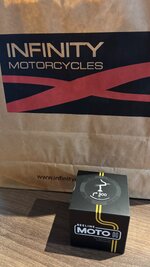
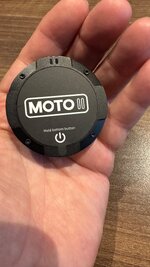
I have picked up from Infinity In Holborn.

So far, so good:

IMG_5809.jpegIMG_5810.jpeg

First things to do are:

A. Get it paired with my sacrificial iPhone.

B. Download the app.

C. Watch some videos / read the manual, to see how it works.

I might get a chance to try it out tomorrow, Sunday, if I just lash it to my Himalayan. That’ll give me a chance to see how it performs against the MyRoute Navigation app and my XT, when running the same bespoke route.

It seems nicely made at the moment and it turns on, which is a very encouraging start. But we shall see.
 
Last edited:
Would be interesting to see what a Beeline Moto II looks like, think they have done from faint LCD to a higher nits OLED display screen?

There are plenty of YouTube videos on the new model. They can’t all be deeply suspicious ‘paid for’ promotions or by remunerated influencers.

:beerjug:
 
I have picked up from Infinity In Holborn.

So far, so good:

View attachment 449107View attachment 449108

First things to do are:

A. Get it paired with my sacrificial iPhone.

B. Download the app.

C. Watch some videos / read the manual, to see how it works.

I might get a chance to try it out tomorrow, Sunday, if I just lash it to my Himalayan. That’ll give me a chance to see how it performs against the MyRoute Navigation app and my XT, when running the same bespoke route.

It seems nicely made at the moment and it turns on, which is a very encouraging start. But we shall see.
Good start.
I thought it came with a basic strap on mount?
Looks a decent size
 
I thought it came with a basic strap on mount?
Looks a decent size

It does. By ‘lash’ I meant: Tidily attach the device to my awesome steed of awesomeness, using the choice of bands, thoughtfully provided in the box.

I will not be starting a thread, entitled: Beeline, where and how do you mount yours?

:beerjug:
 
App downloaded, account set up and sacrificial phone connected.

I have created a basic A to B route, from home to my sister’s in rural Warwickshire, which the app provided in seconds, offering up a direct and alternative ‘fun’ way to go.

I also imported a route into the app, selecting one at random from within my iCloud ‘library’. Again this went smoothly and very fast.

I have now set the device aside, whilst I fully charge it.

Summary:

Nicely packaged and made.
Clear screen, at least indoors.
Set-up so far has been straightforward and logical.

IMG_5812.jpeg
When the full charge is complete, I will see how reliably a route transfers to the device. Then, hopefully tomorrow, see how well it works in action.

In short, no adverse complaints or comments so far.
 
Last edited:
It does. By ‘lash’ I meant: Tidily attach the device to my awesome steed of awesomeness, using the choice of bands, thoughtfully provided in the box.

I will not be starting a thread, entitled: Beeline, where and how do you mount yours?

:beerjug:
I’ll put away my box of assorted cable ties, lengths of hemp rope and gaffer tape that I was about to post south
 
Whilst the device is charging, I am wondering about the factory fit USB C socket on my 450 Himalayan.

Whilst the Beeline seems to have a pretty good internal battery longevity, I do like using ‘bike power’ which is free and otherwise wasted.

The factory fit USB C socket is not powerful enough to run my Peak Design wireless ‘MagSafe’ mount. But it should kick out enough to charge a humble Beeline, surely?

Time will tell….


Back
Top Bottom