BMW Navigator III - Should I buy?

I like the sound of the Nav3, but for £300 I could buy a 2820. I can't ignore the price difference!

PS; I've noticed how much better the Zumo screen is to my TomTom 910. It's much brighter. Is the Nav3 + 2820 the same as the Zumo?

Also; where have you positioned your Nav3 on your bike?

If you're choice is a 2820 or a Zumo, I think I'd go for the Zumo, if only because Garmin are releasing more updates for the Zumo, which they won't for the 2820 (or Nav III)

Nav 3 and Zumo screens are both good - I haven't seen a TomTom to compare.


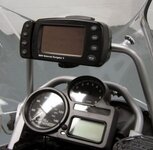
I've got mine here (see below)- not a Migsel mount but similar - nicely in line of site without obscuring anything.

The 2820 Ash posted about looks good, but I'm not sure if it comes with the mapping on CD so you can plan a Mapsource route, which the others will have. I think to buy the mapping separately will be about £75
 

Attachments

  • migsel.jpeg
    migsel.jpeg
    23.8 KB · Views: 228
"Nav 3 and Zumo screens are both good - I haven't seen a TomTom to compare."

Much prefer the TomTom ease of use. The Zumo is also good but the Nav went back after the screen pealed and bubbled which the same happened on another one.
 
"Nav 3 and Zumo screens are both good - I haven't seen a TomTom to compare."

Much prefer the TomTom ease of use. The Zumo is also good but the Nav went back after the screen pealed and bubbled which the same happened on another one.

Depends what you want - I've seen the TomTom's in action, and they are easy to use. But the functionality is much less than the Garmin's. If you want to use it on the bike only (ie no prior route planning) to get from A-B, in UK and mainland Europe (former east bloc maps are very sparse) and are happy with the functionality, ie no track logs etc, and don't need the nice touches like Google earth views, I'm sure it's excellent - as usual, the most appropriate unit depends on what you want to use it for.:thumb2
 
Well to some this will be no suprise - I bought the NavIII today. Met and Spoke to a guy called Shaun (nice bloke) and he answered all my Nav3 questions as he had one on his bike who happened to be visiting BMW when I did. I am so far pleased with the unit and took my bike for a 6 mile spin to check it out - so far so good although it takes some getting used to when all you've been using to date is TomTom. I can see straight away there are more bells and whistles in the software (right up my street). I was annoyed to find that after paying £600 for the unit plus £100 for Autocom duo there was no GS1200 power lead. This apparently is another £50. Thankfully Bill at Ocean gave me a used spare lead which works fine. There is no remote, no car kit & no MP3 player (as expected) so BMW know how to charge mugs like me - they must see us coming! Having said that I am pleased with this unit even though it is well over priced!

Thanks for all your replies

PS; Just gettiing my PC setup, can I plug my Garmin into my Laptop and PC as required or is it only best to keep to one computer when updating the Garmin?
 
There is no remote, no car kit

PS; Just gettiing my PC setup, can I plug my Garmin into my Laptop and PC as required or is it only best to keep to one computer when updating the Garmin?

There is a car kit, or at least a weighted mat which sits on the dash board. The NAV III is powered by a lead into the cigarette lighter socket, which has a speaker built in. It works quite well. The mat is also quite useful indoors, to stand the device in when loading routes.

There is also an external aerial, as the GPS will not work through some UV tinted screens, for instance some SAAB's. That works well, too.

I think there was a remote control. But maybe it was for a different model or a bog standard Garmin, without the BuMW bells and whistles? Not sure why you might want one.

It makes no odds whether you load Mapsource (the maps) onto one, two or 100 PC's or lap tops. I have it on three. The updating of the GPS device has nothing to do with the map software.

===

TINTS AND HIPS

(1) Make sure you keep the copper strips (on the device) and the copper pins in the lead clean.

(2) The locking blade on the cradle vibrates, or the device does. The locking blade is of harder metal than the hasp on the device, which will wear, and the device falls out of the cradle. You can put it back on the move, assuming it hasn't hit the road.

The hasp is not available as a spare but you can beg Garmin for one, or replace the whole lot under BuMW warranty for two years.

The way to reduce vibration in the cradle? Use the locking key but it's a pain, each time you take it off at a stop. Having it locked, simply means the whole cradle and device vibrate together.

http://www.ukgser.com/forums/showthread.php?t=112318

(3) Mounting the device on the yoke means it is way down. You have to refocus between the road, the device and back up to the road. This is sometimes not too healthy when making progress. Mounting it up higher is better, but it attracts the vibrations (see above).

(4) If you buy the road jam device (I forget what it is called) - The thing that works on FM radio transmissions - it is a nuisance to plug in and out.
 
My local BMW dealer has a Nav 3, extra buttons, cradle & power lead + 2yr guarantee which totals £740. I could buy it for £640

For that kind of money I'd go for a Garmin 278. I have one and after owning a Street Pilot III, Quest I and a Zumo 550 (which was the worst of the lot) it's in a league of its own.

Dave
 
Ok I'm at a crucial deciding point and I would be grateful for suggestions. Having taken all suggestions to date onboard I decided to go for the Nav3. It was the most expensive but I liked the unit. Now that I have it and I've been playing with it I find a number of disappointing limitations despite it's so call flexible setup options over the Zumo 550. The traffic receiver is not compatible, Safety Camera Subscriptions are not compatible, no car mount, no remote, unable to customise the units vehicle on maps etc. The mount for my bike is fiddley to remove the unit from the bike and the Zumo screen is way brighter than he Nav3 screen!

BMW says I can take the unit back for a refund or change it for another device - IE Zumo 550 or the BMW Zumo - which took me by suprise as I didn't expect that. The Zumo is appealing cause it will do the extras that the Nav 3 won't but now that I have the Nav3 should I persevere or return it? What else do I need to know??
 
Ok I'm at a crucial deciding point and I would be grateful for suggestions. Having taken all suggestions to date onboard I decided to go for the Nav3. It was the most expensive but I liked the unit. Now that I have it and I've been playing with it I find a number of disappointing limitations despite it's so call flexible setup options over the Zumo 550. The traffic receiver is not compatible, Safety Camera Subscriptions are not compatible, no car mount, no remote, unable to customise the units vehicle on maps etc. The mount for my bike is fiddley to remove the unit from the bike and the Zumo screen is way brighter than he Nav3 screen!

BMW says I can take the unit back for a refund or change it for another device - IE Zumo 550 or the BMW Zumo - which took me by suprise as I didn't expect that. The Zumo is appealing cause it will do the extras that the Nav 3 won't but now that I have the Nav3 should I persevere or return it? What else do I need to know??

1) I have a 2820 for use in the car and on the bike - i have never used the remote.
2) You do not need to change the vehicle icon.
3) The NavIII and Garmin 2820 use the same traffic receiver. It plugs into the micro-USB port that is used to transfer data. I have one but never use it.
4) Try increasing the brighness of the screen.
5) I am surprised that the safety camera subscription are not compatible
6) Bean bag mounts etc are cheap on fleabay.

Having said all of that - I would be tempted to get a refund and go for the Zumo.
 
Well there's never one device that does everything you want well is there? I'm undecided because one of the reasons for buying the Nav3 was the Zumo + touratech bike mount would be £500 or BMW Zumo + Touratech bike mount £575 because the Zumo bike mount isn't that good I hear, although I've not seen one. So for the extra money I thought I was getting an all singing all dancing sat nav plus a 2yr warranty.

To get to the point I probably could settle for the limitations except one - I would like speed camera info. When I tried to access the trial from Garmin it would not recognise my Nav3 then I read it's only compatible with Zumo & Nuvi ranges and not much else! To be honest I was expecting alot more downloadable free POI and good bike routes but there's nothing on the garmin website. Not sure if any free safety camera POI would be as good, anyone got them? Would the NAV3 display in red speed camera warnings in the text line at the top of the screen when there's a speed camera in range or just a speed camera warning symbol on the map instead?
 
Ok I'm at a crucial deciding point and I would be grateful for suggestions. Having taken all suggestions to date onboard I decided to go for the Nav3. It was the most expensive but I liked the unit. Now that I have it and I've been playing with it I find a number of disappointing limitations despite it's so call flexible setup options over the Zumo 550. The traffic receiver is not compatible, Safety Camera Subscriptions are not compatible, no car mount, no remote, unable to customise the units vehicle on maps etc. The mount for my bike is fiddley to remove the unit from the bike and the Zumo screen is way brighter than he Nav3 screen!

BMW says I can take the unit back for a refund or change it for another device - IE Zumo 550 or the BMW Zumo - which took me by suprise as I didn't expect that. The Zumo is appealing cause it will do the extras that the Nav 3 won't but now that I have the Nav3 should I persevere or return it? What else do I need to know??

You have only had it two minutes.
;)

The Nav III is fine for most applications.

It will work with the traffic receiver (well it did on mine)

The device should be easy enough to remove from (and put back into) its cradle. Attaching the power lead can be a fiddle nad the traffic prompt thing, too but it's not life threatening.

The Nav III screen is - or should be - bright enough. The second generation ones have the new non-reflective screen, making them much better in very bright sun. Where do you have the device sat?

Why do you want to muck around with the position cursor?

There is a car mounting kit. It is basic but it works.

Not sure what value the remote is.

I never tried to load speed camera data bases onto my Nav III. No doubt somebody has.

Zumo 550 / BuMW 550

You already have a dedicated thread on the two devices but....

The BuMW version is simply a rebranded 550. Pay the extra if you feel like it. It has the BuMW dealers pre-loaded, if that is handy. It is black.

The 550 does not have a remote.

You can fool around with the device's cursor.

It has interchangeable bling tops.

You can charge your BlackBerry (if you have one) using the same charger, but not the other way around.

It has a car mounting kit but, as far as I know, voice will not work in the car.

It will play tunes, if you load them.

It has an off-bike battery supply, which some people find handy.

It too vibrates in its cradle. Some people have had a problem with contact pins getting worn.

Sometimes it needs re-booting. Keep the Allen key handy, you will need it to take the battery out.

The cradle is fine and it's a doddle but the security screw is a pain. Replace it.

The ram-mount it comes with is ugly IMHO. Others like it.

It comes with assorted power leads (including car) but not one designed to fit the dedicated feed.

The lead to connect it into the dedicated feed (behind the head stock / oil cooler) can be bought (expensive) or made (cheap). The BuMW variant may come with one.

It's a good bit of kit but you won't get any free bike routes, unless you go looking for them.

++++++

Read the assorted threads on this site and others, like the Zumo forum, for what they are worth.

Change it if you feel like it but please do not worry and wonder so much.

It is just a box of electrical widgits, not open heart surgery, after all. You are - again - drowning in questions, half of which people cannot (or won't) answer for you. You heard that the Zumo mount was crap but then didn't go and look at one. What makes you think anything you read here will be any more reliable? Make your own mind up.

 
I think BuMW did away with the car kit and remote when they dropped the price - I have it in my kit, but neither have ever left the box.

have you tried the camera download? It may work. I'm going to try downloading the 30 day trial, but not until it warms up a bit - (I never speed when it's cold). I wouldn't be too bothered about the traffic warnings, I have this in my car and it's absolutely rubbish.

The screen is fine on mine, I have turned the brightness up a bit but it's just as good as the Zumo.

Just checking a couple of things out for this post via my "My Garmin" and it's offered me a free update to CN2009! Result:thumb2

Check the Zumo forum, I believe there have been firmware update issues with the BuMW Zumo

There are also loads of POI's (inc BMW dealer database) routes etc on this website. I notice you can get some things like the AA guides for the Zumo, if you'd find that useful.
 
I think I will stick with the NAV3 as I overcame the Speed Camera Subscription by subscribing to Pocket GPS instead. It cost me £17 for the year and I installed their database. I did a dummy run and watched the Nav3 go to a couple of speed camera locations and the text does appear at the top of the screen similar to the Zumo. I've also added about 70,000 POI locations - cool!

The extras that I felt should have come with the unit I can live without and probably wouldn't use - it was just that when I buy something I want it all perfect with everything, what I got was an opened box! Anyways, the more I play the more I think it's worth keeping!

Does anyone know where I can access some icons (.ico) to replace the POI icons I have because some of them are not very good!
 
Takes some getting use to. Went for a night ride last night, decided to ride to Princetown, dartmoor, then onto Tavistock and back home. Nav3 works ok but because it's in your line of vision as you ride it's distracting cause thats all you see! Then it decided to rain didn't it and what a nightmare that was? Pitch black with useless lights in pooring rain, that visor wax I bought - waste of time, could see much. Ah well, thats biking for you.
 
Takes some getting use to. Went for a night ride last night, decided to ride to Princetown, dartmoor, then onto Tavistock and back home. Nav3 works ok but because it's in your line of vision as you ride it's distracting cause thats all you see!
Stick with it.

It may be distracting at first and especially on roads that you know but the point will be made when you use it to actually guide you somewhere.
 
Takes some getting use to. Went for a night ride last night, decided to ride to Princetown, dartmoor, then onto Tavistock and back home. Nav3 works ok but because it's in your line of vision as you ride it's distracting cause thats all you see! Then it decided to rain didn't it and what a nightmare that was? Pitch black with useless lights in pooring rain, that visor wax I bought - waste of time, could see much. Ah well, thats biking for you.


How short are you?? The GPS is situated in the middle of the screen on the support bar- you should be looking near the top or even over the top of the screen.
 
Ocean BMW must love this guy

Hang on their Bud! I paid good money, over the top money for this device, I never had a chance to try it out as this appeared to be the last boxed one they had - albiet it opened boxed one at that! You maybe the type of guy who just gets an idea then buys it without a second thought but me - mr fussy - likes things right, and the last straw for me was finding out that the unit won't display safety cameras from Garmin! I mean COME ON - what GPS now a days won't do speed cameras???

For what you pay, the top of the range Garmins or TomToms for cars are cheaper and way better!

Anyway, I never went back to Oceon, decided to keep it.

PS; I'm 5'10" tall. I do look over the screen no problem but never the less the sat nav draws you in - maybe because it's new?
 
that the unit won't display safety cameras from Garmin! I mean COME ON - what GPS now a days won't do speed cameras???

BM disagree with you on their website:

How can I use Custom POIs with my BMW Motorrad Navigator III?

In order to use Custom POIs with the Navigator III, please download the POI Loader from the Garmin website at
http://www.garmin.com/support/download_details.jsp?id=927
Use of the POI Loader described in detail in the help messages after being started.

And page 26 here: http://www8.garmin.com/manuals/BMWMotorradNavigatorIII_OwnersManual.pdf


Back
Top Bottom