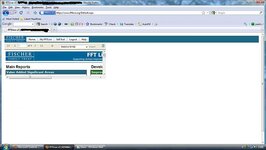
Monsieur Flâneur with style, passion and real substance UKGSer Subscriber Joined Nov 6, 2005 Messages 20,813 Reaction score 8,986 Location London/Lincolnshire Jan 4, 2010 #1 Difficult to see the information I need - how can I make the actual info bigger...fill the screen?? Works fine at work Attachments website.jpg 44.2 KB · Views: 105
Difficult to see the information I need - how can I make the actual info bigger...fill the screen?? Works fine at work
SlowJohn Registered user Joined May 2, 2009 Messages 95 Reaction score 0 Location Melton Mowbray Jan 4, 2010 #2 Ctrl + and Ctrl - let you zoom in and out. Does that help?
Monsieur Flâneur with style, passion and real substance UKGSer Subscriber Joined Nov 6, 2005 Messages 20,813 Reaction score 8,986 Location London/Lincolnshire Jan 4, 2010 #3 SlowJohn said: Ctrl + and Ctrl - let you zoom in and out. Does that help? Click to expand... No, just makes it larger by a couple of centimetres This is the only site that does this, even at work its fine
SlowJohn said: Ctrl + and Ctrl - let you zoom in and out. Does that help? Click to expand... No, just makes it larger by a couple of centimetres This is the only site that does this, even at work its fine
Monsieur Flâneur with style, passion and real substance UKGSer Subscriber Joined Nov 6, 2005 Messages 20,813 Reaction score 8,986 Location London/Lincolnshire Jan 4, 2010 #4 Just tried the same page on explorer and it works fine - just not on firefox where every other website works ok
Just tried the same page on explorer and it works fine - just not on firefox where every other website works ok