Carpuride 702 BS Review (the one with Wonderwheel integration).

This isn’t the case for all Android devices sadly, I have one as a test device and I cannot get the controls down the side except if I connect it to my car with a widescreen display then the controls appear down the side, it’s very annoying
Are talking about the phone screen.......or a mirroring screen like the Carpuride or your Car Screen??

Xiaomi M14U
 
Are talking about the phone screen.......or a mirroring screen like the Carpuride or your Car Screen??

Xiaomi M14U

Android Auto on the 702BS. No matter what options I try the task bar is always on the bottom and never down the side, but in my car with a widescreen display it’s down the side which I prefer

5638f1646deac99211efcceda77041d3.jpg
 
Android Auto on the 702BS. No matter what options I try the task bar is always on the bottom and never down the side, but in my car with a widescreen display it’s down the side which I prefer

5638f1646deac99211efcceda77041d3.jpg
Its a option by the screen manufacturer not the handset.
 
Android Auto on the 702BS. No matter what options I try the task bar is always on the bottom and never down the side, but in my car with a widescreen display it’s down the side which I prefer

5638f1646deac99211efcceda77041d3.jpg
Very strange........do you have this option in your Android Auto settings?

(also.....what phone are you using?)
a73340eda7d6c1d6e54e8545990098de.jpg


Xiaomi M14U
 
Very strange........do you have this option in your Android Auto settings?

(also.....what phone are you using?)
a73340eda7d6c1d6e54e8545990098de.jpg


Xiaomi M14U

Yep I have that option and the task bar never changes location regardless of whether I set it on or off. But in my car with the option on and off the taskbar is always down the side not at the bottom. It’s a screen resolution thing cause if I enable developer mode for Android Auto and force the screen resolution to 800x600 (or something like that) although the screen looks awful and blocky, the task bar moves to the side.

It’s a Xiaomi Redmi Note 3 running Android 15
 
Yep I have that option and the task bar never changes location regardless of whether I set it on or off. But in my car with the option on and off the taskbar is always down the side not at the bottom. It’s a screen resolution thing cause if I enable developer mode for Android Auto and force the screen resolution to 800x600 (or something like that) although the screen looks awful and blocky, the task bar moves to the side.

It’s a Xiaomi Redmi Note 3 running Android 15
Glitch in the Matrix

Xiaomi M14U
 
Android Auto on the 702BS. No matter what options I try the task bar is always on the bottom and never down the side, but in my car with a widescreen display it’s down the side which I prefer

5638f1646deac99211efcceda77041d3.jpg
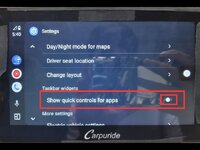
On my 702Pro they were on the side and I wanted them in the bottom. They said to change the settings (image below) and all was well. Maybe it will work for you.

702pro.jpg
 
Does anyone know how to control the music volume when played from an iPhone?
I have SENA remote but the range of the volume is set by the volume on the iPhone.


Sent from my iPhone using Tapatalk
 
Does anyone know how to control the music volume when played from an iPhone?
I have SENA remote but the range of the volume is set by the volume on the iPhone.


Sent from my iPhone using Tapatalk

I have an Apple Shortcut that runs and sets the iPhone volume to 80% so I can then adjust it on my headset accordingly


Back
Top Bottom