Let's see if this will work. A link below to the Firmware BIN file.
https://www.dropbox.com/scl/fi/ld8w...ey=pa6a6vymy5toyek2673cteiqc&st=ldu53kao&dl=0
This was supplied to me by Carpuride on 19th March 2025 so depending on when you read this, you may want to check with Support as the whether there are further updates. In my case, it was supplied for the Carpuride 702BS to fit the BMW Sat Nav cradle.
Also below are the instructions for installing the update that came with the Bin file from Carpuride:
https://www.dropbox.com/scl/fi/ld8w...ey=pa6a6vymy5toyek2673cteiqc&st=ldu53kao&dl=0
This was supplied to me by Carpuride on 19th March 2025 so depending on when you read this, you may want to check with Support as the whether there are further updates. In my case, it was supplied for the Carpuride 702BS to fit the BMW Sat Nav cradle.
Also below are the instructions for installing the update that came with the Bin file from Carpuride:
From: service service <[email protected]>
Date: Wednesday, 19 March 2025 at 08:45
Subject: Re: New customer message on 17 March 2025 at 23:44
Sorry for the trouble. You can try update the MCU:
The following are the steps to update the MCU:
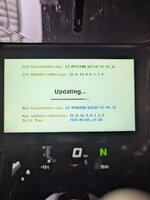
Please use a PC Windows computer to copy the latest version of the software APM32F030.bin to the SD Card. Power on the Carpuride unit, and wait for 10 seconds to display the operation interface. After inserting the SD Card, the "upgrade MPEGBOOTI" will pop up. Check √ -> Wait for the upgrade progress bar to reach 100% -> Update successful and power the device off-> Pull out the SD Card and then power it on.
Need to pay attention to these situations.
1. When installing the device, the SD Card must only have the APM32F030.bin software. If there are other files, it will cause interference and cause the upgrade to fail. It is recommended to use a standard 32GB SD card. It is recommended to format the SD card with FAT32 as the file system before copying the software to the SD card.
2. The file name cannot be changed or added characters, it must be the same as the attachment.
3. The memory of the SD Card should not exceed 32GB.
4. Please do not remove the SD Card during the upgrade in case of damage to the device.
PS: Make sure the machine is powered on before inserting the SD card.
Sincerely,
Carpuride Team