Cellular signal booster question.

Aidan1150

Nice but unfortunate husband.
Moderator
Moderator
Joined
Nov 17, 2004
Messages
14,840
Reaction score
2,796
Location
South Armagh, Ireland
I live in an area with very poor mobile phone reception at my house. The coverage outside is very patchy and completely non-existing inside so I'm looking for a way to pick up what little signal there is, amplify it in the hope that my phone will work indoors. I could hopefully mount the antenna on my chimney and bring the cable down to a window. Does anyone here use such a system or have the knowledge to recommend a supplier? We are very close to the border here so could pick up a UK or an Irish signal which wouldn't really matter as we don't get charged for cross-border roaming. I'm just looking for a reliable amplifying unit.

What about "calling over wi-fi" as an alternative? I have a Google Pixel 8 Pro but it is very unreliable for calling over wi-fi. In fact, in most cases it doesn't work at all. I have been through the settings but it still doesn't work. A Google search confirms that it is a well known issue for Pixel phones. My wife has a Samsung phone which has no difficulty with wi-fi calling and visitors with iPhones don't have any problem at all. I'm getting a new company phone for work and have had to ask my boss not to get a Pixel phone, even though it would be my first preference so it looks like I'll be having a Samsung or an Apple device.

So, back to the signal amplifier, any recommendations or suggestions please?
 
I am in the same situation, I have no cell or very little coverage at my house. I predominately use wi fi calling on my iPhone, but I do have a device called a boost box from O2 which provides 3g coverage in the house via the wi fi router. Disadvantages with this device are, every phone has to be on the same provider network and must be registered and added by them. It is 3g, so when they switch off the 3g network (this year), guess it will not work. Vodafone used to provide a similar device. O2 only used to supply boost boxes to business customers. But I rely on wi fi calling mostly
 
My mum had the same issue. Used to have the Vodafone signal booster, with all the downsides already mentioned. That is no longer supported.

Best/simplest/cheapest solution was to change her phone and use WiFi calling.
 
What about "calling over wi-fi" as an alternative? I have a Google Pixel 8 Pro but it is very unreliable for calling over wi-fi. In fact, in most cases it doesn't work at all. I have been through the settings but it still doesn't work.
Not sure about the other part of your post but I use WIFi calling on a Pixel 7 Pro and found it pretty reliable. I have found it carrier dependant as some carriers (Three predominantly) won't allow the switch from GSM to WiFi while there's a whiff of GSM signal available. O2 was much better and would switch to WiFi as soon as it picked up a known WiFI network.

Another thing that you can try nowadays is to enable WiFi while in Aeroplane mode and then use Aeroplane mode when indoors to try and force the phone to switch to use WiFi calling. Fortunately modern phones like Pixels remember this setting which is also handy when going on ferries as you can turn on Aeroplane mode and use their WiFi if available and not risk using the very expensive marine GSM networks.
 
I guess as a work phone you do not have a choice of cell network?
Have you checked to see if there are better signals from rival cell networks? If this is the case, maybe your employer would let you switch?

As for wifi VOIP calling, my cheap Moto phone is not enabled on the Lebara/Vodafone network so I mostly use Whatsapp for calls via wifi. Does this work on the Pixel phone?
 
Thanks for the replies so far gentlemen. My broadband provider was BT but that changed to EE a few weeks ago, same router etc. My wifes Samsung is on a 3 UK contract and my Pixel is on the same, 3 UK. Her Samsung works fine on wi-fi calls, the Pixel doesn't. My new work phone will be 3 IRL so we'll see how that goes when I get my new phone, whatever model it will be.

I have zero GSM signal indoors at all @MrC99 but still I can't call over wi-fi. I have tried the Airplane mode to no avail so I'll just have to accept that it's a Pixel thing and live with it. It's a great device in every other respect.

I don't have a choice of network for my work phone @wessie so I have asked for a device other than Pixel to see how that goes. Geographically we are right on the border and fall into "either or" coverage. All networks are patchy at best here and as you drive along the border in the north you often have roaming coverage from southern networks. It's a very fluid and oft-changing scenario in terms of coverage.

Thanks for all the suggestions so far. :thumb2
 
As an aside. I have noticed that my Vodafone coverage is very poor at home and that most of my calls are directed to be over wifi.
However, when I switch off the wifi connection on my phone, the Vodafone signal gets a whole load better. It's like Vodafone are reducing their coverage to force people to make calls over wifi where possible and reduce the traffic on their very expensive network (they have to bid and buy spectrum from the Govt. at the cost of £billions)
I still get charged for the calls over wifi even though I'm paying for the wifi connectivity.
A further problem arises when I go out of wifi range as the call often drops before switching over to the Vodafone network
 
It's possible but....

Let's start with the legal bit which is Section 8 of the Wireless Telegraphy Act 2006 which bans a whole bunch of these devices. Or rather, it bans the use of them in the UK, but not the sale of them so be careful what you buy if you decide to buy one.

OK, so you're going to get an Ofcom compliant one and not risk a £5,000 fine. Great.

The next hurdle is the cost of them.

The only ones I've had experience of are the more commercially oriented ones such as these but there are some 'cheaper' domestic ones such as these.

It all depends on how deep your pockets are and how badly you want one I guess, but it's going to be a bit of an investment.

No idea how good the domestic units are, but hopefully that's a bit of a nudge in the right direction for your research.

If you do get a home one I'd be very interested to hear how you get on with it. :thumb2
 
The only ones I've had experience of are the more commercially oriented ones such as these but there are some 'cheaper' domestic ones such as these.

It all depends on how deep your pockets are and how badly you want one I guess, but it's going to be a bit of an investment.

No idea how good the domestic units are, but hopefully that's a bit of a nudge in the right direction for your research.

If you do get a home one I'd be very interested to hear how you get on with it. :thumb2
So, finally this morning I pulled the trigger on one of these based upon your recommendation Fil. With a 20% discount it worked out at £260 but that includes a higher rated outside antenna. It's should arrive early next week and when I get it fitted I'll let you know how it goes. Thanks to everyone for all the suggestions.
 
I'd be really interested to know how you get on with it Aidan.

As I said I don't have any experience of the 'domestic' ones so all I can do is cross my fingers for you and hope I haven't encouraged you to waste £260!
 
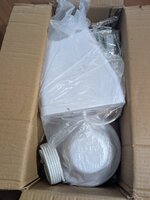
It arrived today, looks to be pretty well packaged so let's see what all there is.

PXL_20250811_140649894.jpg

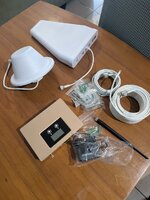
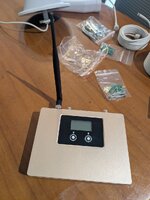
We have the exterior antenna, the indoor antenna (conical type thing) smaller indoor antenna, the booster unit itself along with plenty of cable and some hardware.

PXL_20250811_140946087.jpg

PXL_20250811_142642542.jpg

Where to site the exterior antenna is my first priority but I think I can maybe use a 6m length of angle or even box section and bolt it to a wall at the side of the house then run the cable from it into the loft. I don't really want to bolt it to the house itself. This will be the hardest part of the installation I think.

The indoor antenna is quite big (7.5" diameter by 4.5" high) so I'm thinking of making a little pedestal and hiding it behind the tv which sits on a little moveable stand. The booster would sit beside it. I'd get pretty decent signal without having to see the antenna fingers crossed.

I'll update when I'm up and running.......
 
A top tip for testing the speed improvement is to download the speedtest.net app onto your phone or laptop rather than using the speedtest.net website.

This eliminates all the other stuff that web browsers do that can give inconsistent results.

Would be great to have before & after figures.

These will inevitably fluctuate at different times of day and in certain weather conditions etc (electrical storms are bad for cell reception for example) but it would be interesting to see what sorts of numbers you get.
 
This morning curiosity got the better of me so I decided to try a temporary install just to see if it works.
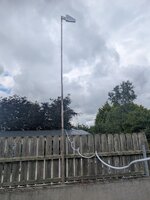
I found a lath just over 4m long and mounted it up on a 1m high wall and cable-tied it to a steel strut then ran the cable into the house.

PXL_20250814_110042051.jpg

Hooked everything up according to the accompanying instructions and fired her up.

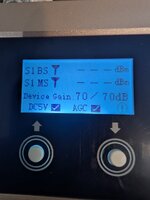
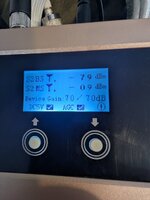
Nothing at all on the S1 channel, but strong figures on S2.

PXL_20250814_105951397.jpgPXL_20250814_105715478.jpg

Also, the device tells me that the signal incoming to the antenna is very poor, but sure I know that, that's why I'm doing this....... A quick online chat with Mobile Booster confirms that it's possible that my nearest tower isn't 'broadcasting' on S1. Hopefully my 'proper' installation will yield even better results as I hope to raise the antenna at least another 1.5m.

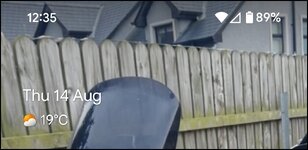
Meanwhile, my indoor signal went from this;

Screenshot_20250814-123507~2.jpg

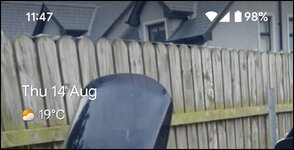
To this;

Screenshot_20250814-114747~2.jpg

First impressions, from admittedly a basic and temporary installation are very good indeed. A more thoughtful 'permanent' install should help the results at least stay the same or hopefully improve.
Having the outdoor antenna higher, and better placement of the booster unit and indoor antenna should see even stronger signal throughout the house.

So, am I happy with the outcome so far? In short yes, it's a huge improvement to my mobile signal in the house and given that I now work predominantly from home it will bring a significant benefit there too. Now I just need to see if my boss will make a contribution towards the £260 outlay. 🤞
 
Meanwhile, my indoor signal went from this;
I hate to tell you this, but....

That indicator doesn't mean anything really. It just means it's getting a strong signal from the nearest device (which is the one you just fitted)

Even if the booster you fitted couldn't connect to a tower, you'd be getting a 'full bars' signal on the phone because the booster would be pushing out a strong signal (with no connectivity) if that makes sense?

Your only real measure is to do a speed test (lots available e.g. speedtest.net) before and after.

Really appreciate the updates.
 
I understand Fil, but during the online "chat" they assure me that what I'm getting in S2 is a good signal. I'm now also able to make and receive calls where that wasn't possible before.


Back
Top Bottom