Connect ride & google maps

Jayjayuno

Member
UKGSer Subscriber
Joined
Jun 13, 2014
Messages
99
Reaction score
4
Location
Bristol England
My connect ride shows its own BMW maps which I’ve downloaded and they working. But I don’t like them as much as google maps.
Is it possible to show google maps on the connect ride ?


Sent from my iPhone using Tapatalk

======

Moved.

Richard
 
Last edited by a moderator:
The BMW Motorrad ConnectedRide Navigator does not directly support third-party maps, but you can import routes created with other mapping software into the device using a GPX file, essentially allowing you to use third-party map data on your ride by planning routes on another platform and then transferring them to the navigator; however, the map display itself will be based on the built-in maps provided by BMW, which are powered by TomTom technology.

In other words, no.
 
My connect ride shows its own BMW maps which I’ve downloaded and they working. But I don’t like them as much as google maps.
Is it possible to show google maps on the connect ride ?


Sent from my iPhone using Tapatalk

======

Moved.

Richard
 
Yes, Jayjayuno, you can use Google Maps on your phone, as well as on your ConnectedRide Navigator unit. It's quite a tricky process, and involves converting the Google Map route into a GPX file, which your Garmin unit can interpret. Through many hours of experimenting and researching forums, I've managed to get the process documented. If you're interested in trying, I can post a list of steps to follow. It works, I've used it many times during the last couple of months. But... now I need your help...
I'm new to this site, how do I attach a file/document?
 
Just reply and you'll see a paperclip at the bottom. Clicking on it let's you add a file or photo


Sent from my iPhone using Tapatalk
 

Jayjayuno,​


Is it that you don’t like the look of the map that the BMW device displays? In other words, you prefer the look that Google maps displays? If so, the advice offered by Hans probably won’t help you. As I read it, Hans’ advice tells you how to get a GPX file of a route (created in Google Maps) onto your BMW device, where it will display on the BMW map. In short, see post #2.

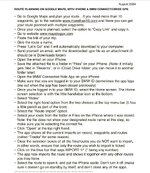
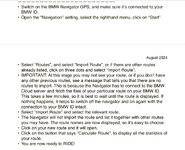
Here is how Hans created the GPX file:

IMG_0699.jpegIMG_0700.jpeg

You can do exactly the same (and very possibly much easier) by creating the route in say, MyRoute. MyRoute will then create a suitable GPX file itself, saving you going via mapstoGPX. That though, will still display on your BMW device against the BMW map.


PS MapstoGPX, was offline for a month or more but is now mended.
 
Last edited:
It’s true I don’t like the look or usability of the BMW app but maybe I haven’t learnt how to use it well enough.
I will look at MyRoute-app but it seems you have to pay to make it reasonably functional Maybe it’s worth it monthly fora touring trip?


Sent from my iPad using Tapatalk
 
Thanks for confirming that it’s the style / design of the displayed BMW map you don’t like.
 

Jayjayuno,​


Is it that you don’t like the look of the map that the BMW device displays? In other words, you prefer the look that Google maps displays? If so, the advice offered by Hans probably won’t help you. As I read it, Hans’ advice tells you how to get a GPX file of a route (created in Google Maps) onto your BMW device, where it will display on the BMW map. In short, see post #2.

Here is how Hans created the GPX file:

View attachment 399626View attachment 399627

You can do exactly the same (and very possibly much easier) by creating the route in say, MyRoute. MyRoute will then create a suitable GPX file itself, saving you going via mapstoGPX. That though, will still display on your BMW device against the BMW map.


PS MapstoGPX, was offline for a month or more but is now mended.
I like Google Maps..........................mmmmmm...........but not that much.
 
It’s true I don’t like the look or usability of the BMW app but maybe I haven’t learnt how to use it well enough.


Sent from my iPad using Tapatalk

I have started you a fresh thread on your separate MyRoute app question.


Richard


Back
Top Bottom