Connecting a phone to the 450’s instrument screen

Wapping

Well-known member
Moderator
Joined
Oct 21, 2005
Messages
91,008
Reaction score
15,972
Location
Wapping, London
Has anyone done this successfully, using the wifi connection?


I had a very quick go yesterday evening. I can get the phone and the instrument screen to see each other, the phone and the screen saying they are connected. Then the app drops the connection. Either I am doing it incorrectly or, I suspect, an iPhone problem.
 
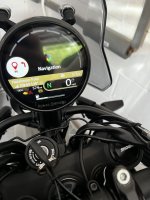
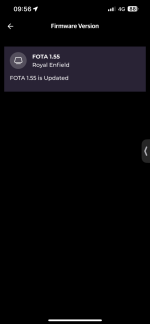
I had the re app but hadnt tried to connect, just tried it now as per above seems fine no dropping connections, i can cast a map on the dash similar to the video. After trying maps a few times I did also update the software on the screen via the app under devices after the two were paired, as it said there was a newer version.

Iphone 13.
 
Thank you.

I strongly suspect user error on my part, jaundiced in part that the BMW wifi connection, using a iPhone was very shonky on my 1600.

I’ll delete the app and give it a fresh go, not least as I was using a different (and very excitable Indian) YouTube instruction video last night, which I was laughing at, rather than paying attention.

This one is not bad….

 
Still a resolute failure.

I have deleted and successfully reloaded the Enfield app, along with a successful logging into it. I have followed, to the letter, the method of connecting the phone / app to the bike.

The bike and phone establish an internet connection, giving me a green Royal Enfield logo thing. Each and every time, this then crashes after about 10 seconds. The app then displays a red tick in a circle, replacing the green logo, along with a message that there is no internet connection.

Even so, the bike still displays the phone’s battery strength, so there is still a connection of some. Likewise, if I close the app, the screen displays that the phone is no longer connected.

My phone lists the bike’s WiFi address and a tick, to say that it’s joined to it. But, the ‘internet symbol’, within 10 seconds, has an exclamation mark through it, along with the legend: ‘No internet connection’.

Either I am doing something wrong, but if so, why the initial internet connection and, more importantly, why does it crash each time?
 
just tried mine again, it did drop just the once.

I can see some small bars on the himmy screen next to the odo, i think they relate to the wifi signal from the bikes dash as they arent matching the signal bars on my phone.

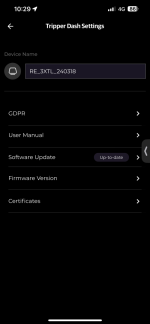
Are you on the latest firmware after you 1. connect you should be able to check by clicking the 3 dots?

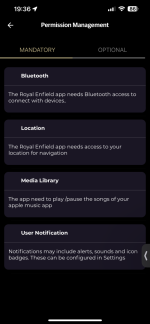
Top left in app, profile, then the cog wheel, permissions it says bluetooth needs to be on on users phone settings.

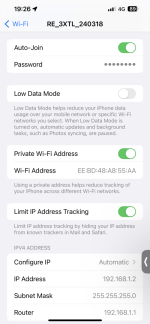
Have you looked in your wifi page on your phone, i have included a screen print of my settings. Is auto join on?

Clutching at straws but when was the last time you switched your phone off and on?

Im out of ideas now sorry!


IMG_6578.jpeg
 

Attachments

  • IMG_6592.png
    IMG_6592.png
    91.3 KB · Views: 8
  • IMG_6591.png
    IMG_6591.png
    160.3 KB · Views: 8
  • IMG_6581.png
    IMG_6581.png
    42 KB · Views: 7
  • IMG_6579.png
    IMG_6579.png
    26.7 KB · Views: 7
Still a resolute failure.

I have deleted and successfully reloaded the Enfield app, along with a successful logging into it. I have followed, to the letter, the method of connecting the phone / app to the bike.

The bike and phone establish an internet connection, giving me a green Royal Enfield logo thing. Each and every time, this then crashes after about 10 seconds. The app then displays a red tick in a circle, replacing the green logo, along with a message that there is no internet connection.

Even so, the bike still displays the phone’s battery strength, so there is still a connection of some. Likewise, if I close the app, the screen displays that the phone is no longer connected.

My phone lists the bike’s WiFi address and a tick, to say that it’s joined to it. But, the ‘internet symbol’, within 10 seconds, has an exclamation mark through it, along with the legend: ‘No internet connection’.

Either I am doing something wrong, but if so, why the initial internet connection and, more importantly, why does it crash each time?
Any chance some of your "Hot Spotting" permissions on your phone are wrong?
 
Thanks.

As far as I can see, everything is as it should be.

I am going to give it a go with my android phone at some point.
 
Thanks.

As far as I can see, everything is as it should be.

I am going to give it a go with my android phone at some point.
I think that's possibly the issue......Android phones seem to be so much better for connecting stuff like this.....and, diagnostic apps + OBD2 applications etc
 
My iPhone really struggled to reconnect with my 1600’s inbuilt wifi.

According to all the blurb on the Royal Enfield site, the iPhone should work. I have even gone as far as to force the iPhone to forget my home wifi channel (I was standing in my garage, where the home wifi booms in) in case the phone was struggling to connect to that, too. It made no difference. The phone makes the wifi connection with the bike, but then it drops it again. I tried a second iPhone, with the same result.
 
My iPhone really struggled to reconnect with my 1600’s inbuilt wifi.

According to all the blurb on the Royal Enfield site, the iPhone should work. I have even gone as far as to force the iPhone to forget my home wifi channel (I was standing in my garage, where the home wifi booms in) in case the phone was struggling to connect to that, too. It made no difference. The phone makes the wifi connection with the bike, but then it drops it again. I tried a second iPhone, with the same result.
If it's happening with two different phones to me it points to your tripper dash or the software on it. All these Indians with iPhones that buy by the bucket load seem to be managing ok did you update the software on the tripper dash (think the app has changed and its 'tripper dash settings' in place of infotainment now but in same place). maybe you could disconnect the bike battery to totally power it down/restart? im not sure if it gets any current when ignition is off.

this dude has an iPhone, what's your grasp of Hindi like?!! :D

 
Is there anything in the Himmy 450 FB groups on this, or even the more general RE groups, can't be something specific to the Himmy? Still think it's worth a go with an Android phone though.
 
Been out on the bike today for about 2 hours and the nav on mine works perfect with iPhone 13, no failed connections at all. Even filled with petrol and jumped back on bike and it all kicked back in automatically. Its very basic nav, I probably prefer the more concise view without the map and just a directional arrow and distance to next turn, holding the mode button on rh cluster toggles between map and no map view.
 
One of the things I love about India? It's like going back 75 years in the English language. Where else could you still find people using expressions like "Top hole"? :D or grammatically correct, formal English in broadsheet newspapers?

Anyway, I've not ridden the bike for a while and it's a lovely day so I'll have a go with the app and the Android phone and report back.
 
One of the things I love about India? It's like going back 75 years in the English language. Where else could you still find people using expressions like "Top hole"? :D or grammatically correct, formal English in broadsheet newspapers?

Anyway, I've not ridden the bike for a while and it's a lovely day so I'll have a go with the app and the Android phone and report back.
Great people, i have been working with them for 20 years through my job in IT, i find them friendly and hard working, they put many of the brits to shame. An inclination to rush in sometimes to try do the right thing.

Enjoy your ride!
 
So, no joy. The phone / app recognises the wi fi code on the screen and then fails to connect. I tried several times, reloaded the app, switched off the phone etc.

Looking at available WiFi on the phone, I can see the bike's WiFi and it's the same code as on the screen but I don't know the password to link the two.

Just as well I still have my wheezy old Garmin 550 which steered me all around Germany!
 
So, no joy. The phone / app recognises the wi fi code on the screen and then fails to connect. I tried several times, reloaded the app, switched off the phone etc.

Looking at available WiFi on the phone, I can see the bike's WiFi and it's the same code as on the screen but I don't know the password to link the two.

Just as well I still have my wheezy old Garmin 550 which steered me all around Germany!
Could be teaching granny to suck eggs but given it wont even connect you definitely don't have an alphabetical O in the second string of the wifi code it provides by any chance? That needs to be swapped for a numerical 0 as per wappings first video:confused: that is a known connection problem. 3.08 mins. Apologies if you knew this already!

 
Update:

Two steps forward and one backwards.

1. I have now connected and reconnected (several times) one of my two iPhones. This means I know it all works. Two steps forward.

2. My second iPhone, establishes a WiFi connection but immediately drops it, after about five seconds. One step backwards.

3. When the WiFi connection fails, the app freezes.

4. There is still even so some sort of connection between the phone and the app, as:

A. The TFT screen still shows the phone’s battery strength. Similarly, the option (only available with a phone connected) to display Navigation, Music and Compass are all there.

B. If I close the app, the TFT screen tells me that the connection with the phone is lost.

I am left with the conclusion that the problem lies with the phone. But what it is, I have no idea.


Back
Top Bottom