Converting a Detecht Nav route to Garmin

G&T

Well-known member
UKGSer Subscriber
Joined
Jan 18, 2016
Messages
4,430
Reaction score
2,368
Location
Shropshire
Help required please fellas. I have 8 days of routes created by a chap in a Nav app called Detecht. Never heard of it before. He has exported as a .gpx file in order that I can see in Basecamp and transfer to my Nav VI.

I’ve downloaded the files and tried to open with Basecamp, but get an import error message. A little reading on the subject and it might be that Detecht uses non standard names etc, so I tried GPS visualiser to maybe clean up but no luck. I just get a few way points and straight lines.

Any ideas/ help
Thanks
Glenn

======

I have moved your post and its subsequent thread.

Richard
 
Last edited by a moderator:
try the free version of My Route App. I used this to convert GPX files created on my Garmin to the GPX format my Moto Guzzi app could decode. I think I had to change them from 1.1 to 1.0. You might need to do the reverse.

also, have you used File Explorer to transfer the file to the Nav, bypassing Basecamp? I do this sometimes, sticking the GPX file in the relevant SD card folder then importing them into the Trip Planner
 
Can you share the eight routes (or just one of the eight) here, please.

It makes it much easier to possibly help.

:beerjug:
 
I think you can if you stick them in a zip file?
 
This should open directly in basecamp
Wow....you fellas are bloomin stars. That opened up perfect in Basecamp. Thank you.
So what do I have to do for the other days....?

Thank you
 
If you fire them up I can convert them for you and send them back. If you want to have a go first yourself then download a little Free utility called "GPSBabel" just be careful what you are clicking on and go to the downloads page and pick the download for your OS there are lots of downloads on the site that contain crap and browser extensions so avoid those and AV check whatever you do download if you go that way! It's a great little utility otherwise and it allows you to convert many formats.
 
Wow....you fellas are bloomin stars. That opened up perfect in Basecamp. Thank you.
So what do I have to do for the other days....?

Thank you
I notice Mzokk that your file kept all the way points from the original(y)
 
If you fire them up I can convert them for you and send them back. If you want to have a go first yourself then download a little Free utility called "GPSBabel" just be careful what you are clicking on and go to the downloads page and pick the download for your OS there are lots of downloads on the site that contain crap and browser extensions so avoid those and AV check whatever you do download if you go that way! It's a great little utility otherwise and it allows you to convert many formats.
OK, at the risk of catching something and efficiency here you go. Once again a huge thanks.
Glenn
 

Attachments

Here you are, all eight in one folder:

https://www.myrouteapp.com/en/social/folder/15131955?mode=share

One comment: They could do with some more shaping points, to pin the routes better. This might help if you ever need to go into a route recalculation.

Second comment: Check that you haven’t got road closures activated. One of the routes (I forget which) that I opened at random, does something very odd. I didn’t play around with it to see the cause. That said, it might be down to nothing more than not enough shaping points.

I know that you don’t use MyRoute, but they recommend a shaping point every 5 km (3 miles).

=====

Edit:

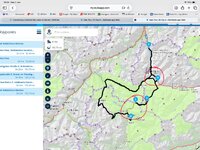
It was route 4:


IMG_0464.jpeg

The route seems to be circular, the start point 1 being the same as end point 6. This is sometimes tricky for some devices to deal with.

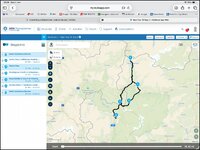
If I switch from Here maps to TomTom, the anomaly goes away:


IMG_0465.jpg

At a little under 100 miles, best practice says: 30 to 35 shaping points not five. And maybe do something about the circle, by splitting it into two legs. Leg one being start, via points two, three and four to point five. Leg two being point five back to point six, via point two.

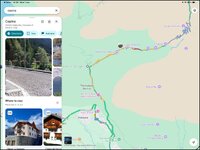
PPS If the road isn’t shut, it is at least very slow going, so I suspect roadworks. You can see it in Google Map’s Traffic layer:

IMG_0466.jpg


Here maps is probably just routing you around the delay or it thinks the road is closed at the moment.
 
Last edited:
This is routes 2-8 I have included a track of the routes as well as there are some differences between the tracks and the way Basecamp has calculated them when opened in Basecamp. But you can trail the route to match the tracks if necessary. looks a lovely trip. (y)
 

Attachments

Oh and stick these all in one list in Basecamp then you can split them at will.
 
This is routes 2-8 I have included a track of the routes as well as there are some differences between the tracks and the way Basecamp has calculated them when opened in Basecamp. But you can trail the route to match the tracks if necessary. looks a lovely trip. (y)
Marvellous Mzokk. Thank you. I did look at GPSBabel, but only supports Win 10 & 11 now. My computer is still Enterprise 7....I know....I know.

Got them all into 1 list. I'll check out route v track.
Cheers
 
Here you are, all eight in one folder:

https://www.myrouteapp.com/en/social/folder/15131955?mode=share

One comment: They could do with some more shaping points, to pin the routes better. This might help if you ever need to go into a route recalculation.

Second comment: Check that you haven’t got road closures activated. One of the routes (I forget which) that I opened at random, does something very odd. I didn’t play around with it to see the cause. That said, it might be down to nothing more than not enough shaping points.

I know that you don’t use MyRoute, but they recommend a shaping point every 5 km (3 miles).

=====

Edit:

It was route 4:


View attachment 508636

The route seems to be circular, the start point 1 being the same as end point 6. This is sometimes tricky for some devices to deal with.

If I switch from Here maps to TomTom, the anomaly goes away:


View attachment 508637

At a little under 100 miles, best practice says: 30 to 35 shaping points not five. And maybe do something about the circle, by splitting it into two legs. Leg one being start, via points two, three and four to point five. Leg two being point five back to point six, via point two.

PPS If the road isn’t shut, it is at least very slow going, so I suspect roadworks. You can see it in Google Map’s Traffic layer:

View attachment 508639


Here maps is probably just routing you around the delay or it thinks the road is closed at the moment.
Thanks Richard. It's a bit like 'Houston in the dark.' This trip has come about because a chap in a group can't now go and I said, on invite and a toss of a coin, 'I'll go. The chap with Detecht is leading it, and most others seem happy to follow. I'm usually solo, so this lack of control, what's what, where's where etc is...well difficult. At least now I have a route - thanks to you guys. I'll examine all that has been listed above.
Thanks
Glenn
 
If you’d like some more assistance, just shout.

Five minutes or so spent now, might save an hour or more shouting at a dumb (and very deaf) device.

:beerjug:


Back
Top Bottom