Curing the XT U-turn (Repeated U-turns / RUTs) weirdness for imported routes - Two separate methods

Pablo1

Well-known member
UKGSer Subscriber
Joined
Oct 4, 2011
Messages
2,399
Reaction score
53
Location
Glasgow, scotland
METHOD ONE

For the repeated u-turns problem, this seems to stop it being a PITA,

1) Send the calculated route to the XT

2) Open it up in the Trip Planner

3) Select Go!

4) Select the next via / way point, then Start

5) Then go back into Trip Planner

6) Select Saved trips

7) Select My Active Route and Save it. Unfortunately the original name is lost, but c'est la vie

8) Then select the trip you just saved in the Saved Trips area

So far, it seems to work for me.
 
Last edited by a moderator:
METHOD TWO

So, I remeber recently on here when discussing this annoying U-turn behaviour alot of us are experiencing where it seems to want us to constantly around to satisfy some sort of twisted logic the XT has, someone commented (possibly Wapping) that there is a known "fix" that it only affects Imported Trips and not Saved Trips, which are those created on the XT itself and if you edit the route on the XT and then save it, it becomes a Saved Trip and this seems to remedy it. Personally I find editing routes on the XT itself a little clunky so I did some digging and found a way to fix this issue, although not permanently unfortunately. I'll link the original thread on another forum at the bottom but it jumps around a bit and is a little long winded, but I tested this out yesterday and it worked flawlessly, although I haven't had a chance to put it into practise out on the road yet.

I take zero credit for the fix, I did not discover or create it, but I have tried to shorten the steps to be a little more friendly.

This works on both Windows PC's and Mac's, the only difference being on the Mac you would use the "Android File Transfer" app to copy the required files off/back on to the XT. In short, we need to copy the trip files off, upload them to a website which "fixes" them and then put them back on the XT.

WARNING - This fix involved accessing the "System" area of your XT and moving files around, if done correctly the risk is low, but, you have been warned.

STEP 1


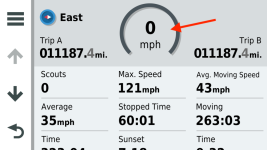
We need to enable access to the SYSTEM folder on the XT, which by default is not visible. To do this you should be on the Map View on your XT, once there press on the Speed tile:

232303.png

Then on the next screen press and hold on the Speedo icon in the middle for at least 5 seconds:

8875.png

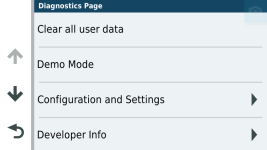
Then you'll see this menu:

9797.png

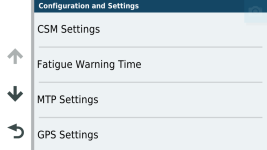
Go into "Configuration and Settings" and you'll get this screen:

10055.png\

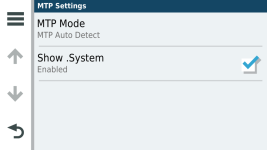
Then into "MTP Settings":

10297.png

Make sure the "Show .System" option is enabled.

STEP 2

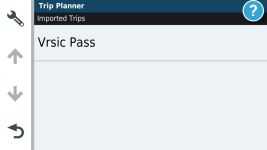
Now go ahead and import your routes as normal, for instance via the Garmin Drive app etc. Obviously they will then show as an Imported Trip:

29660.png

Now we need to get the file off the XT, unfortunately this won't work with the original .GPX file as Garmin changes the file to a .TRIP file.

Connect the XT to your computer and wait for it to show in the filesystem. As above, Mac users will need to use Android File Transfer but the steps are the same.

Browse to the /.System/Trips folder on the XT and copy the relevant .TRIP file onto your machine. Sadly the XT names them random numbers so I just did all of them at once.

STEP 3

This is the step where we convert the file, so with the .TRIP file you have on your computer, go to this website: https://www.javawa.nl/triprepair.html

Use the Upload Trip File button and then the Download Trip File button to convert and download the new version of the file. The file will be the same name but with _MOD so 12345.trip becomes 12345_mod.trip.

STEP 4

Now all we need to do is get the file back onto the XT, which I won't list out as it's exact opposite of copying it off. But you need to make sure you delete the original version of the file, or the XT will get confused.

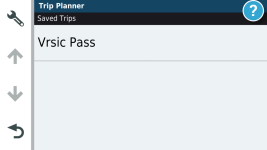
Simply copy the file back (making sure you remove the original file) and then once booted back up the trip will now show as a Saved Trip:

4931.png

I know this all looks a bit long winded, but in essence once Step 1 is done it never has to be done again, the rest is just copy the file off, upload/download, copy back.

Anyway, as said I didn't create this nor do take any responsibility for the online tool for changing the trips. It seems that this method has worked pretty much perfectly for everyone who's used it, so I'll be curious to find out properly myself once the weather improves.

Here is the original link I found: https://www.zumouserforums.co.uk/viewtopic.php?t=2301

 
Last edited by a moderator:
So, I remeber recently on here when discussing this annoying U-turn behaviour alot of us are experiencing where it seems to want us to constantly around to satisfy some sort of twisted logic the XT has, someone commented (possibly Wapping) that there is a known "fix" that it only affects Imported Trips and not Saved Trips, which are those created on the XT itself and if you edit the route on the XT and then save it, it becomes a Saved Trip and this seems to remedy it. Personally I find editing routes on the XT itself a little clunky so I did some digging and found a way to fix this issue, although not permanently unfortunately. I'll link the original thread on another forum at the bottom but it jumps around a bit and is a little long winded, but I tested this out yesterday and it worked flawlessly, although I haven't had a chance to put it into practise out on the road yet.

I take zero credit for the fix, I did not discover or create it, but I have tried to shorten the steps to be a little more friendly.

This works on both Windows PC's and Mac's, the only difference being on the Mac you would use the "Android File Transfer" app to copy the required files off/back on to the XT. In short, we need to copy the trip files off, upload them to a website which "fixes" them and then put them back on the XT.

WARNING - This fix involved accessing the "System" area of your XT and moving files around, if done correctly the risk is low, but, you have been warned.

STEP 1


We need to enable access to the SYSTEM folder on the XT, which by default is not visible. To do this you should be on the Map View on your XT, once there press on the Speed tile:

View attachment 283606

Then on the next screen press and hold on the Speedo icon in the middle for at least 5 seconds:

View attachment 283607

Then you'll see this menu:

View attachment 283608

Go into "Configuration and Settings" and you'll get this screen:

View attachment 283609\

Then into "MTP Settings":

View attachment 283610

Make sure the "Show .System" option is enabled.

STEP 2

Now go ahead and import your routes as normal, for instance via the Garmin Drive app etc. Obviously they will then show as an Imported Trip:

View attachment 283611

Now we need to get the file off the XT, unfortunately this won't work with the original .GPX file as Garmin changes the file to a .TRIP file.

Connect the XT to your computer and wait for it to show in the filesystem. As above, Mac users will need to use Android File Transfer but the steps are the same.

Browse to the /.System/Trips folder on the XT and copy the relevant .TRIP file onto your machine. Sadly the XT names them random numbers so I just did all of them at once.

STEP 3

This is the step where we convert the file, so with the .TRIP file you have on your computer, go to this website: https://www.javawa.nl/triprepair.html

Use the Upload Trip File button and then the Download Trip File button to convert and download the new version of the file. The file will be the same name but with _MOD so 12345.trip becomes 12345_mod.trip.

STEP 4

Now all we need to do is get the file back onto the XT, which I won't list out as it's exact opposite of copying it off. But you need to make sure you delete the original version of the file, or the XT will get confused.

Simply copy the file back (making sure you remove the original file) and then once booted back up the trip will now show as a Saved Trip:

View attachment 283612

I know this all looks a bit long winded, but in essence once Step 1 is done it never has to be done again, the rest is just copy the file off, upload/download, copy back.

Anyway, as said I didn't create this nor do take any responsibility for the online tool for changing the trips. It seems that this method has worked pretty much perfectly for everyone who's used it, so I'll be curious to find out properly myself once the weather improves.

Here is the original link I found: https://www.zumouserforums.co.uk/viewtopic.php?t=2301
You've explained that very well - and clearly. :thumb2
 
With any luck, Garmin will write a software update to fix this issue.

We can only hope.
Agreed, we shouldn't have to do this, but it's good to know it can be done. Hopefully they will fix it. Would be interesting to know if it also affects the XT2.

Anyone wanna buy one just to find out? Haha
 
With any luck, Garmin will write a software update to fix this issue.
Not gonna happen sadly.
Their GPS consumer software division seems to be a complete mess.


Thanks for the little guide. Short and clear.
 
Their GPS consumer software division seems to be a complete mess.
That's a shame, as I believe the XT hardware is an otherwise excellent unit, especially if bought at a 40% discount such as the Blue Light scheme.
 
The XT does everything wonderfully, apart from knowing the difference between "fastest route" and a route that uses faster roads, plus the repeated u-turn mayhem for imported routes with way / via points which thankfully has work arounds.

If only Garmin could marry the routing algorithms of the 590 / 595 and the screen etc of the XT. Though they'd probably get the 590's dull screen and the XT's routing together :(
 
With any luck, Garmin will write a software update to fix this issue.

We can only hope.

They won't as not enough people are reporting the issue!

Myself and @jfheath have been in touch with Garmin about the issue and raised it with them and gave them all the information required to replicate it and even shown them this fix which was found early on in the year by one of my members here https://www.zumouserforums.co.uk/viewtopic.php?t=2301 but still no fix

I think what we really need is for people to start reporting the issue through Garmin to put pressure on them
 
There is also this method by @John Armstrong too which works well if you don't have a computer handy and are out on a ride etc

 
They won't as not enough people are reporting the issue!

Myself and @jfheath have been in touch with Garmin about the issue and raised it with them and gave them all the information required to replicate it and even shown them this fix which was found early on in the year by one of my members here https://www.zumouserforums.co.uk/viewtopic.php?t=2301 but still no fix
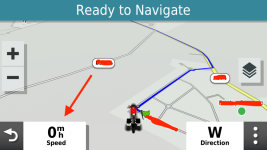
I think what we really need is for people to start reporting the issue through Garmin to put pressure on them

It's an issue I've never had - I don't know why. I import routes from Basecamp (still the best) and also MRA and they have all worked fine so far. On MRA, I do always use the "expand waypoints" option to force more waypoints in.
 
It's an issue I've never had - I don't know why. I import routes from Basecamp (still the best) and also MRA and they have all worked fine so far. On MRA, I do always use the "expand waypoints" option to force more waypoints in.

I don't use BaseCamp anymore (it runs terrible on M1 Macs) but I do use MRA and use the Expand feature and I still encountered this issue unfortunately :(
 
I don't use BaseCamp anymore (it runs terrible on M1 Macs) but I do use MRA and use the Expand feature and I still encountered this issue unfortunately :(
I know, I run a windows VM so I can use basecamp, Javawa and a few others. There’s still not really a replacement for basecamp, even from Garmin, though. As an example, I wanted to save the track from my recent trip. Unless you hit ‘record track’ the XT saves the tracks in segments. It took 5 minutes to import the tracks into Basecamp, join them, then save as a track per day. The track can then be turned back into a route. I don’t think this can be done in MRA.

I do have another question though; if you import GPX 1.2, both track and route, into the XT, why not just navigate the track?
 
I know, I run a windows VM so I can use basecamp, Javawa and a few others. There’s still not really a replacement for basecamp, even from Garmin, though. As an example, I wanted to save the track from my recent trip. Unless you hit ‘record track’ the XT saves the tracks in segments. It took 5 minutes to import the tracks into Basecamp, join them, then save as a track per day. The track can then be turned back into a route. I don’t think this can be done in MRA.

I do have another question though; if you import GPX 1.2, both track and route, into the XT, why not just navigate the track?
Well I like to have the turn instructions coming through my headset using the 3D map - especially in towns.
 
Good point. I never have that turned on so makes no odds to me.
I wonder if opening the track as a trip would solve the RUT problem. I get that it can be done by the javawa method but that need a computer and I’ve switched to MRA to avoid that
 
It's an issue I've never had - I don't know why. I import routes from Basecamp (still the best) and also MRA and they have all worked fine so far. On MRA, I do always use the "expand waypoints" option to force more waypoints in.

You have been lucky then!

Either that or you have followed the XT if you have gone off route to get you back on track

Usually its if you go off route and then don't get back on track straight away
 
You have been lucky then!

Either that or you have followed the XT if you have gone off route to get you back on track

Usually its if you go off route and then don't get back on track straight away
If you don't have via or way points, then the u-turn madness doesn't occur with imported routes.


Back
Top Bottom