More Zumo woes: what about the new update?

One thing….. The route came to me from a friend, who created it originally in BaseCamp. I put it into MyRoute to get it into my XT. I wonder if BaseCamp was the cause? But, if so, why didn’t other routes (which he also created) screw up too?

Not least, why does it do it sometimes and not others? Why do the laser beams, change the point from which they squirt out from? What dictates the points along the route, which the laser beams point to? What was with the globe display and the straight magenta line to an orange flag (ie a via point) past Nigeria?
 
you mention 27C in another thread - perhaps heat is involved? Does the unit get any ventilation or is it behind the screen in a bubble of still air?

Was the display catching direct sunlight? In a previous life, I worked on display modules for Xerox products. We used to get batches of modules returned from the production line's final test area. Faults were seemingly random and we could not replicate them in the lab. I worked out the failures were related to the environment on the production line which was in an old warehouse, not air conditioned and had skylights in the roof. Some of the test bays were under these skylights and on hot days we had more failed units. I found I could induce the faults by placing the test machine in sunlight for a while. I made an assumption that differential expansion of the display layers was causing errant signals confusing the machine, producing these seemingly random errors.
 
@Wapping: yes, it could be Basecamp. In my case the route was done in Basecamp as well.
If you remember I used to have straight line issues (you helped me with) many years ago with Basecamp and sending routes to the GPS with mismatched maps.

Wessie: I'd exclude heath as a possible source for the error. In my case temperatures were below 10 degrees.
I also used this very same XT in >40 degrees temperatures, full sun exposure, without any issues.
 
I think we might have to scrap the idea of it being to do with BaseCamp.

We prepared a fresh route for today in BaseCamp, which was then transferred to my XT. It ran perfectly. There again, so do the routes for day one, which also came from BaseCamp.

It was only yesterday’s route which showed corruption, I do though think it is something inside the XT, which manifested itself only yesterday afternoon. WhAt triggered it, I have no idea. The only thing I did (and this might only be coincidental) was skip a via point. The problem though fid not happen as soon as I skipped the via point, it appeared about 20 minutes later and kep reappearing.

I cannot explain it.
 
It was very hot today too, Wessie.

The device got as hot as yesterday. No problems today.

The device also showed the same laser beams back at the hotel, in the cool of evening.
 
I had this yesterday. Open track from few days ago recorded on the XT. Save as route. Press go and it goes spastic trying to take me somew miles back despite tapping “join at nearest point”
Several times stopped/started/re-saves. In the end an option to “Go” came up in the track which hadn’t previously and then it worked fine.
 
I had this yesterday. Open track from few days ago recorded on the XT. Save as route. Press go and it goes spastic trying to take me some miles back despite tapping “join at nearest point”
Several times stopped/started/re-saves. In the end an option to “Go” came up in the track which hadn’t previously and then it worked fine.
I never use the "closest entry point" always the next logical way /via point as I've read that to do otherwise can cause a whole heap of pain.
 
I never use the "closest entry point" always the next logical way /via point as I've read that to do otherwise can cause a whole heap of pain.

It can! as can skipping waypoints or missing turns but its not that whats the issue

The problem lies withing anything that has been imported to the zumo XT and listed as imported in the trip planner

Any trips planned on the actual device will run fine and they are stored under the saved trips

There is a workaround though but it means plugging the XT in to a computer and using a hex editor or a program thats been created to edit any imported trips so they show under the saved trips

This then allows the zumo to recalculate trips properly if you go off route

here is a link to the solution for routes not re routing preperly https://www.zumouserforums.co.uk/viewtopic.php?t=2301
 
There is a workaround though but it means plugging the XT in to a computer and using a hex editor or a program thats been created to edit any imported trips so they show under the saved trips

This then allows the zumo to recalculate trips properly if you go off route
For the repeated u-turns problem then this seems to stop it being a PITA if ;like me you're wary of using hex editors etc, or already have the saved trip on the XT:

1) Send the calculated route to the XT,
2) Open it up in the Trip Planner,
3) Select Go!,
4) Select the next via / way point, then Start.
5) Then go back into Trip Planner
6) Select Saved trips
7) Select My Active Route,
8) and Save it. Unfortunately the original name is lost, but c'est la vie.
9) Then select the trip you just saved in the Saved Trips area.

And so far, it seems to work for me. HTH.
 
For the repeated u-turns problem then this seems to stop it being a PITA if ;like me you're wary of using hex editors etc, or already have the saved trip on the XT:

1) Send the calculated route to the XT,
2) Open it up in the Trip Planner,
3) Select Go!,
4) Select the next via / way point, then Start.
5) Then go back into Trip Planner
6) Select Saved trips
7) Select My Active Route,
8) and Save it. Unfortunately the original name is lost, but c'est la vie.
9) Then select the trip you just saved in the Saved Trips area.

And so far, it seems to work for me. HTH.
I will have to give that way a try as while you are out and about without a PC/Laptop there is no way to edit routes
 
Ever since the attack of the laser beams, my XT has behaved completely normally. This includes joining routes, at the nearest entry point and running imported routes.

What caused the problem I have no idea.

I’ll just let sleeping dogs lie.
 
Making sure that the routes are in the saved list by editing the hex file, java conversion (which is handy for multiple routes) or the method outlined by John Armstrong above seem to make the XT behave. I tend to run a lot of routes on very minor roads with loads of Junctions and often skip via points and waypoints because the roads are tight or very poorly surfaced or there is a big tractor/lorryblocking it. I don't understand the behaviour of the unit when navigating imported routes regarding repeated RUT and prediliction for faster roads v's faster time. JFHeath and FrankB have put loads of work into identifying the issues for garmin and putting in place remedies for XT users. Hopefully garmin will fix the issues properly rather than users developing their own work arounds. I really like the functionality of the unit.
 
I had the cannot calculate message today, only when selecting closest entry point, when i selected next waypoint hey presto
 
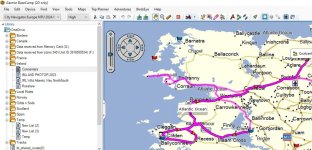
I thought that the issue of following a basecamp route was cracked using the Java Script created by FrankB to show the routes as saved rather than Imported. I used routes modified as such on a 4 day trip to Scotland. However I was comming back to Belfast from Connemara on Wednesday and is reasonably common with my routes I put a couple of optional loops in. Because of time constraints I decided to cut off the loop going to Clifden. (this was a route doctored to be saved using the java script) I stopped at Leenaun to delete the two waypoints on this loop and set off. It tried to then loop me back to a shaping point created near Cong Co Mayo. I stopped and started the route again using nearest entry point
:roll:
and the route behaved all the way back to Belfast. Still persisting with this thing even though I still have a Nav IV Zumo340, Zumo390 and Streetpilot 2610....but then I am a masochist
:D
I've never had any bother with these units and they have behaved as expected. It seems to me that there are some fundemental issues with the XT routing logic.
 

Attachments

  • Clifden.jpg
    Clifden.jpg
    123.1 KB · Views: 16
Update 6.60 is out today for the XT, best every one prays to their god, does rain dances etc in the hope that they've fixed the routing algorithms, but are too embarrassed to admit in the update notes!
 
Update 6.60 is out today for the XT, best every one prays to their god, does rain dances etc in the hope that they've fixed the routing algorithms, but are too embarrassed to admit in the update notes!
would be good if someone fedback on here if it does sort anything
 
Limited testing I did today suggests that the repeated u-turns on imported routes with a via / way point and faster roads not fastest routes haven't been fixed with 6.60
Where is this faster roads setting ?

I can only find Faster Time, Straight Line or Shorter Distance.
 
Where is this faster roads setting ?

I can only find Faster Time, Straight Line or Shorter Distance.
The Fastest time is incorrectly labelled as the XT seems to prefer to route you on roads which should be faster eg Motorway over "A" roads, "B" roads over unclassified etc, even if the unclassified road is quicker. So, it can often give a route that is effectively two sides of a triangle, when the fastest is the other side. That is "<" on the XT when the actual fastest route is between the two legs. If you went off the "<" route on the then the XT will then take it's blinkers off, and work out that the route between the legs is faster, sometimes this recalculation can be in a few hundred yards.
Hope this makes sense of a feature / bug that is almost as irritating as the repeated u-turns.
 
The Fastest time is incorrectly labelled as the XT seems to prefer to route you on roads which should be faster eg Motorway over "A" roads, "B" roads over unclassified etc, even if the unclassified road is quicker. So, it can often give a route that is effectively two sides of a triangle, when the fastest is the other side. That is "<" on the XT when the actual fastest route is between the two legs. If you went off the "<" route on the then the XT will then take it's blinkers off, and work out that the route between the legs is faster, sometimes this recalculation can be in a few hundred yards.
Hope this makes sense of a feature / bug that is almost as irritating as the repeated u-turns.
The fastest time meaning the fastest roads is a pain and can interfere with routes particularly if automatic recalculation is set. Thankfully I dont use the XT as a point to point nav very often and for planned routes you can avoid it by careful placement of shaping points and prompted recalculation.


Back
Top Bottom