'Detailed' maps and mapsets

  • Thread starter Thread starter denty_uk
  • Start date Start date

denty_uk

Guest
Hi chaps

I'm new to this part of the forum and having just boughtt a zumo 660 I need a little bit of help please:bow

I have updated both my unit software and mapsource to the latest versions via the garmin dashboard. I have worked out how to create custom routes both on the unit and in mapsource but I have a few basic questions that I have not been able to find the answers to in either the user manuals or on the net. They're probably ansewered on this site somewhere but hidden within all the other nuggets:rob

Anyway here's the questions :

1. The user manual talks of downloading 'detailed' maps and mapsets - for example selecting and downloading to the unit detailed maps for your custom route - surely if I've downloaded the latest maps (city navigator 10.30) then the unit already contains 'detailed' maps for the whole of Europe ? I'm planning to tour around France, Spain and Italy later this year - do I have to download specific 'detailed' maps for all of these areas ?

2. Do I need to download a backup version of CN10 maps to the micro SD in the unit, incase I have a problem with those on the unit ?

3. If I create a route in Mapsource (through the Pyrenees for instance) is it possible to plot fuel stops every x number of miles ?

Thanks for your time in answering these questions....at the moment I seem to be going round in circles trying to get the answers :type

Cheers
 
1. The user manual talks of downloading 'detailed' maps and mapsets - for example selecting and downloading to the unit detailed maps for your custom route - surely if I've downloaded the latest maps (city navigator 10.30) then the unit already contains 'detailed' maps for the whole of Europe ? I'm planning to tour around France, Spain and Italy later this year - do I have to download specific 'detailed' maps for all of these areas ?

No, absolutely not, they are already preloaded, sending them to the GPS again will/could cause problems in duplication

2. Do I need to download a backup version of CN10 maps to the micro SD in the unit, incase I have a problem with those on the unit ?

No, its not necessary, rarely do the maps themselves give trouble, it is wiser to backup routes and way-points on the SD card in case you have to do a hard re-set of the GPS unit, in this scenario you can reload back to unit from the SD card

3. If I create a route in Mapsource (through the Pyrenees for instance) is it possible to plot fuel stops every x number of miles ?

Yes
 
Jaws thanks very much for your quick answers - I got fed up trawling the net :blast

Would it be possible to tell me how to do include fuel stops say every 100 miles on a route ? I have tried it in Mapsource but without success :nenau

Thanks again.
 
I wouldn't rely on the embedded Garmin POI data for petrol stations as they're woefully out of date, maybe the new quarterly release mapping is better. On the release of the 2009 mapping a majority of the listed petrol stations around here were closed.

Unfortunately this data is probably sourced by Navteq from other providers, the chain is too long and the lead time too great for them to be trusted implicitly.

If you only have 100 mile range then I would be inclined to run to 60-75 miles and then keep an eye out for the next petrol station. This is where a 150 mile range comes in handy as stopping every 70 miles or so is too frequent IMHO.
 
What Bumpkin says is & can be true....businesses come and they go especially with recession.....but by and large they are pretty accurate except maybe in more out of the way places.

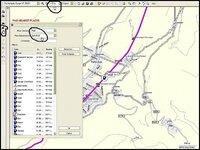
When you plan your route try the following procedure as you scroll along your route to find the nearest fuel outlets

Mapsource.jpg

You can also download petrol stations as your own Poi's from the following site (GPX) http://www.poiplaza.com/

Here' a file of petrol stations in France from PoiPlaza in Gdp format which is the only way I can attach on the forum. Open it and save in GPX format if you want to download to your Gps using Garmin Poi loader. Most are probably duplicated in Mapsource, but you will find some that are not. Copy your route into the file and pick stations on or near your route and so on.
View attachment Petrol France.gdb

Set up a file on your PC to store Poi's for loading with POI loader and add a BMP icon with the exact same name ....remember the mapsource file must be saved in GPX format
Poi.jpg

POI loader software from Garmin for your PC here http://www8.garmin.com/support/download_details.jsp?id=927

The best forum & source of information on the net for the Zumo http://www.zumoforums.com/index.php

PS/ In France petrol can be hard to come by on Sundays except on the main routes- motorways
 
When you say, set a point to stop for fuel every 100 miles, what do you mean?

Do you want to put in specific fuel stations? If so, you can find the pre-loaded ones by the simple method shown above. Simply click on them and they can be loaded as a waypoint and appear in your Favourites. It doesn't mean they are open but it's a start.

If you can't find a petrol station pre-loaded but want a reminder to stop every 100 miles, you can do it another way.

Plot your route as normal using Route Tool. As you plot you will notice that the accumulated mileage builds up. When it gets to 100 miles, hit the waypoint button (the little green flag).

A black flag will appear and you can give it a name, I suggest, "Stop for fuel" or "Do I need fuel" or "Time to change my underpants". In short you can call it anything you like. The device will then say to you (if you have earphones) "Drive for 100 miles to, "Stop for fuel"...."Time to change my underpants" or whatever you decided to call the waypoint. You can even change the symbol from a black flag, if you feel you must.

It will then remind you again, and again, and again, as you approach the 100 mile mark, not stopping squawking until you have passed it.

Alternatively, you could try to take a little responsibility for yourself and do what people did before they had an electronic reminder.

Look at your mileometer. When it gets to 100 miles since you last filled up, go, "Um, it's been a 100 miles since I last filled up, I might want to get some fuel....." That may well be easiest, or more difficult. Who can tell?
 
Feck me, why are we even bothering with Mapsource? :blast

The 660 has a fuel gauge function, has it not?

Just set the tank range to 100 miles and it will do it all for you, beeping away (or whatever it does) when you have gone 100 miles.

Job done. :thumb2
 
Thanks for the replies.

Wapping : no I'm not so braindead that I have to get the sat nav to remind me that I've done 100 miles - I can't envisage any situation where I would use the zumo's function to set fuel reminders !!:nenau

The bike I might be taking through the pyrenees will only do 60 miles (when going for it - which I will be doing) before the reserve light comes on. I then only have 10 miles or so before I will need to push it ! As I will be in the mountains that will take some considerable effort....unless I'm luckyh enough that it only happens when I'm on the descents!!

What I was trying to do was plan definite fuel stops along my route to see if the trip was feasable on that bike. If not I'll use another bike that has twice the fuel range.

Jaws I'll give your method a go - thanks for the info, much appreciated :beerjug:
 
Thanks for the replies.

Wapping : no I'm not so braindead that I have to get the sat nav to remind me that I've done 100 miles - I can't envisage any situation where I would use the zumo's function to set fuel reminders !!:nenau

The bike I might be taking through the pyrenees will only do 60 miles (when going for it - which I will be doing) before the reserve light comes on. I then only have 10 miles or so before I will need to push it ! As I will be in the mountains that will take some considerable effort....unless I'm luckyh enough that it only happens when I'm on the descents!!

What I was trying to do was plan definite fuel stops along my route to see if the trip was feasable on that bike. If not I'll use another bike that has twice the fuel range.

.... ah, all is now clear... Get ready to push and pray that someone does not turn off gravity....

You may like to have a look at this map, perhaps. I cannot recall how detailed the petrol station markings are but it may help you.

http://www.amazon.co.uk/product-reviews/2067135333/ref=dp_top_cm_cr_acr_txt?ie=UTF8&showViewpoints=1

I would be surprised if half decent petrol stations are more than 50 miles apart across the whole area. A small 5 litre jerrycan, like this, might be helpful if you are going miles on really rugged trails: http://images.google.co.uk/imgres?i...ox-a&rls=org.mozilla:en-GB:official&sa=G&um=1

A friend of mine took a KTM Superduke thing, which has a very small tank and was fine.... and he doesn't hang about.


Back
Top Bottom