Device cannot calculate a route, using Open Street Maps

INBOC

Member
UKGSer Subscriber
Joined
Sep 10, 2011
Messages
79
Reaction score
32
Location
Oxfordshire, England
Afternoon, sorry about the coms black out, we have been offline due to BT and there incompetence, now have a temporary fix, so hopefully I will be able to try and experiment using the advice given so far, I will report back or possibly ask for some more guidance, many thanks
INBOC
So, randomly we got cut off the internet and it’s taken until now to have something temporary anyway that I can use. I am in the UK.

I have managed to able to get the Oceania maps onto an sd card and appearing on the screen.
I have managed to get the maps onto BaseCamp as well , there were a few nuances in the instructions on a site that was suggested, but even a Luddite like myself managed it.

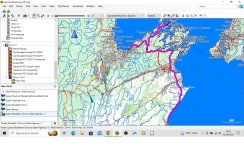
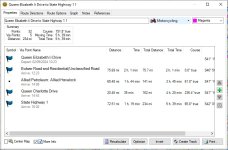
So I created 2 waypoints on basecamp using the Oceania maps, on basecamp a route was created and all looked as expected, so pleased with that as a test.

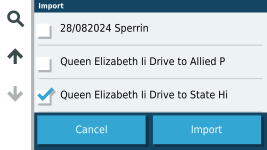
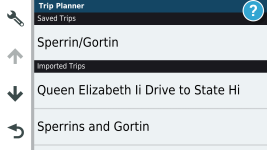
I then transferred it to the XT , firstly into the unit and it said there was a route to import, apon confirming I wanted to import it I started to calculate route, got to 1% then stopped and I had nothing to see or run. I tried by sending it to the SDcard as well with the same result.

Im i asking for the impossible, as im sat in the UK and im trying to see my created routes of New Zealand on the XT in simulator mode ???.

As always any help and guidance much appreciated
Many thanks

INBOC

=============

I have started you a fresh thread, just in case your appeal for help gets overlooked.

Richard
 
Last edited by a moderator:
My guess is that the device cannot match the A to B route, with any maps.

My second guess is that you might need to untick the generic Garmin maps the device came loaded with (untick them all, it won’t blow up) and tick ONLY the Oceania map.

Try this and report back, please.
 
Last edited:
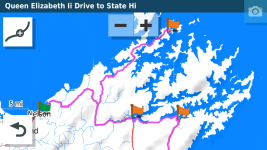
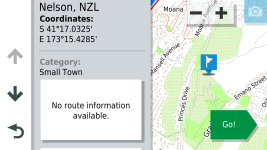
Hi Inboc. I had a go at this. I created a couple of routes in Basecamp using the OpenStreetMap NZ maps that I found the other day. These routed fine in Basecamp.NZ1.jpg
One of the Routes Based round Nelson on the South Island.

NZ2.jpg

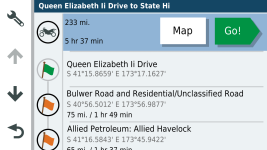
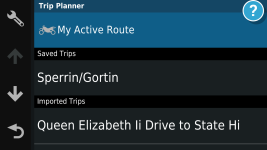
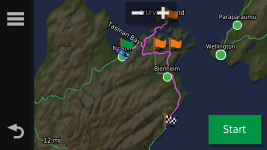
These calculated fine in the Zumo XT unit with ONLY the OSMNZ map selected.

If you want to simulate these routes you have to switch the GPS signal off to your device and tell it your In NZ.
From the Zumo XT manual the procedure is as follows.
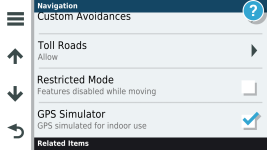
  1. Select Settings > Navigation > GPS Simulator.
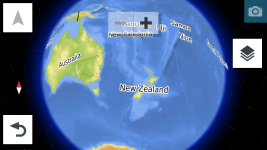
  2. From the main menu, select View Map.
  3. Tap the map twice to select an area.
    The address of the location appears at the bottom of the screen.
  4. Select the location description.
  5. Select Set Location.
*Note make sure that the GPS off for indoor use is Ticked or the "Set Location" option does not appear.


1725271893736.png

1725271945359.png

1725272053434.png

1725272128273.png

1725272343032.png

1725272415064.png

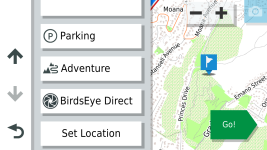
Scroll down on this page using the arrows on the left until get to the "Set Location" option

1725272549616.png

If you do this during the day UK it will default to NZ tme and put your XT into night mode.

1725272760838.png

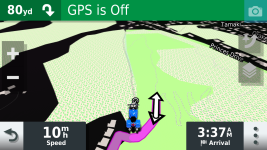
From here you can simulate your NZ route/s

1725272869105.png

1725272944301.png

Hope this helps.
 
Oops missed the set location option in the sequence above. :rolleyes:


1725273658448.png
 

I tried to mend it for you but, despite my super powers, I ran into the site’s 12 pictures per post limit.

Richard
 
My guess is that the device cannot match the A to B route, with any maps.

My second guess is that you might need to untick the generic Garmin maps the device came loaded with (untick them all, it won’t blow up) and tick ONLY the Oceania map.

Try this and report back, please.
So I will have sometime this evening to experiment more, but I can confirm during Saturdays test I unticked all the other maps, can’t comment yet on your first point, as always many thanks , INBOC
 
Hi Inboc. I had a go at this. I created a couple of routes in Basecamp using the OpenStreetMap NZ maps that I found the other day. These routed fine in Basecamp.View attachment 348620
One of the Routes Based round Nelson on the South Island.

View attachment 348624

These calculated fine in the Zumo XT unit with ONLY the OSMNZ map selected.

If you want to simulate these routes you have to switch the GPS signal off to your device and tell it your In NZ.
From the Zumo XT manual the procedure is as follows.
  1. Select Settings > Navigation > GPS Simulator.
  2. From the main menu, select View Map.
  3. Tap the map twice to select an area.
    The address of the location appears at the bottom of the screen.
  4. Select the location description.
  5. Select Set Location.
*Note make sure that the GPS off for indoor use is Ticked or the "Set Location" option does not appear.


View attachment 348630

View attachment 348631

View attachment 348632

View attachment 348633

View attachment 348634

View attachment 348635

Scroll down on this page using the arrows on the left until get to the "Set Location" option

View attachment 348636

If you do this during the day UK it will default to NZ tme and put your XT into night mode.

View attachment 348643

From here you can simulate your NZ route/s

View attachment 348648

View attachment 348649

Hope this helps.
Sir I thank you very much for this, as posted earlier I will have some proper time to check my homework against yours and see what I either got wrong or can’t do, I will say in my first test basecamp behaved as expected and the route tried to go into the XT but wouldn’t calculate, it did however put the 2 waypoints in my favourites and I could route straight to those whilst in simulation mode, there was a lot of playing about and I didn’t break it but I may of not set it up correctly for an imported route, so free time tonight and I will report back, once again many thanks , INBOC
 
Sir I thank you very much for this, as posted earlier I will have some proper time to check my homework against yours and see what I either got wrong or can’t do, I will say in my first test basecamp behaved as expected and the route tried to go into the XT but wouldn’t calculate, it did however put the 2 waypoints in my favourites and I could route straight to those whilst in simulation mode, there was a lot of playing about and I didn’t break it but I may of not set it up correctly for an imported route, so free time tonight and I will report back, once again many thanks , INBOC
I was looking closely at some of the mapping and there are a LOT of unsealed roads in NZ. It might be worth checking that your avoidances for both basecamp and the XT unit are set the same. For example if you have Edit>options>activity profile>motorcycling>routing in basecamp with "unpaved roads" unchecked in route avoidances, but checked in Settings>navigation>avoidances in the XT unit then the unit may not be able to calculate the route particularly if a waypoint is on an unpaved road. Good Luck!
 
You could always save the routes as tracks, and export those to the Zumo. Then the maps don’t matter so much, but you don’t get turn by turn directions
 
I was looking closely at some of the mapping and there are a LOT of unsealed roads in NZ. It might be worth checking that your avoidances for both basecamp and the XT unit are set the same. For example if you have Edit>options>activity profile>motorcycling>routing in basecamp with "unpaved roads" unchecked in route avoidances, but checked in Settings>navigation>avoidances in the XT unit then the unit may not be able to calculate the route particularly if a waypoint is on an unpaved road. Good Luck!
Hi, thanks for this, it’s always set that way for me, but I have checked, it’s the black tarmac all the way for the trip, many thanks,INBOC
 
Oops missed the set location option in the sequence above. :rolleyes:


View attachment 348651
So I have tried a few times already, I have got the box to think it’s in NZ, and I can import and see the route in import area, I ask it to import and it gets to 1% and says “cannot calculate the route”. So I press ok . When I go to favourites the two way points which have individual symbols from the display option (not plain flags) they are there. If I go to where to on the front page and then select one of these favourites and pres go it routes okay and simulates ok. So I used a OSM site recommended Zumo users forum, I did not use the site you used, I may well try afresh using the site you recommended, thoughts please. Many thanks INBOC
 
So I have tried a few times already, I have got the box to think it’s in NZ, and I can import and see the route in import area, I ask it to import and it gets to 1% and says “cannot calculate the route”. So I press ok . When I go to favourites the two way points which have individual symbols from the display option (not plain flags) they are there. If I go to where to on the front page and then select one of these favourites and pres go it routes okay and simulates ok. So I used a OSM site recommended Zumo users forum, I did not use the site you used, I may well try afresh using the site you recommended, thoughts please. Many thanks INBOC
The maps I found on the site I used seem to work. Attached is a GPX test file that I produced from it in Basecamp and simulated navigation. You could give it a try before you try another mapset. Good Luck.
 

Attachments

I also checked the route on MRA and the routing was identical to Basecamp. :)
 
The maps I found on the site I used seem to work. Attached is a GPX test file that I produced from it in Basecamp and simulated navigation. You could give it a try before you try another mapset. Good Luck.
HI, just brought this into basecamp and all looked good and played ok using basecamp, sent it into XT and tried to simulate and it did not look right even before or after calculating, i am also getting a new error when sending anything to XT so i am going to reset everything and use first set of maps i downloaded if that doesn't work i will try the site you have used, so far its not broken yet
many thanks
INBOC
 
Which maps are you using in Basecamp? Are they the ones on the Zumo? They will appear in the top left box on the screen where it shows the maps on your Zumo.
 
Which maps are you using in Basecamp? Are they the ones on the Zumo? They will appear in the top left box on the screen where it shows the maps on your Zumo.
Might help if you put up some screenshots of steps you take.
 
Which maps are you using in Basecamp? Are they the ones on the Zumo? They will appear in the top left box on the screen where it shows the maps on your Zumo.
Yes I believe they are, I downloaded a set for basecamp and a set for the XT from a OSMsite, I have even tried copying the set from basecamp into sd card that didn’t work, I have decided to have a go with another set from another site, many thanks, INBOC


Back
Top Bottom