INBOC, are you sure that your device is not trying to calculate you a route, from where you are standing (presumably in the UK) to either the start or end point in New Zealand?
Last edited:


Hi, I am able to con it into thinking it’s in New Zealand, I had another play last night, still not broke it, I have one error in particular I don’t understand as the map sets are from the same site and look good on the windows laptop in basecamp and on the XT, see picture. Last experiment last night seemed to work correctly on a very simple route, i now want to do a proper route and see how that goes before reporting back, many thanks as always,INBOCINBOC, are you sure that your device is not trying to calculate you a route, from where you are standing (presumably in the UK) to either the start or end point in New Zealand?
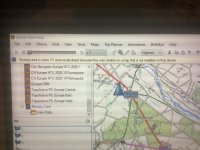

So, how did you download the set for Basecamp and how did you install them?Yes I believe they are, I downloaded a set for basecamp and a set for the XT from a OSMsite, I have even tried copying the set from basecamp into sd card that didn’t work, I have decided to have a go with another set from another site, many thanks, INBOC
The only maps shown here are your normal City Navigator Europe maps.Hi, I am able to con it into thinking it’s in New Zealand, I had another play last night, still not broke it, I have one error in particular I don’t understand as the map sets are from the same site and look good on the windows laptop in basecamp and on the XT, see picture. Last experiment last night seemed to work correctly on a very simple route, i now want to do a proper route and see how that goes before reporting back, many thanks as always,INBOC
View attachment 349103
So the second set I downloaded and followed instructions was fro the site Mzokk was kind enough to recommend, the installs went ok in my opinion onto BaseCamp and onto a correctly formatted sd card.I used the pc an the XT as standalone units and they performed as I would and have seen in the past in there fully Garmined mode with maps etcSo, how did you download the set for Basecamp and how did you install them?
The only maps shown here are your normal City Navigator Europe maps.
And it says the maps don’t match. So whatever maps you have where, they don’t match.
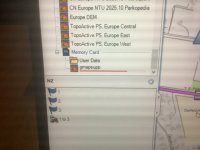
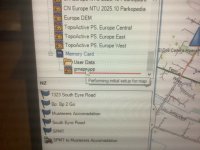
Gmapsupp is the generic name. You can only have one gmapsupp map image on a device, so if you have downloaded more than one map, gmapsupp will be the last one you downloaded. You can change the image name to avoid this.View attachment 349178
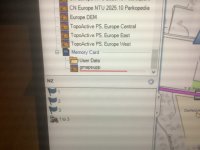
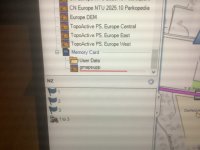
So I have all the maps I normally use in the XT turned off, when you plug the XT in with the sd card of osm maps installed, you have to be quick to see it and take a picture, it shows the name of the file from download site, so I am no expert as this is my first time doing this, but as it’s the only maps turned on in the XT and the naming convention matches the basecamp set I believe they should be correct, I have got them from the one site and followed there instruction, as always I am grateful for any information or help as that is the strength of this forum. As mentioned to Wapping my last try last night was very close to working correctly, tonight I will try sorting a route we are going to actually do, then see if I can get it all to work repeatedly without issue.
Many thanks as always
INBOC
Hi,soGmapsupp is the generic name. You can only have one gmapsupp map image on a device, so if you have downloaded more than one map, gmapsupp will be the last one you downloaded. You can change the image name to avoid this.
if you select the map named gmapsupp in the top left of the screen (as you have shown it) then this is the map that Basecamp will use, reading it directly from the SD card. You’ll then be sure the maps you create the route on are correct.
Then select the route you’ve created, right click and select show on map. If everything is OK the route should then show. If not, create a new route, in Basecamp, with the map on the SD card selected.
Report back!
Ps You can use the scroll bar on the right side of that window to view all the maps, or you can expand the window by dragging the bar at the bottom of that window
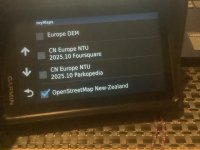
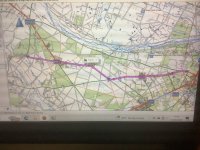
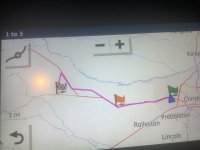
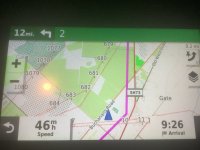
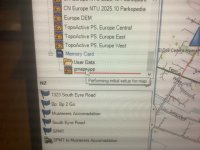
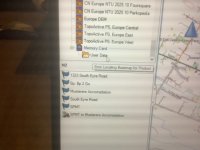 of maps onto sd card again and possibly use another card. Hope pictures help as well,many thanks again,INBOC
Hi will try and do this later, the second set of maps I tried came from the map site you suggested at the start of this , I feel I’m close but there’s a missing bit or step, but I’ve still not broke it.many thanks INBOCHI INBOC could you upload a couple of the routes you are attempting as GPX files any maybe some of us could shed some light on your issues? I haven't used Open Street Map maps in New Zealand but have used them in North America and here in Ireland and they have been perfect.
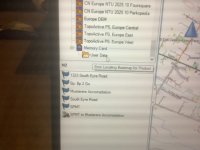
sorry about poor response to this, i did actually try it last night and it worked as expected on basecamp, i am starting to think its the maps on the sd card as after the xt is connected it shows the unit and its maps, then it shoes the sd card and its folder and it starts to build the map, but i don't get the icon showing the map, on one of your screen shots you can just see the top of this icon under the folder of the sd card. if you see some of my pictures the folder is under the sd card but no map icon is there but the maps are on the XT ??. So as mentioned in another reply to Berin i am going to have another go at formatting and loading the sd card, i will report back and as always i am grate full for all help and guidance in this matter guidance in this matterThe maps I found on the site I used seem to work. Attached is a GPX test file that I produced from it in Basecamp and simulated navigation. You could give it a try before you try another mapset. Good Luck.
HI try this , i am about to get into starting from afresh with anything to do with the sd card first, many thanks as always,INBOCHI INBOC could you upload a couple of the routes you are attempting as GPX files any maybe some of us could shed some light on your issues? I haven't used Open Street Map maps in New Zealand but have used them in North America and here in Ireland and they have been perfect.

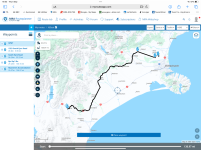
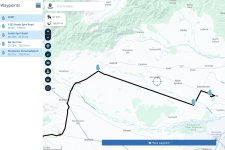
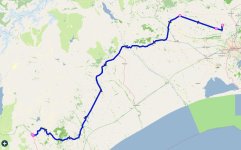
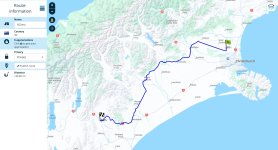
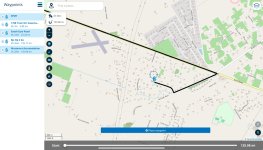
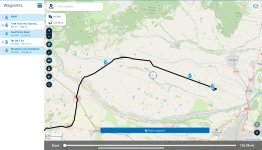

Hi, I believe it’s actually a straight road (bloody romans what have they done for us) called south eyre road, I will let you double check as well, the route looks fine on my basecamp it’s when it’s transferred to the XT , as mentioned before I’m not getting what ever is on the sd card to show as an icon under the yellow folder even though it’s ticked on in the unit, many thanks INBOCI uploaded the route in post #33 into MyRoute on my iPad. Note, I uploaded it as a route, not a track.
It looks OK but with one oddity. The route displayed has straight lines between points 1, 2 and 3.
View attachment 349387
View attachment 349389
For whatever reasons, MyRoute could not resolve the issue.
Pocket Earth Pro, showed exactly the same:
View attachment 349390
I guess that, when Mzokk made his recalculation in BaseCamp, it might well have corrected the straight lines between points 1,2 and 3?
I then tried uploading it into MyRoute as a track, not a route. The same straight lines appeared between points 1, 2 and 3:
View attachment 349392
My only suggestion now is that there is some sort of corruption in the route between points 1,2 and 3, as created by the OP in Open Street Maps, which the Navigator 6 cannot resolve into a route.
OP can you place some additional waypoints between points 1 and 2 and 3, to see if it’s possible to force the route along?
Hi I’m not doubting that, my current suspicion is why when the XT is cabled up to the laptop and base camp I’m I not getting whatever is on the sd card to register correctly, I’m not seeing the default icon with a name after it has finished going through its loading, see my pictures , this happens every time , I have even reformatted and reloaded the maps to the card tonight,would like to see what yours is showing when connected up, when the XT is un plugged I can do a to b routing with the maps on the sd card and con the XT to think it’s in NZ,many thanks as always,INBOCHi INBOC. I Loaded that route into Basecamp and recalculated it and transferred it into my SD card (the same one with the NZ maps) and then imported it into routes. It calculated fine on the unit. I Put the XT in simulation mode in the middle of Christchurch and it routed fine including good verbal directions. I've taken a load of screenshots. I have to be out for a few hours but I'll do you a detailed reply on my return.
Hi, I believe it’s actually a straight road (bloody romans what have they done for us) called south eyre road, I will let you double check as well, the route looks fine on my basecamp it’s when it’s transferred to the XT , as mentioned before I’m not getting what ever is on the sd card to show as an icon under the yellow folder even though it’s ticked on in the unit, many thanks INBOC
No worries, I believe your credit rating is quite high, INBOCForgive me, I should have zoomed in further. It is a dead straight road in the original. Ignore post #36, please.