Device not being recognised by a Mac - Solution found

Flipper_Man

Well-known member
UKGSer Subscriber
Joined
May 6, 2009
Messages
731
Reaction score
14
Location
Thame, Oxon
I can confirm that Commander ONE (PRO - paid for version) - allows the Nav to appear on the Mac and files to be copied to it....

=========

I have cut this post from a parallel thread, as it might help others with the same problem.

Richard
 
Last edited by a moderator:
I can confirm that Commander ONE (PRO - paid for version) - allows the Nav to appear on the Mac and files to be copied to it....

=========

I have cut this post from a parallel thread, as it might help others with the same problem.

Richard
Just downloaded this after numerous attempts at cables , USB hubs etc

Now works all ok

Thanks for the info

karl
 
I used the Apple multi adapter to connect using the USB 3.0 cable rather than the USB C

Just incase you have a problem
Hi, simple question from a non computer guy. I have installed Commander One Pro (paid version), and wonder what the next step is to get the Nav to appear on my desktop!
 
From memory only….

Plug in your device.

Ask Commander One Pro to find the device. It might take a while. Or it might find it automatically. I forget, not least as I haven’t touched it for two or more years.

I am really bad at stuff like this but managed it by guesswork or a video on YouTube. The good news is that you probably can’t break it….. just read anything that pops up and DON’T say yes or no, until you think you are sure what ‘yes’ and / or ‘no’ means.
 
Last edited:
Hi, simple question from a non computer guy. I have installed Commander One Pro (paid version), and wonder what the next step is to get the Nav to appear on my desktop!
It appears in the Commander One menu

Then just choose it and it shows the ‘drive’

You can then copy files
 
But don’t forget with the Android devices it will only connect to 1 app at a time, so turn of the tick box in Garmin Express that fires up GE when you connect a device or it won’t work.

If GE is running the device won’t connect to Commander One.


Sent from my iPhone using Tapatalk
 
It appears in the Commander One menu

Then just choose it and it shows the ‘drive’

You can then copy files
Well many days later ..... I uninstalled the Commander App, and reinstalled. I now have the Navigator showing in the Commander Pro split view. However, my hopes of drag and drop via cable from Basecamp to the Nav in Commander were dashed. The Device transfer stayed greyed out. I could only copy the route as a gpx to my desktop.
The other thing I found was that when I hooked up the Nav to my Phone via Hotspot, I had to enter the code of the phone into the Nav each visit.
OK, I'm grumbling, but BMW seem to be solving a problem I didn't have, by creating a new problem, which I also didn't have, but do have now.
And, they don't sell a proper tank bag with a big transparent map pocket on top, as was the situation pre 1300GS!.
Off to TT for that.

Anyways, should I be able to drag and drop into the Nav on the Commander Pro App?

Thanks for everyone's help.
 
Anyways, should I be able to drag and drop into the Nav on the Commander Pro App?

Yes

The split view is something inherited by FTP/file transfer programs (witch CommanderOne is). But you can just drag and drop stuff from folders in your Finder onto the CommanderOne view of the satnav filesystem.
 
Well many days later ..... I uninstalled the Commander App, and reinstalled. I now have the Navigator showing in the Commander Pro split view. However, my hopes of drag and drop via cable from Basecamp to the Nav in Commander were dashed. The Device transfer stayed greyed out. I could only copy the route as a gpx to my desktop.
The other thing I found was that when I hooked up the Nav to my Phone via Hotspot, I had to enter the code of the phone into the Nav each visit.
OK, I'm grumbling, but BMW seem to be solving a problem I didn't have, by creating a new problem, which I also didn't have, but do have now.
And, they don't sell a proper tank bag with a big transparent map pocket on top, as was the situation pre 1300GS!.
Off to TT for that.

Anyways, should I be able to drag and drop into the Nav on the Commander Pro App?

Thanks for everyone's help.

That’s not how it works. If you want to send a gpx file from Basecamp, then just connect the Nav to Mac, making sure Garmin Express and Commander One are off, and start up Basecamp.

It can take ages - maybe 5 minutes- but the Nav should appear in Basecamp, then you can send from Basecamp to the Nav using “send to device”.

2nd method is to fire up Basecamp, find the routes/tracks you want, and export them as a GPX file using Basecamp.

Then, close Basecamp, unplug and then replug in the Nav, and making sure neither Basecamp nor Garmin Express are running, fire up Commander 1.

Navigate in 1 window to the correct folder on the Nav, and in the second to the correct folder on the Mac, where you stored your GPX file.

Drag the file to the Nav.

Eject the Nav, unplug, and the gpx file containing all your routes should be there.


I export all my routes and tracks to somewhere safe on the hard drive in case Basecamp crashes and loses everything


Sent from my iPhone using Tapatalk

 
Sorry, I misunderstood he was referring to sending gpx files. I assumed system shit and maps.
 
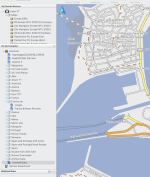
Here's the XT in Basecamp. If you are having trouble, I find the Garmin devices are a bit sensitive to cables so use the Garmin one provided, and plug directly to the Mac, not via USB hub


Screenshot 2024-05-13 at 17.32.25.png
 
That’s not how it works. If you want to send a gpx file from Basecamp, then just connect the Nav to Mac, making sure Garmin Express and Commander One are off, and start up Basecamp.

It can take ages - maybe 5 minutes- but the Nav should appear in Basecamp, then you can send from Basecamp to the Nav using “send to device”.

2nd method is to fire up Basecamp, find the routes/tracks you want, and export them as a GPX file using Basecamp.

Then, close Basecamp, unplug and then replug in the Nav, and making sure neither Basecamp nor Garmin Express are running, fire up Commander 1.

Navigate in 1 window to the correct folder on the Nav, and in the second to the correct folder on the Mac, where you stored your GPX file.

Drag the file to the Nav.

Eject the Nav, unplug, and the gpx file containing all your routes should be there.


I export all my routes and tracks to somewhere safe on the hard drive in case Basecamp crashes and loses everything


Sent from my iPhone using Tapatalk
Wow, that's just the sort of info and instructions my wee brain needs👍
Many thanks; no wonder I was getting nowhere fast. Definitely finger trouble on my part.
Thanks to everyone else that helped out as well.


Back
Top Bottom