Hello all.
R1250GSA on 2021 plate. I’m looking at installing a Chigee AIO6 LTE. Having read some threads about splicing it in etc. I decided based upon the simplicity and lack of cutting that Ez Can was the way to go.
I’ve updated the unit f which was very easy. However I am now presented with option to tweak the ezcan to suit the Chigee. I have no idea what I should be doing or altering. Videos I’ve seen on You Tube show a relatively straightforward physical installation. But little about tweaking the brains of the ezcan.
Anyone with experience out there who has fitted these units with some advice? That would be great? I thought this was just plug and play.
TIA
R1250GSA on 2021 plate. I’m looking at installing a Chigee AIO6 LTE. Having read some threads about splicing it in etc. I decided based upon the simplicity and lack of cutting that Ez Can was the way to go.
I’ve updated the unit f which was very easy. However I am now presented with option to tweak the ezcan to suit the Chigee. I have no idea what I should be doing or altering. Videos I’ve seen on You Tube show a relatively straightforward physical installation. But little about tweaking the brains of the ezcan.
Anyone with experience out there who has fitted these units with some advice? That would be great? I thought this was just plug and play.
TIA


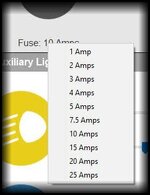
 The Ezcan will just need to tell it when to turn on/off. You can see the fuse setting just below the channel, where you would set the yellow circuit to accessory for example