Garmin Basecamp Software

This old chestnut again.

Trier found in under a second.

Basel found in under a second,

Both using BaseCamp.

I guess I am just lucky?

Or know how to use it! The search is not wonderful but if you do find out how it functions it will find places Bugger that's the second time have defended Basecrap must be going soft in my old age

John
 
Or Find it in Bing Maps (great search for virtually anything you want) then save it and then transfer all your saved waypoints directly as GPX files. Simples!
 
Trying to find St Malo kept me occupied for quite a while.
Basically you have to guess what the mappers decided to call it.
 
Took me a while to find this short cut. You may already know and are just typing "St Malo" but never the less this is it...
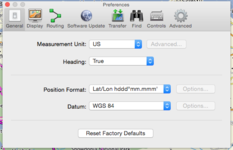
...make sure you have yelp unchecked in basecamp preferences/find.
Single tap anywhere on the map then enter saint malo Basecamp will return all the cities name Saint malo. click which one you need base camp return that city ready to waypoint it..
Don't use the find function in the tool bar if you are looking for a town or city.
 
Took me a while to find this short cut. You may already know and are just typing "St Malo" but never the less this is it...
...make sure you have yelp unchecked in basecamp preferences/find.
Single tap anywhere on the map then enter saint malo Basecamp will return all the cities name Saint malo. click which one you need base camp return that city ready to waypoint it..
Don't use the find function in the tool bar if you are looking for a town or city.

Brilliant! I like that. Thanks George :thumb2
 
Forgive me for my penneth but if I am trying to find somewhere, first I look in Google maps and zoom right into the place I also drop the little yellow man in for street view to see exactly where I am going so when I do arrive I am familiar with the road / street / town layout ie bars, restaurants, hotels. with this familiarity, I then zoom right into the same place on Basecamp and plant a way point exactly where I want to stop.

Easy peasy lemon squeezy!!!
 
Use GPS co-ordinates from Google Maps

If you can't find a place in BC or Mapsource then use Google maps first to find it. Just type the name of the place in the Google maps search and when it's found, look in the url at the top of the Google Maps page. After the @ symbol you will see the gps co-ordinates of the location you just found e.g. this is St Malo Ferry --> https://www.google.co.uk/maps/search/st+malo+ferry/@48.6462819,-2.006653,13z/data=!3m1!4b1 (so, in this case GPS is 48.6462819,-2.006653)

Highlight and copy.

In BaseCamp, click anywhere on the map and select 'new waypoint', a random new waypoint will appear in your waypoint list on the left. Open the waypoint by clicking on it in the list, in the properties you will see the GPS co-ordinates of the random waypoint. Paste in the co-ordinates from Google Maps to overwrite the random one, BaseCamp will change the format of the new pasted co-ord's to the BC co-ordinate format all by itself. Change the icon/name as required. Job done.

If you are still using Mapsource then you have to manually edit the pasted co-ords in the waypoint as Mapsource can't auto change. In my example you would edit 48.6462819,-2.006653 to N48.6462819 E2.006653

You can also use this trick to find a specific location that's not a place name. Just use Google streetview and 'drive' to the spot you want. As you move along the road in streetview the GPS co-ord's change in the url at the top. I have used this to find the exact entrance of campsites etc.

Hope this helps.

 
If you can't find a place in BC or Mapsource then use Google maps first to find it. Just type the name of the place in the Google maps search and when it's found, look in the url at the top of the Google Maps page. After the @ symbol you will see the gps co-ordinates of the location you just found e.g. this is St Malo Ferry --> https://www.google.co.uk/maps/search/st+malo+ferry/@48.6462819,-2.006653,13z/data=!3m1!4b1 (so, in this case GPS is 48.6462819,-2.006653)

Highlight and copy.

In BaseCamp, click anywhere on the map and select 'new waypoint', a random new waypoint will appear in your waypoint list on the left. Open the waypoint by clicking on it in the list, in the properties you will see the GPS co-ordinates of the random waypoint. Paste in the co-ordinates from Google Maps to overwrite the random one, BaseCamp will change the format of the new pasted co-ord's to the BC co-ordinate format all by itself. Change the icon/name as required. Job done.

If you are still using Mapsource then you have to manually edit the pasted co-ords in the waypoint as Mapsource can't auto change. In my example you would edit 48.6462819,-2.006653 to N48.6462819 E2.006653

You can also use this trick to find a specific location that's not a place name. Just use Google streetview and 'drive' to the spot you want. As you move along the road in streetview the GPS co-ord's change in the url at the top. I have used this to find the exact entrance of campsites etc.

Hope this helps.

Thanks ST4S. I tried that and I kept getting a pop up saying 'Invalid Position'. Is there a preference setting in basecamp that first needs to be set for this to work?
 

Attachments

  • Screen Shot 2015-07-09 at 11.02.33.png
    Screen Shot 2015-07-09 at 11.02.33.png
    63.7 KB · Views: 158
Thanks ST4S. I tried that and I kept getting a pop up saying 'Invalid Position'. Is there a preference setting in basecamp that first needs to be set for this to work?

Hi, if you remove the comma between the two sets of figures copied from google and replace with a space, it works fine

Regards
 
Hi John

I tried selecting transportation but could not find the Port, found plenty of bus stops.

is there an alternative to base camp beisdes a good old fashioned paper map

Yes there is....... MAP SOURCE... it still works fine for me!
 
If used correctly ( which it isn't by many) yes !

I wonder why that is?

I agree it works but it also scares people off by requiring too much patience and persistence to achieve even the simplest tasks. If software is simple to use you encourage people to both use the simple functions and explore its capabilities. What is tragic is that it could have been so much better. Instead of re inventing the wheel they should have built on the function of Mapsource, maybe making basic functions even simpler. Instead they tore it all up and started again with a one size fits all system that appears to be the result of design by committee

I have said many times before I find Mapsource does all I need, I can create a route in seconds, download it to my device quickly and simply. I, despite being retired, have limited time to spend on such things. Why should I use a significant chunk of that time learning how to use Basecamp? That is not to say I think everyone else should do likewise. I salute those of you who have mastered Basecamp and do, myself, keep my copy up to date. I even play with it from time to time when my nerves can stand it.

Someday it might win me over, in the meantime I will carry on with a system that both works and allows me to spend more time actually riding the bike.

John
 
I don't have the Basecamp gene either. It is like it is being deliberately difficult and glitchy.
It can take literally hours to get a trip off my satnav and show it in Basecamp and then sometimes trying to colour different days in different colours can remove parts of the trip, they just disappear. I am sure it can do wonderful things, the problem is that it is plain user unfriendly.
Reminds me of Oracle!


Back
Top Bottom