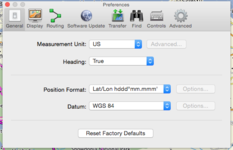
If you can't find a place in BC or Mapsource then use Google maps first to find it. Just type the name of the place in the Google maps search and when it's found, look in the url at the top of the Google Maps page. After the @ symbol you will see the gps co-ordinates of the location you just found e.g. this is St Malo Ferry -->
https://www.google.co.uk/maps/search/st+malo+ferry/@48.6462819,-2.006653,13z/data=!3m1!4b1 (so, in this case GPS is 48.6462819,-2.006653)
Highlight and copy.
In BaseCamp, click anywhere on the map and select 'new waypoint', a random new waypoint will appear in your waypoint list on the left. Open the waypoint by clicking on it in the list, in the properties you will see the GPS co-ordinates of the random waypoint. Paste in the co-ordinates from Google Maps to overwrite the random one, BaseCamp will change the format of the new pasted co-ord's to the BC co-ordinate format all by itself. Change the icon/name as required. Job done.
If you are still using Mapsource then you have to manually edit the pasted co-ords in the waypoint as Mapsource can't auto change. In my example you would edit 48.6462819,-2.006653 to N48.6462819 E2.006653
You can also use this trick to find a specific location that's not a place name. Just use Google streetview and 'drive' to the spot you want. As you move along the road in streetview the GPS co-ord's change in the url at the top. I have used this to find the exact entrance of campsites etc.
Hope this helps.