Garmin device alternatives being sought - Carpe Iter and or DMD/Thork Racing

Berin

Well-known member
UKGSer Subscriber
Joined
May 29, 2006
Messages
8,115
Reaction score
4,008
Location
South Oxfordshire
I reckon I’m at the end of the road with Garmin devices.

Basecamp on Apple silicon is increasingly buggy, and I’ve just come to the realisation that we’re taking 2 Montana’s and 2 Zumo xt’s on this trip, and then backing that up with Beeline and phone mounts on both bikes!

So while not as good as Basecamp I’m pretty sure I can meet most of the planning with that Two nav system and/or gpx editor, and road routes with MRA.

The device itself I think needs to be some kind of Android. MRA runs fine, as does Locus Maps and OSMand, TomTom Go which is a good enough a-b device.

Now I’ve been running a Ulefone device, as a back up. It’s ok but the buttons are in the wrong place, it’s hard to read in sunlight, it overheats and the gps isn’t very good.

So, I’m thinking I may as well switch over to a purpose made device, of which there are 2 main contenders who make phone- size devices and that’s Carpe Iter and DMD/Thork Racing.

Both devices are £800 ish, both are pretty much designed as rugged devices for motorbike navigation with very bright screens, are very rugged and come with decent rugged powered mounts. Both take a sim and both have a load of accessories like a bar mounted controller or even I think integrating to the BMW wonder wheel (not that I care about that)

DMD comes with the DMD app, maps, a navigation app, planning app and can even connect to the OBD to show bike functions. Both have UK dealers.

I’m kind of leaning towards DMD, as it has the software as part of the package, whereas Carp Iter it’s you and the Play store.

Mrs Berin will continue to use the XT till it breaks as she doesn’t like change but I reckon I’m now at the point where one of these devices will serve better than the Garmins.

=========

I have edited the thread’s title slightly.

Richard
 
Last edited by a moderator:
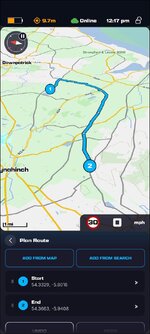
I've been playing about with the DMD2 software on an old phone and it seems pretty good and I have a free account so can use the route planner online. The route creation tool is similar to MRA and can be synced with the app. It's based on Open Street Maps.

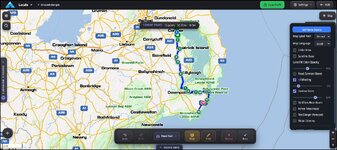
Planning page looks like this.

1788371073603.jpg

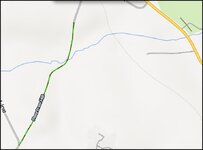
Little off road sections are highlighted and colour coded according to difficulty. So much more off road focused than MRA.

1788371192186.jpg
 
I see the current version, just out as of a couple of weeks ago, is the DMD 2 which has a lot of new features including the DMD “hub”, which allows planning and syncing of data like MRA- only it cover trails and unpaved road too.

Anyone want a Montana?
 
I am following this thread with interest...
My position is the same as Mrs Berin, but it's good to learn what's out there.
 
And so much more.
Told you months ago to dump the Garmin and switch to DMD2!
The “latest” is actually what was DMD Next but now in stable release from dev.
What was Next is now the beta, very similar unlike before where they were very different.
Everything is designed around the hub. Access to files, worldwide connectivity, riding groups, etc.
Simplest ways to join the Facebook group ran by the developer and everything is on there and explained.

The Carpe Iter is yet another rip off of Thork’s kit as they did with the original DMD and its licensing - hence why Jonny and Tex sued them and moved it onto DMD2 locking them out,
 
DMD2 is next level to any mapping ive used in the past, after a few pointers from my mates its really user friendly, i use it along with a samsung active 5 (got new ffrom ebay £250) and a ram powered mount. works perfect on my kove 450
 
And so much more.
Told you months ago to dump the Garmin and switch to DMD2!
The “latest” is actually what was DMD Next but now in stable release from dev.
What was Next is now the beta, very similar unlike before where they were very different.
Everything is designed around the hub. Access to files, worldwide connectivity, riding groups, etc.
Simplest ways to join the Facebook group ran by the developer and everything is on there and explained.

The Carpe Iter is yet another rip off of Thork’s kit as they did with the original DMD and its licensing - hence why Jonny and Tex sued them and moved it onto DMD2 locking them out,
Well, looks like you may well be right. I had only looked at the original DMD and it was literally a dashboard that then relied on other Android apps for navigation, but first glance at DMD 2 indicates it’s now a proper nav device, including running fully offline like a Garmin device.

The blurb says it has lot of map choices- are they all extra, or included?

I still want to plan routes on my desk top, I’ll go for the smaller device and it’s too small to plan on though modifying routes looks doable.

What are you using as your main Nav app? The actual DMD navigator or another Android app like OSmand or Locus?

I guess I would use MRA for road routes, or TomTom or Google maps for a-b and finding locations in town.
 
Well, looks like you may well be right. I had only looked at the original DMD and it was literally a dashboard that then relied on other Android apps for navigation, but first glance at DMD 2 indicates it’s now a proper nav device, including running fully offline like a Garmin device.

The blurb says it has lot of map choices- are they all extra, or included?

I still want to plan routes on my desk top, I’ll go for the smaller device and it’s too small to plan on though modifying routes looks doable.

What are you using as your main Nav app? The actual DMD navigator or another Android app like OSmand or Locus?

I guess I would use MRA for road routes, or TomTom or Google maps for a-b and finding locations in town.
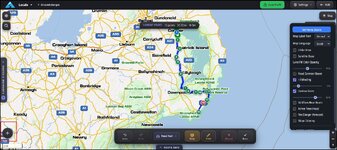
If you want to experiment with the site and app they have made it relatively easy so that you can see if it's for you, or not. Create an account on the hub download the app to a phone or tablet and sign it in. You can do a lot of things in this environment including downloading 3 offline maps and creating routes and tracks on the device or the desktop planner. You need a subscription or a DMD2 device to automatically sync routes created on the desktop with the device. For the desktop planner you start at the plus sign with the square round it.

1788432552024.jpg

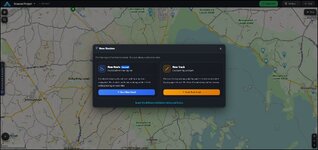
and it brings up this dialog.

1788432664975.jpg

Routes and tracks are created in the same way by clicking on the map and clicking further down in the direction of travel. If you make a mistake of the route track takes a different road than that intended then you have to hit the undo button and place a shaping point on the missed road. This is the main difference I could find in route creation in MRA where you can grab the route and insert a waypoint or basecamp where you can rubber band it. There are loads of options regarding the type of routing algorithm you might want to use. Beyond that it's pretty intuitive.

Planning on the app is pretty intuitive as well and reasonably consistent with the desktop planner. The only odd thing I have found is that it routes from your current GPS position so if you want to create a route elsewhere then you have to delete the first waypoint created. That said the app is new to me and I probably haven't worked out how to start at a remote location to the device.

1788434540202.jpg

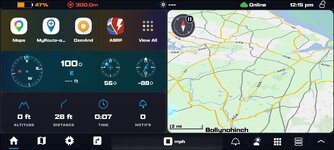
Even if you didn't want to use DMD2 route planning it makes for a good home screen for a dedicated navigation tablet. I have it on a phone set up like this. With a row of other navigation apps set up on the left hand side of the screen.

1788434806909.jpg

I use a phone linked to AA at the moment and was leading a group in the Borders last April. Wanting to stop for lunch I launched google maps (while navigating with MRA) and asked google via my cardo headset to direct me to the nearest coffee stop with a google rating > 4.5 on the B6318 and it directed me to the Riverside Kitchen at Chollerford Bridge. That's the advantage of android based device navigation you are not stuck with Garmin software and can use whatever app is suitable in the circumstances.
 
Do you remember back in the day, when someone said they're not getting another Garmin it meant one thing.

Tomtom
 
Well, looks like you may well be right. I had only looked at the original DMD and it was literally a dashboard that then relied on other Android apps for navigation, but first glance at DMD 2 indicates it’s now a proper nav device, including running fully offline like a Garmin device.

The blurb says it has lot of map choices- are they all extra, or included?

I still want to plan routes on my desk top, I’ll go for the smaller device and it’s too small to plan on though modifying routes looks doable.

What are you using as your main Nav app? The actual DMD navigator or another Android app like OSmand or Locus?

I guess I would use MRA for road routes, or TomTom or Google maps for a-b and finding locations in town.
Absolutely no need for any external apps.
Web planner is fully online, saves to your hub, available anywhere with a signal.
Navigation is Offroad, onroad, mixed - whatever you choose. Hybrid available for where they intersect and it will do standard point to point nav on postcode or online POI search but with an immediate choice of fast road, fun road, Offroad, etc.
You’ll sack off all the other subscriptions.
 
What model Ulafones do you have Berin, we use X7 pro and DMD2 is compatible but like you say they are dim compared to the latest models. I've always seen DMD2 limitations as not having a pc app, now that's changed I'll revisit it. Thanks for the heads up.
 
Same, I think it’s a 7 armour.

It’s ok but dim, and has lots of inconvenient switches on the side

The DMD device looks very bright


Back
Top Bottom