Garmin Zumo 390 -- import a GPX file from an Android Phone

MaybeweeGS

Registered user
Joined
Nov 25, 2025
Messages
53
Reaction score
6
Location
Scotland
By reading various threads on here and a bit of try and see what happens ---
I am happily creating routes on the free MRA app.
I am happily saving MRA routes as GPX 1.1 files and downloading them to Files on my Android phone.
I am happily opening those GPX 1.1 files in the Tread App and playing with colours.

Try as I might I cannot get a GPX 1.1 file on to my Zumo 390 from my Android phone.

I have an SD card in the Z390.
I have tried inserting that card in an SD reader and uploading the GPX file to the SD card. No idea if the file uploaded to the card but with the card back in the Z390 -- no sign of the file in Apps Trips .
I tried connecting a cable from the phone C to the Z390 usb funny shaped USB input to see what happened -- nothing , probably not surprisingly .

I found this wisdom on Google --
  1. Open the phone and navigate to its file manager. This varies depending on the make of mobile phone/personal choice but you should see the Garmin as an attached device. The Garmin USB device is just the SD card if you have one in your unit.
I get the concept of finding the Zumo in file manager --- but no idea how to achieve that.

Should i just give up trying to import a GPX file to the Z390 ??
 
are you putting the file into the correct folder on the SD card?
Folder is Garmin/GPX
are you using the "import" function in the 390 trip planner? This looks in the GPX folder for routes.

I routinely do this but using a USB connection from my laptop direct to the 390's card. Swapping the SD card between devices should achieve the same if you use the correct folder

looked at https://zumouserforums.co.uk/ ?
 
I did see something about folders but didn't understand the significance.
So, the SD card I have in my Z390 is a card I put in years ago to give more capacity when downloading map updates when I had a Windows pc.
So -- do I need to create a folder on the SD card called Garmin/GPX ? Is that the Silver Bullet.
No idea how to do that tjough !🤔
I may have fallen over Import when I had a Windows device but not in this current attempt to use my phone.
 
I do it this way. Easy Peasy.

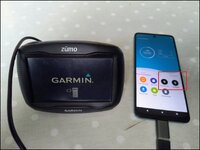
USB A to C converter and garmin lead between phone and Zumo 340 or 390. I use CX file explorer on Android. You can see the files on the SD card and Device on the phone outlined.

1781720571213.jpg

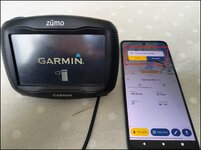
Download the GPX from MRA to the phone

1781720719538.jpg

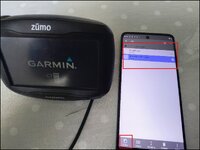
Locate the file on Downloads to the phone and copy the file.

1781720826807.jpg

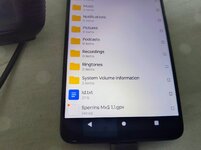
Paste the file onto the SD card of the Zumo unit.

1781720905458.jpeg

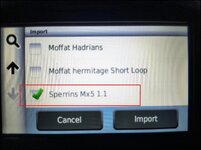
Disconnect the USB lead and boot up the Zumo. go to Trips> import and select the file.

1781721023134.jpg

You can then run the route on the Zumo.

1781721082360.jpeg
 
the Garmin/GPX folder should be there already. Possibly created when you install the maps to the SD card
 
Try saving as 1.0. I save MRA routes as gpx 1.0 for my 396. Cable transfer from laptop. 1.1 doesn’t work for me. No idea if saving to SD card would be same/different
 
OK. Thanks guys.

Did a bit of back to basics.
I put the SD card in my reader, plugged it in to my tablet ( easier to see Files there).

The SD card did have the GPX files on it -- hooray !
The SD card has a Garmin folder --- the GPX files were not in it. !!😮
Copied them in to that folder - hooray.😄

Put the SD card back in the Zumo. Switched on, into Trips, into Import --- the GPX files are not visible. DOH.🤔

I guess I will try a GPX 1 file and see what happens.

Any other suggestions ?
 
OK. Thanks guys.

Did a bit of back to basics.
I put the SD card in my reader, plugged it in to my tablet ( easier to see Files there).

The SD card did have the GPX files on it -- hooray !
The SD card has a Garmin folder --- the GPX files were not in it. !!😮
Copied them in to that folder - hooray.😄

Put the SD card back in the Zumo. Switched on, into Trips, into Import --- the GPX files are not visible. DOH.🤔

I guess I will try a GPX 1 file and see what happens.

Any other suggestions ?

did you copy files into the folder called GARMIN? If so that is not correct.

the correct folder is called GPX and it is a sub folder inside the GARMIN folder
 
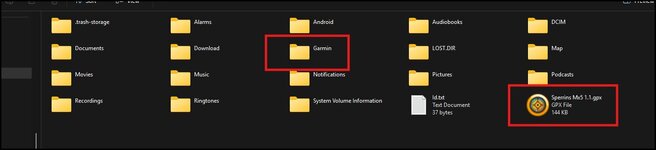
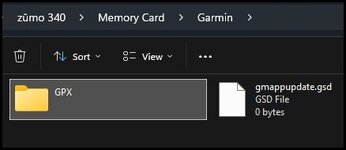
Wessie is correct, if you want your Zumo 390 to "See" the GPX file you can plonk it in the root directory of the SD card as I did last night from my phone or more correctly as Wessie says in Garmin>Gpx file. Im just showing this in file explorer as its more clear. Where I plonked it last night the Zumo OS can "See" the file but it's not how garmin organise it. If you put it in the Garmin folder without the GPX sub folder the unit can't see the file.

1781778459340.jpg

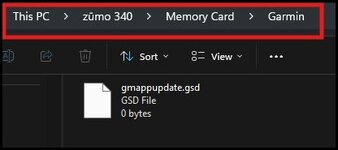
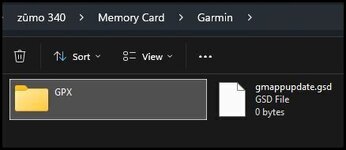
As you can see in my old zumo 340 the GPX folder is missing. This is because when I finish a trip with a device I delete this file and the one inside the device so that I have a "clean slate" for entering new routes for a new trip.

1781778724758.jpg

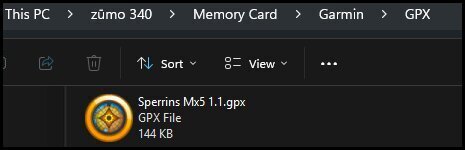
This folder gets recreated automatically if you download GPX files from basecamp to the SD card of the device or you can just create the folder yourself using a file explorer.

1781779040868.jpg

1781779357309.jpg

File plonked in the correct folder.

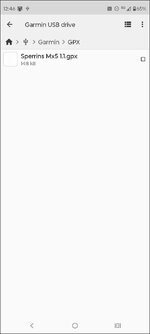
How it looks on the phone connected to the Zumo 340

1781780211284.jpg

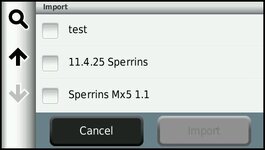
Then when you open the Zumo it will import from that folder on the SD card when selected. I pulled a couple more files from the phone to test it.

1781784352168.jpg
 
thanks again for taking the time to post those pics and supporting script.

I am away from the Zumo for a few days --- but am pretty certain i did not have Garmin and GPX sub folder --- so that gives me something to look at / replicate.
Thanks again.
 
Well -- see what I found --- section A gets superseeded by Section B , but left it for continuity.
Section A
Z390 SD card hascthe Garmin folder with a GPX sub folder – looked by putting the card in a reader plugged into my tablet.

The GPX 1.1 files I loaded onto the card were in the Garmin folder. Corrected that to putting them in the GPX sub folder.
SD card replaced in the Zumo.

Opened Apps, Trip planner, Import but did not see the GPX files. ( A few other routes from my windows basecamp days visible).

Went back to MRA and saved a route as 1.0gpx and loaded that on the card ,-- again did not see it in Import.

So connected the Zumo to the tablet, USB A and C cable with the card in the Zumo, to “see what I could see” in file manager. That’s where it became a bit more revealing.


Pic 1 File Manager.
USB Storage 1
USB Storage 2
There is my first shake of the head ,- I had not noticed previously there are Two USB Storage files. Guess that would confuse things for starters.

Pic 2, clicked on USB Storage 2.
Garmin folder top of the pic.
The June files are gpx ex my current MRA playing.

Pic 3 clicked on the Garmin folder.
GPX folder within the Garmin folder.
and two June gpx files, as mentioned above, plus a couple of other files.

Pic 4 clicked on the GPX folder.
gpx files going back to probably previous experimentation AND three gpx files from the current experimentation.

Pic 6 clicked on USB Storage 1.
The Garmin folder is dated 2025.

Pic 7 clicked on the Garmin folder (USB storage 1).

Where does that get me to ?? Delete USB Storage 1 folder and its files ?????

Or move the Garmin Folder with its GPX folder and the couple of gpx files From USB storage 2 into USB Storage 1 and then delete USB2 and the residue in it ?????

The oldest item in USB Storage 1 is 2015 which is probably a year or two after I bought the Z390.
I have no idea how two USB folders exist.

Here’s hoping you can make some sense of all of that.
 
Here’s hoping you can make some sense of all of that.

Are we meant to be looking at pictures to go with your words? If so, I can’t see any.

:beerjug:

PS I see you are not a subscriber to the forum. That might well mean you cannot post pictures. For the few pounds it costs (and the help you’ll receive) it might well pay you to subscribe.
 
Last edited:
I dug out my old Zumo 390. The memory card is 16gb. For these units anything larger than 32gb is a liability as they want to format as exFAT rather than FAT32. FAT32 has a theoretical partition size of 2TB but Windows limits formatting to 32GB after which it defaults to exFAT unless the (SD card in this case) is partitioned. Is your SD card a big card? Other than that it should just be one partition. I don't think the OS on a Zumo 390 can read a partitioned card.

1781962821773.jpg

I have 16gb SD cards in my 340 and 390.

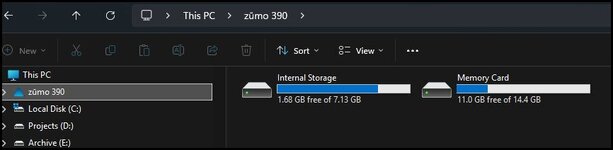
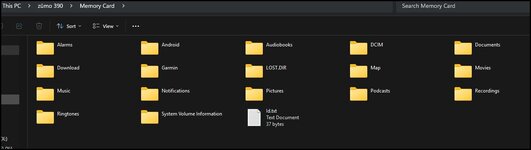
The gubbins and Android folders created on the SD card are to support the map download from Garmin being split between the unit (which has a nominal 8gb of internal storage*7.13) and the SD card

1781963304789.jpg

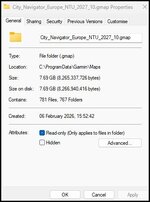
This is because all of Europe now occupies nearly 8gb. As you can see the memory card is one partition not USB 1 and 2, So Garmin Express puts about 3.25-3.5 gb of maps on the SD card.

1781963646724.jpg

If the card you are using is <32gb one option would be to format the card as FAT32. HOWEVER!!! if you do this you would have to reinstall the maps on your unit via Garmin Express. This should return your device to the files in the unit and the map split across the unit and the SD card. You can remake the GPX folder in the SD card by downloading a route from Basecamp to the SD card or by creating the folder using file explorer, as suggested above.

1781964434139.jpg

There is of course a chance of FUBAR-ing the whole shebang......but what is life without a little jeopardy :D
 
I endorse starting from scratch with a newly formatted SD card of the correct size.

This would need access to a device with Garmin Express installed to load maps to the Zumo. The fact that you are faffing about to get GPX from a phone/tablet to the the Zumo makes me wonder if you no longer have Garmin Express/Basecamp available.
 
Mzokk and Wessie,
thank you for your tutoring and suggestions.
From your help I finally followed a logical process and writing it down led me to getting a result.

Answering your latest observations I no longer have access to Windows, Basecamp --- so was indeed anxious about fubaring the whole thing when my Z390 does work perfectly well as a "take me to a destination" device - which often perfectly adequate.

So ---
Got rid of USB2 files and left only Garmin and GPX sub folder on USB1.

Saved gpx1.1 downloads of a couple of "new" MRA routes on my Android tablet.

Connected the Z390 via A and C usb cable.
Used "Copy To" function on the Tablet to USB1.
Disconnected the umbilical cord.

Switched on the Zumo -- which asked me if I wanted to Import New Routes.
Refused that and went to look for the gpx1.1 route via Import -- and Lo and Behold there it was loaded up as created in free MRA.

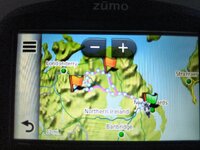
Imported it, Opened it up as a Route, all Waypoints identified,. Job's a Good Un.

Switched off the Zumo, repeated the upload of another gpx1.1, and this time accepted "prompted" import of the new file.
Route loaded up as created in free MRA .

🤒👍😄😄😂😂😁😁.

Thanks .

The summary of all of that is Clean out everything Except --- Garmin folder and GPX sub folder --- and try again !!


Back
Top Bottom