google chrome and Youtube ?

Giles

Well-known member
UKGSer Subscriber
Joined
Jan 19, 2010
Messages
14,669
Reaction score
7
Location
kent
Now then, now then ...

Can I start by making myself very clear. I AM A LUDDITE.

So .... my spelling is also quite shite. I quite like google chrome, and it has a built in spill checker that I quite like, but it simply won't let me copy and paste an embedded code from youtube ??

(I can copy and the code appears when I paste it, but when I actually post or preview, the you tube link is not there :mad:).

Any ideas from the techy geeks ... ??

:thumb
 
Closes Safari on Macbook Air, opens Google Chrome, signs in , goes to You Tube, copies and pastes embed code and....

<iframe width="560" height="315" src="//www.youtube.com/embed/sAmz-Evlmxk" frameborder="0" allowfullscreen></iframe>
 
The embedded link isn't there when you first make the post but when you refresh the page, it appears.... :thumb
 
It worked Giles...! Well, it was there before you deleted it.....:confused:
 
FFS ...!!!! Now my copy / paste thing is sort of stuck!! but yes ... got it! Thanks very much.
 
Tell me you're not really as contrary as that. Yeah, I know.....be careful what you wish for......:blast

EDIT: WTF happened to the duck....!?!?!?
 
I found an excellent pants video, but for some reason my copy and paste doesn't like it :nenau But it liked the duck video ... :nenau
 
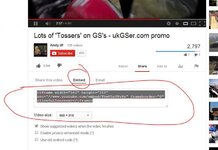
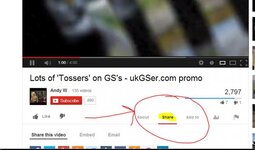
Will this help??

Go to Ewe Toob in Chrome

And select your video, Click Share, Click Embed, Copy the text from the box, paste into post on UKgser

snip 3.jpgsnip 2.jpgsnip1.jpg
 
Like a cock, I uploaded the files in the wrong order :) Work from the bottom up :)

"I can copy and the code appears when I paste it, but when I actually post or preview, the you tube link is not there"

Chrome "does" that though, the embedded video appears not to be there, just post it anyway, come back to your post and refresh it, and it will be there, consider it a "feature of Chrome" (apologies for not reading your original post correctly, it's been a long day ........working with luddites :) )
 
Yep all good. With any other browser, If I copy the embedded HTML I see it in the 'preview post' and of course in the reply. For some reason with Chrome, when you post reply, it's there in the preview as it's coded bunch of letters / numbers, but it doesn't appear in the post itself .... until, as schtum rightly says, you refresh it.

(Gawd knows why ... :nenau).


Back
Top Bottom