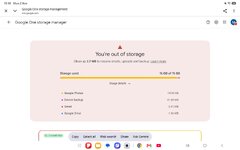
Google keeps saying i am out of storage....help me please..

crumbles

C*ntry Bumpkin.
UKGSer Subscriber
Joined
Feb 11, 2012
Messages
1,867
Reaction score
583
Location
Honiton Debenshire
One of my two Google addresses kept pinging me this.👇...since two weeks ago...
Screenshot_20261102_191614_Chrome.jpgI ain't no computer geek so go steady.
I have deleted thousands of pictures,emails and some videos.....
It takes pictures from my phone,then fills up the photo stoarge in the said email address on my tablet..

I was up around 8+ thousand but have never had a problem before.i am now down too 5 thousand or so and it still wants me too delete stuff and pay for storage ,
I have had it down too 14.3% on my tablet,then a few hours later it pings me saying i am out if storage and there is random photos from my phone in my storage again.!
Do I just keep deleting stuff or just pay the storage price they keep pushing on me..
Mike.
 
When I started putting my pics on an external hard drive, I found that my IPhone pictures were being stored on the phone, in Apples iCloud, and on Google as Google pics.

I ditched all the Google pics, and thinned out my pics by sorting them in order of file size - ie vids

Good luck, someone will be along with a tech solution soon.
 
Buy extra storage. I did and kept all my pictures and the storage message has gone.
You can also share your storage with family.
 
when you delete a file on the Google Drive on one device, do you have it set so that it deletes all local copies on all devices and the one in the cloud? This is how I have my various cloud storage spaces set up. For example, if I edit or delete a file on my laptop the change is mirrored everywhere.
 
when you delete a file on the Google Drive on one device, do you have it set so that it deletes all local copies on all devices and the one in the cloud? This is how I have my various cloud storage spaces set up. For example, if I edit or delete a file on my laptop the change is mirrored everywhere.
Dunno,
On my tablet there is virtually none,all are on the phone from where I delete them from.i don't have or would know how or if there stored in the cloud.
When i delete them on my tablet,it then fills it back up again by transferring random pictures from my phone.
Utter numpty on computer stuff..
 
I pay ÂŁ1-59 per month for up to 100GB of storage with google and regularly delete stuff that I don't need. (y)
That's what google is telling me too do..
I haven't taken pictures or videos for some time,it just suddenly popped up 2 weeks ago saying i was out of storage.
 
I had to delete them by logging into Google and not just deleting from an app and then emptying the trash and finally when I thought I'd failed a couple of days later I saw I had more storage......I believe it's not instantly deleted from the server.
 
Dunno,
On my tablet there is virtually none,all are on the phone from where I delete them from.i don't have or would know how or if there stored in the cloud.
When i delete them on my tablet,it then fills it back up again by transferring random pictures from my phone.
Utter numpty on computer stuff..

the messages relate to cloud storage on Google servers. This is where your space is limited unless you pay extra. Your options are:
1. buy more space from Google
2. delete stuff so that it is not using space on the cloud servers
3. disable the syncing between your phone and the server.

I use a version of 2. Cloud storage hygiene. All of my phone photos go to a folder in the cloud storage. Periodically I go into that folder and delete photos of cats, accidental ones of my feet, meals and other rubbish uploaded to Facebook. The occasional nice photo is then moved to a more permanent archive.

as I have suggested to the uber computer numpty, @King Rat, do you have a local group for seniors, e.g. in the local library, where you can seek help from someone that knows? Alternatively, a family member of a more recent vintage?
 
I regularly get the same and have to clear stuff out, I've also got an Amazon Prime account, this gives free photo storage, they claim unlimited but there is a limit to the number of videos you can store though. If you are Prime member it might be works stopping the Google sync and turning on the Prime one.
 
That's what google is telling me too do..
I haven't taken pictures or videos for some time,it just suddenly popped up 2 weeks ago saying i was out of storage.
As @wessie mentions, it’s probably the syncing function across platforms that’s filling up your storage.
Clearing out photos will just mean they re-sync once the connection is restored. 👍
 
IF you want to download a load of photos to archive them, then you have to use a PC to do it you can't do it on a phone. You select photos, for example, by ticking them on google photos and downloading them into a zip file. I usually download about 500 at a time. If you have a backup solution set up at home you can then open them into whatever software you use to display your photos and back them up using your normal system. I have an archive drive and two 2TB ssd's backed up weekly with one SSD always outside the house.
 
the messages relate to cloud storage on Google servers. This is where your space is limited unless you pay extra. Your options are:
1. buy more space from Google
2. delete stuff so that it is not using space on the cloud servers
3. disable the syncing between your phone and the server.

I use a version of 2. Cloud storage hygiene. All of my phone photos go to a folder in the cloud storage. Periodically I go into that folder and delete photos of cats, accidental ones of my feet, meals and other rubbish uploaded to Facebook. The occasional nice photo is then moved to a more permanent archive.

as I have suggested to the uber computer numpty, @King Rat, do you have a local group for seniors, e.g. in the local library, where you can seek help from someone that knows? Alternatively, a family member of a more recent vintage?

I have NO cloud storage. Google is desperate to get me to 'synch' my devices - that is enough of a warning bell for me. It is obviously to their benefit, not mine. I am happy to buy 10TB SSDs to store stuff myself on. I am then not encumbant on third parties for my own material. Once they've got you, they can ransom you for your valuable data back.... you want all those pictures? That'll be $500 please or we will delete them all. Photobucket did it to 000s of people.

The other thing is, the cloud will, at some stage, be hacked. AI will get in somehow and as we have seen with half of Europe throwing fridge contents away this week, it is going to be seismic - and everyone is embracing it. BE CAUTIOUS and stand back a bit from all this technology for technology sake - it is sheer laziness that makes it proliferate.
 
I appreciate you've deleted a load of stuff to free up some space. Have you emptied the recycle bin? If not they sit in there still taking up space.
 
Almost all of it (14.95GB) is being used by Google Photos, so that’s where you need to concentrate.

Go to https://one.google.com/storage/management and look for the option to review and clean up Google Photos.

You can delete unwanted photos, screenshots or large videos to free up space. Don’t forget to empty the Google Photos Bin afterwards, otherwise you may not get the space back straight away.

Important: Make sure you’ve saved any photos or videos you want to keep before deleting them, as deleting them from Google Photos can also remove them from synced devices.

You only need to free up 2.7MB to get things working again, although I’d suggest clearing a bit more to prevent the problem happening again.

Alternatively, if you’d prefer to keep all your photos and videos, you can purchase additional Google storage through Google One for a monthly or annual subscription fee.

There’s no need to pay for extra storage if you’re happy to delete some unwanted photos or videos.
 
Almost all of it (14.95GB) is being used by Google Photos, so that’s where you need to concentrate.

Go to https://one.google.com/storage/management and look for the option to review and clean up Google Photos.

You can delete unwanted photos, screenshots or large videos to free up space. Don’t forget to empty the Google Photos Bin afterwards, otherwise you may not get the space back straight away.

Important: Make sure you’ve saved any photos or videos you want to keep before deleting them, as deleting them from Google Photos can also remove them from synced devices.

You only need to free up 2.7MB to get things working again, although I’d suggest clearing a bit more to prevent the problem happening again.

Alternatively, if you’d prefer to keep all your photos and videos, you can purchase additional Google storage through Google One for a monthly or annual subscription fee.

There’s no need to pay for extra storage if you’re happy to delete some unwanted photos or videos.

2.7mb? That is less than half of one picture! One shot from my flying camera is 14mb average.
 
Thanks all for your replies,
The photos that i have already deleted are from years & years ago.and I very rarely look at them again.
It surprisingly how many crap one's there are and when you look back,you think..why did I take that.......!

I have time too delete more so will go down that route and see how I go..

Many thanks again..
Mike.
 
It surprisingly how many crap one's there are and when you look back,you think..why did I take that.......!

Agreed - :thumb2

I know that this is anal but - At the end of every year, I go through all my photos from that year and delete the crap. I then create a file with all the good stuff which I then put onto to two SSD and upload to 'Photobox'. I then delete that year from (in my case) iCloud. Finally I have the really REALLY good stuff printed and stuffed into an album. Photobox will host for free as long as you place an order with them now and again - my annual really REALLY good prints ticks that box.

Sounds long winded but I've always enjoyed taking photographs - I'm old and value the memories. I would hate to lose them.


Back
Top Bottom