GPS routes "faster/shortest"

richie

Registered user
Joined
Aug 14, 2003
Messages
9,437
Reaction score
439
Location
Allihies again.. but off to Asia soon....
OK peeps, when I make a route directly on the gps with a couple of via's I find it normal that it asks wether I want shortest or fastest. However if I take the time to make a route in mapsource then upload it to my GPS it still asks the same question....


WHY does it do that????

I'm going to have to make a small 1KM circuit and see what difference it makes...
 
Assuming you've a SP3 / 2610 then a possible reason because you aren't on the planned route and therefore it is asking the usual questions. BTW you can select the asking question "faster / shorter" to off which will solve your problem completely. :D
 
Probably you have Automatic Route Recalculation set - if you set it to "Off" then it won't alter the uploaded route.
 
Richie
This is a quirk with the 60c. My GPS V never used to do this but the 60c does it all the time. I have found however that if you have selected a route and then answer the fastest/shortest question it doesn't matter it still just uses the route so it seems to be an unnecessary question. What you should do though is turn off the automatic recalculation when you are running a route otherwise if you go off the route it will recalc on the fastest or shortest depending how you answered the choice. If you turn off the auto recalc you may see the route diappear off your screen when you go wrong but it's easy enough to zoom out and pick it up again.
Cheers
Gecko
 
richie said:
OK peeps, when I make a route directly on the gps with a couple of via's I find it normal that it asks wether I want shortest or fastest. However if I take the time to make a route in mapsource then upload it to my GPS it still asks the same question....


WHY does it do that????


I'm assuming you mean it does that when it has to recalculate. It does not know what preferences you chose on your PC. All it gets is a route put into its memory.
 
Well, actually, you're all wrong with your answers.

GPSR's that have been introduced in the last year or so - this includes the whole SP 26xx family, as well as other new models - actually "learn" what your average speeds are on the different classes of roads. In other words, if you took two identical GPSR's out of the box, and asked them to calculate a "fastest" route, they would give you the same result. But, if you asked them to calculate the same "fastest" route 2 months later, the one that had been used by a more lead-footed driver would probably calculate a slightly different route that would return a shorter predicted time.

The difference in routing would depend on whether the driver was, for example, very obedient of the speed limit in cities, but lead-footed on higher speed class roads, or lead-footed all the time. FYI, there are about 5 different speed classes of roads that the GPSR itself evaluates as it is building an "actual speed travelled" reference for the owner.

Last week, I did a lot of riding in Germany - from Zurich up to Dresden and back - and I was moving at warp speed along the autobahns. For the next few hundred miles (once I left Germany), if I asked the GPSR to calculate a "fastest" route, it would send me quite a distance out of my way to find the highest speed class road (an expressway), because it figured I would do my usual 110 MPH+ on an expressway. After a few hundred miles of experiencing me drive slowly on expressways (Swiss ones are limited to 110 km/h, French ones to 130 km/h), it settled back down again.

You can't modify these "learned speeds", and you can't look them up, either (unless you put the GPSR into diagnostic mode). But, they exist within the GPSR, and are used to return more accurate routings and more accurate enroute time projections when you ask the GPSR to calculate a "fastest" route. Older GPSRs - such as the GPS V, SP III, etc. - did not have this capability, so, they didn't offer to recalculate when you activated an uploaded route.

So there - y'all learned something today.

PanEuropean

 
Average Speeds

Just to go on from what Pan has said (yet another gem of wisdom), is everyone aware of the effects of setting average speed parameters in MapSource?

When I first got my SPIII, I was somewhat disappointed to find that, when asked to find the 'quickest' route, it often sent me through town centres. I then found the parameters on my PC (MapSource) to change the average speed of all classes of roads. With a bit of careful experimentation, I have now set these to my preferences and find that, when asked to find 'quickest', it now sends me around motorways, dual-carriageways etc.

To get this info onto the SPIII, you need to download the Mapset of your choice, when it will delete everything on the card and reload. Don't forget to tick the box about 'downloading Autorouting information', though.

Yes, yes - before anyone else says it, I know these aren't GS roads, but if I need to invoke the quickest route home, I usually want quickest, not most scenic!
 
PanEuropean said:


...You can't modify these "learned speeds", and you can't look them up, either (unless you put the GPSR into diagnostic mode).....

So these rider profiles (which presumably are distilled to a pretty diddly bit of binary code in the soul of the GPSR) constitute a very damning but illuminating little log for Big Brother to peruse at his leisure.

Confiscating (or even just USB flashing) this log by an 'interested' police patrol would nail the habitual built up area speeder with such accuracy that I can easily forsee the situation where summary roadside execution could become the order of the day.

Speed cameras; who needs 'em?

Watch out for GPSR transponders with 'un-switch-offable' profile log upload; coming soon!*


*Shortly to be followed by log de-encryption/re-encryption cleanup software ...first available available.....on this forum probably.
 
Boundless, gimme a break, OK?

If you do a master reset on your GPSR (the technique is different for each model, but pretty widely known), it erases everything. Just be sure to put the tinfoil up over your windows to keep the space aliens from watching when you do the master reset.

PanEuropean
 
Y'know, I was just thinking, if I don't provide some closure on this topic, Boundless may need to go back on his medication again (or else, get put back in that jacket with the long, long arm-sleeves...)

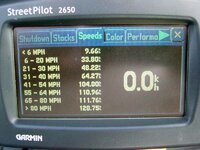
So, here it is, all the super-secret, incriminating evidence: The column on the left shows the different "speed classes" of roads, as they are broken out in the cartographic database. How a speed class gets assigned to a road has very little to do with what the posted speed limit is on the road - it mostly has to do with how many stop signs, traffic lights, and pedestrian crosswalks there are per mile of roadway. The width of the roadway, and other factors such as presence of a median, the number of side roads present, and whether there is on-street parking also affect the speed class assigned to the road. In other words, the speed class represent the mapmaker's best guess of the speed that a vehicle would actually achieve when going down that road, averaged over a fairly long distance. For example, there are few streets that I know of that have posted speed limits of 6 MPH and less - but the mapmaker obviously thinks that there will be some roadways where a vehicle will average 6 MPH or less. Perhaps parking lots, or roadway toll plazas, or long driveways? Who knows.

On the right, you see the actual speeds that the vehicle in question (in this case, my motorcycle, last summer) averaged when on the different classifications of roadways. I use km/h as my unit of measurement, so that's what the numbers on the right hand side are in. Because this is a diagnostic screen, and not an end-user screen, the speed classes are only shown in MPH - they don't convert over.

There's not really much you can conclude from looking at this data - the only thing I can read into it is that I tend to average a bit faster speed (by about 3 MPH) than the mapmaker's estimates on city streets (the 6 to 30 MPH range), quite a bit faster than the mapmaker's guess in the 55 to 64 MPH range, but slower than the mapmaker's guess on the fastest classes of roads (65 MPH and up). There's nothing there that would keep me from getting a good night's sleep...

PanEuropean
 

Attachments

  • road classes 1.jpg
    road classes 1.jpg
    104.8 KB · Views: 148


Back
Top Bottom